Operation
Preheating the Oven
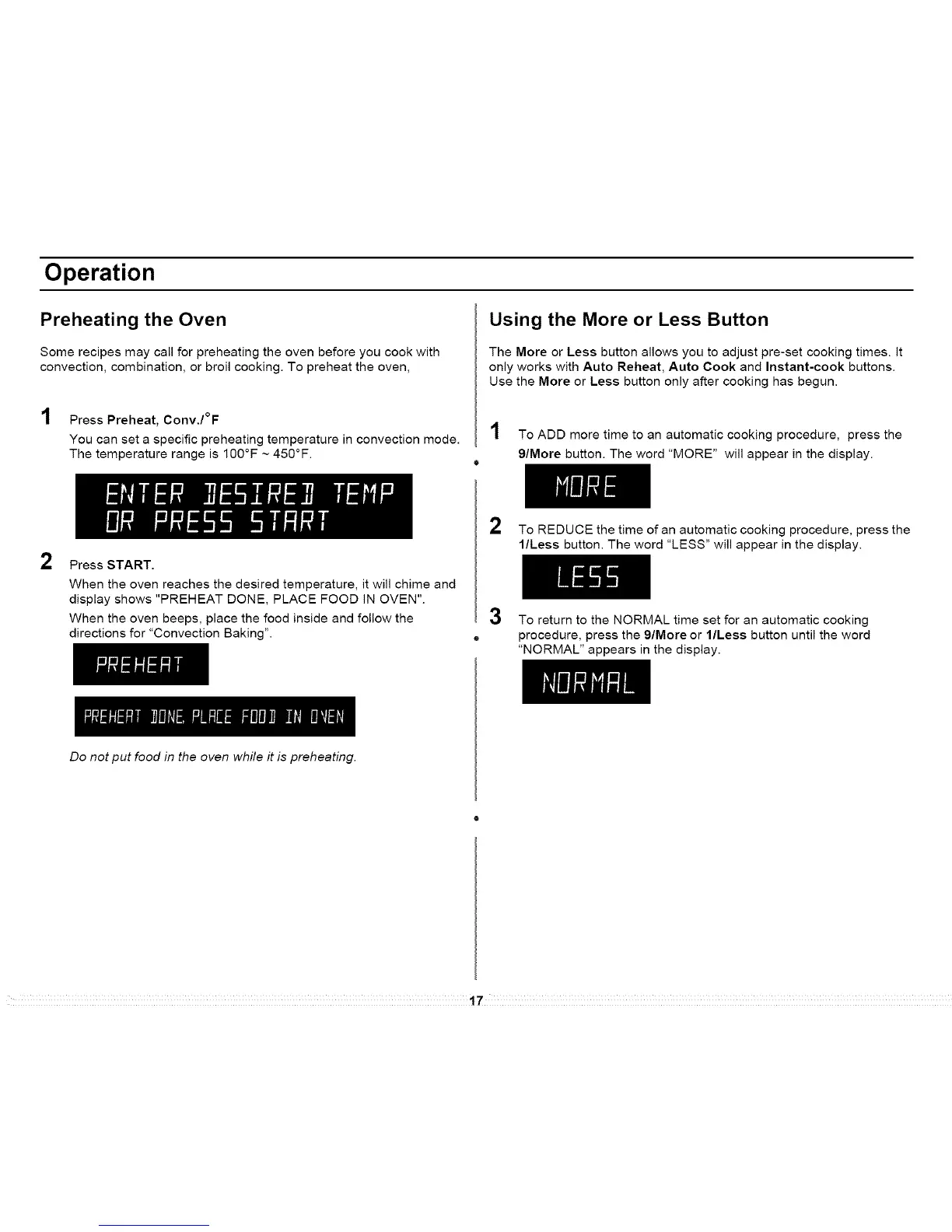
Some recipes may call for preheating the oven before you cook with
convection, combination, or broil cooking. To preheat the oven,
1 Press Preheat, Conv./°F
You can set a specific preheating temperature in convection mode.
The temperature range is 100°F ~ 450°F.
Using the More or Less Button
The More or Less button allows you to adjust pre-set cooking times. It
only works with Auto Reheat, Auto Cook and Instant-cook buttons.
Use the More or Less button only after cooking has begun.
1 To ADD more time to an automatic cooking procedure, press the
g/More button. The word "MORE" will appear in the display.
o
2
Press START.
When the oven reaches the desired temperature, it will chime and
display shows "PREHEAT DONE, PLACE FOOD IN OVEN".
When the oven beeps, place the food inside and follow the
directions for "Convection Baking".
2 To REDUCE the time of an automatic cooking procedure, press the
l/Less button. The word "LESS" will appear in the display.
3
To return to the NORMAL time set for an automatic cooking
procedure, press the 9/More or l/Less button until the word
"NORMAL" appears in the display.
Do not put food in the oven while it is preheating.
17




 To Next Page