oven use _45
OVEN USE
Code Food
Serving
Size
Standing
Time (min.)
Recommendations
8 Drumsticks
0.2-0.25 kg
0.3-0.35 kg
0.4-0.45 kg
1-2 Weigh drumsticks and brush with
oil and spices. Place them evenly
on multi-pan with insert rack.
Insert in shelf level 2. Turnover
after beep sounds, oven will stop
process. Press start to continue.
9 Sliced
Courgettes
0.1-0.15 kg
0.2-0.25 kg
- Rinse and slice courgettes. Brush
with 5 g olive oil and add spices.
Put slices evenly on the multi-pan
and inset in shelf level 2. Turnover
after beep sounds. Press start
to continue. (The oven keeps
operating if you do not turn over).
10 Apple Halves
0.3-0.35 kg
0.4-0.45 kg
-
Rinse and core apples (each
150g). Cut them into halves
horizontally. Put halves with the cut
side down on multi-pan, add filling
e.g. raisins or grated almonds.
Insert in shelf level 1. After cooking
serve with vanilla ice cream.
USING THE DOUGH PROOF/YOGURT MODE
The features include/provide pre-programmed cooking
times. You do not need to set either the cooking times or
the power level. You can adjust the dough proof/yogurt
category by press the dough proof/yogurt button.
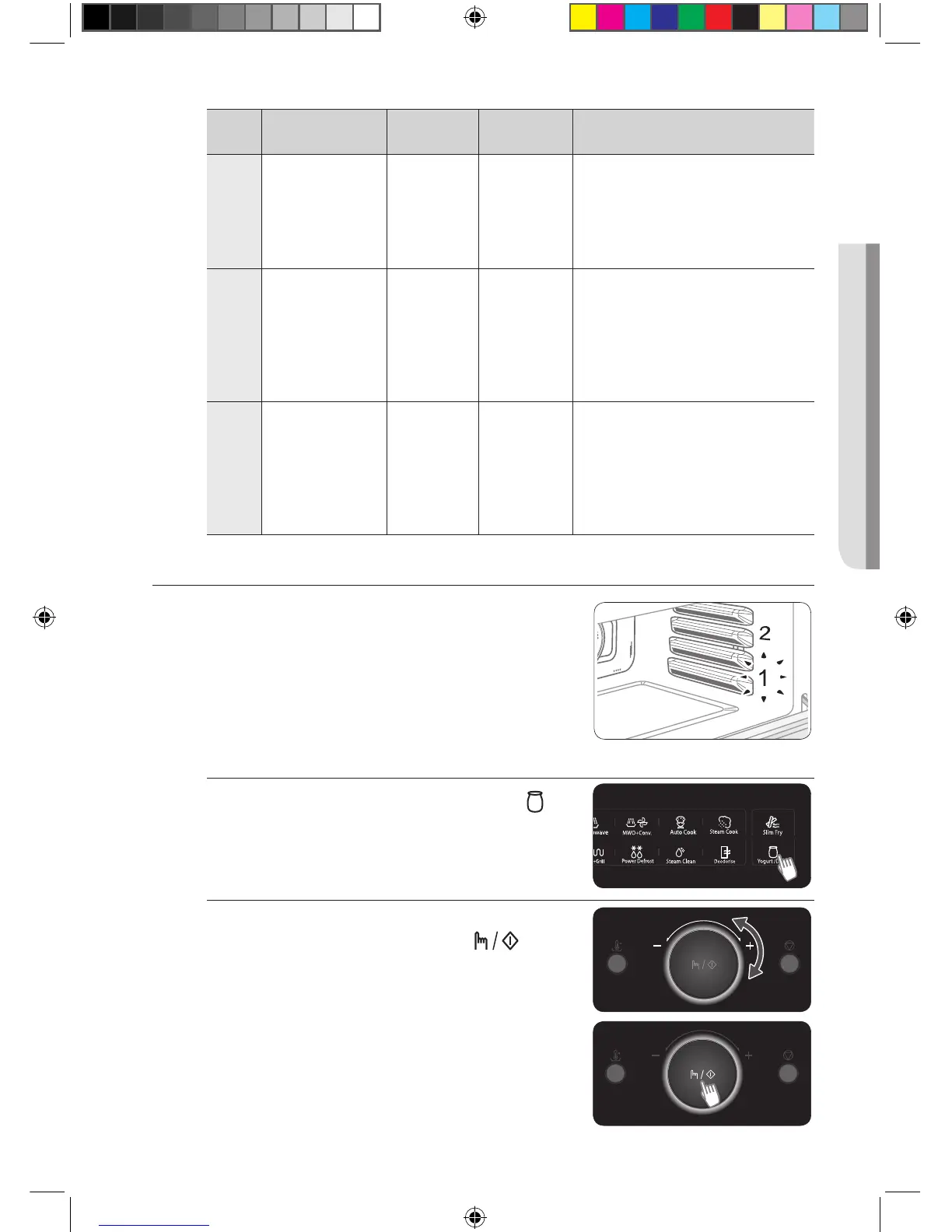
Put the food on the multi-pan and insert in shelf level 1.
Dough Proof/Yogurt mode setting
1. Press the DOUGH PROOF/YOGURT ( )
button on the touch panel.
2. Turn the +/- DIAL to select one from 1 or 2,
and press the SELECT/START ( ) button.
(1-Dough Proof, 2-Yogurt)
(Steam)MC324GAKCBB_SA_DE68-04142E_EN.indb 45 25/06/2013 18:13:31





 To Next Page