EasyManua.ls Logo

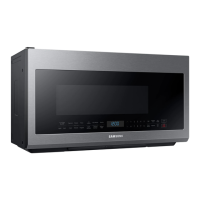
Samsung ME21DG6300MT - User Manual

Samsung ME21DG6300MT
44 pages
Print Icon
To Next Page IconTo Next Page
Loading...
Microwave Oven
User manual
ME21D*6300****

Table of Contents

Questions and Answers

  • A
    Alexandra SmithSep 18, 2025
    Why does the brightness inside my Samsung Microwave Oven change?
    • N
      Nancy HornSep 19, 2025
      If the brightness inside your Samsung Microwave Oven varies, it reflects changes in power output depending on the function being used. These power output changes during cooking are normal and not a malfunction.
  • M
    moorewilliamAug 25, 2025
    How to fix Samsung Microwave Oven buttons that don't work?
    • R
      Ronald LambertAug 25, 2025
      If the buttons on your Samsung Microwave Oven are not working, first check for any foreign matter stuck between the buttons and remove it. For touch models, wipe away any moisture on the exterior. Also, ensure that the Child Lock feature is deactivated.
  • E
    Ethan CalhounAug 25, 2025
    What to do if my Samsung Microwave Oven does not heat food?
    • S
      Stephanie HughesAug 26, 2025
      If your Samsung Microwave Oven isn't heating, it might be due to too much food or improper cookware. To test, place a cup of water in a microwave-safe container and run the microwave for 1-2 minutes. If the water heats, reduce the food amount and use a flat-bottomed container.
  • A
    Aimee LeeAug 26, 2025
    What to do if my Samsung ME21DG6300MT Microwave Oven door won't open?
    • S
      Sarah HoAug 27, 2025
      If you're having trouble opening the door of your Samsung Microwave Oven, check for any food residue stuck between the door and the oven interior. Clean the door and the surrounding area to remove any obstructions.
  • R
    Richard ZavalaSep 23, 2025
    Why does the fan keep running after cooking in my Samsung Microwave Oven?
    • A
      ashleymasonSep 23, 2025
      If the cooling fan continues to run in your Samsung Microwave Oven after cooking is finished, it is normal. The fan runs for about 3 minutes to ventilate the oven and prevent overheating.
  • K
    katherinelopezSep 23, 2025
    Why does pressing start immediately begin operation on my Samsung ME21DG6300MT Microwave Oven?
    • S
      Stephanie SmithSep 23, 2025
      Your Samsung Microwave Oven is designed to start operating when you press the Start button if it was not already in operation.
  • L
    Linda QuinnSep 10, 2025
    Why does my Samsung ME21DG6300MT Microwave Oven start automatically when plugged in?
    • T
      thomas64Sep 10, 2025
      If your Samsung Microwave Oven starts working immediately when power is connected, it indicates that the door is not properly closed. Ensure the door is fully closed.
  • M
    Matthew ArnoldSep 12, 2025
    Why is there water dripping inside my Samsung ME21DG6300MT?
    • N
      nbarrettSep 12, 2025
      If you notice water dripping in your Samsung Microwave Oven, it's likely due to steam from cooking or defrosting, which is normal. Allow the oven to cool down and then wipe it dry with a dish towel.
  • A
    Aaron NavarroSep 3, 2025
    Why does the outside of my Samsung ME21DG6300MT get so hot?
    • J
      Joseph LozanoSep 4, 2025
      If the exterior of your Samsung Microwave Oven gets too hot during operation, ensure there is enough ventilation space around the oven, referring to the installation guide for proper clearance from walls and cabinets. Also, remove any objects placed on top of the oven.
  • H
    Hannah ColemanSep 1, 2025
    Why does my Samsung ME21DG6300MT Microwave Oven stop when I open the door?
    • B
      Bryan LivingstonSep 2, 2025
      If your Samsung Microwave Oven stops during operation because you opened the door to turn the food, press the Start button again to resume cooking.

Summary

Important Safety Instructions

Safety Knowledge

Essential information on safety practices for microwave operation.

Critical Cleaning Instructions

Essential instructions for safely and effectively cleaning the microwave.

Microwave Energy Exposure Precautions

Guidelines to prevent excessive exposure to microwave energy.

Important Safety Instructions

Grounding Instructions

Proper grounding procedures to prevent electric shock.

Important Safety Instructions

Critical Installation Warnings

Crucial warnings related to the correct installation of the microwave oven.

Usage Cautions

Cautions to be mindful of during the general use of the microwave oven.

Important Safety Instructions

Critical Usage Warnings

Serious warnings to observe during the operation of the microwave.

Setting Up Your Microwave Oven

Control Panel Overview

Explanation of the different buttons and functions on the control panel.

Voice Control Setup

Instructions for setting up voice control with Bixby, Alexa, or Google Assistant.

Setting Up Your Microwave Oven

Setting Up Your Microwave Oven

Using Your Microwave Oven

Using Your Microwave Oven

Using Your Microwave Oven

Sensor Cook Feature

How to use the Sensor Cook feature for automatic cooking.

Auto Cook Function

Instructions for using the Auto Cook feature for various recipes.

Cleaning and Maintaining Your Microwave Oven

Troubleshooting Common Issues

Initial Troubleshooting Steps

Covers initial checks, stops, power issues, and no power.

Troubleshooting Common Issues

Oven Not Heating

Steps to diagnose and fix issues where the oven isn't heating.

Weak or Slow Heating

Solutions for when heating performance is suboptimal.

Troubleshooting Common Issues

Appendix

Warranty Information

Samsung ME21DG6300MT Specifications

General IconGeneral
BrandSamsung
ModelME21DG6300MT
CategoryMicrowave Oven
LanguageEnglish

Related product manuals