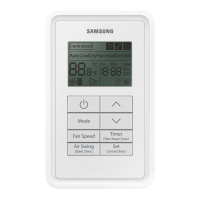
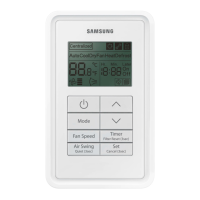
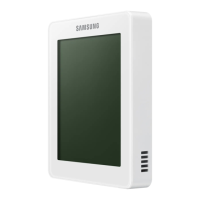
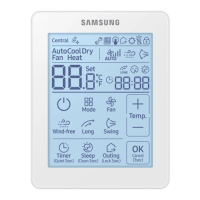
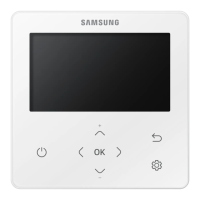
This document is an owner's instruction manual for the Samsung MWR-SC00T Wired Remote Controller, designed for use with System Air Conditioners. It provides essential information for safe operation, installation, and troubleshooting of the device.
Function Description
The Samsung MWR-SC00T Wired Remote Controller serves as the primary interface for controlling a Samsung System Air Conditioner. It allows users to manage various aspects of the air conditioning system, including:
- On/Off Control: Powering the air conditioner on or off.
- Temperature Adjustment: Setting the desired room temperature within a range of 18°C to 30°C.
- Fan Speed Selection: Choosing from multiple fan speed settings, including Automatic, Low, Medium, and High, to optimize airflow and comfort.
- Timer Functions: Programming the air conditioner to switch on or off automatically after a specified period. The "On Timer" allows users to set a time for the unit to turn on, while the "Off Timer" enables automatic shutdown. Both timers can be set for durations ranging from 30 minutes to 24 hours.
- Filter Maintenance Indication: Displaying a "Filter Wash" sign when it's time to clean the air filter, ensuring optimal performance and air quality.
- Error Code Display: Showing specific error codes on the on/off timer display in case of malfunctions in the indoor or outdoor unit, or the remote controller itself, to aid in troubleshooting.
Usage Features
The wired remote controller is designed for straightforward and intuitive operation, with a clear display and dedicated buttons for various functions.
Basic Operation:
- Turning On/Off: Pressing the (ON/OFF) button initiates or terminates operation. Upon startup, the unit will run in the mode and temperature selected during its last use. A built-in protection mechanism ensures a three-minute delay before starting if the unit has just been plugged in or stopped, preventing damage.
- Adjusting Temperature: The ▲ and ▼ buttons are used to increase or decrease the temperature setting, with each press adjusting the temperature by 1°C. The air conditioner will begin cooling if the room temperature is higher than the set temperature, while the fan will always operate.
- Selecting Fan Speed: The "Fan Speed" button cycles through the available fan speed options: Automatic, Low, Medium, and High. The selected speed is indicated on the display.
Timer Settings:
- Setting the On Timer: When the air conditioner is off, the "On/Off" timer button can be pressed repeatedly to set the desired time for the unit to switch on. The time can be set from 0.5 hours to 24 hours. Pressing the "Confirm/Cancel" button finalizes the setting. The display will show the remaining time, and the timer indicator will stop blinking. The air conditioner will automatically turn on when the counter reaches the set time.
- Setting the Off Timer: When the air conditioner is on, the "On/Off" timer button is used to set the time for the unit to switch off. Similar to the On Timer, the duration can be set from 0.5 hours to 24 hours, and the "Confirm/Cancel" button confirms the setting. The unit will switch off automatically when the counter reaches the set time.
- Canceling Timers: Both On and Off timers can be canceled by pressing the "Confirm/Cancel" button. If the user wishes to turn the air conditioner on or off before the timer expires, they can press the "Confirm/Cancel" button.
Maintenance Features
The MWR-SC00T remote controller includes features that assist in maintaining the air conditioning system:
- Filter Wash Indicator: The "Filter Wash" sign appears on the display to remind users when the air filter needs cleaning. This helps ensure the air conditioner operates efficiently and maintains good air quality.
- Filter Reset Function: After cleaning the filter, users must press the "Filter Reset" button on the remote controller. This action clears the "Filter Wash" sign from the display, acknowledging that maintenance has been performed.
- Error Code Display for Troubleshooting: In the event of a malfunction, the remote controller's on/off timer display will show specific error codes. These codes are crucial for diagnosing issues, whether they originate from the indoor unit, outdoor unit, or the wired remote controller itself. Users are advised to contact an installer or authorized service personnel if an error code appears, as these codes provide valuable information for technicians to resolve problems efficiently. Examples of error codes include those related to temperature sensors, heat exchanger sensors, EEPROM errors, and communication errors between units.
Safety Precautions
The manual emphasizes several safety precautions to ensure safe operation and prevent damage:
- Professional Installation: The wired remote controller and the air conditioning system must be installed by authorized service personnel. Users should never attempt installation or relocation themselves.
- No User-Serviceable Parts: The remote controller contains no user-serviceable parts. All repairs must be performed by authorized service personnel.
- Power Supply: The remote controller must be installed with the rated power supply.
- Emergency Procedures: In case of a malfunction (e.g., burning smell), users should immediately stop operation, turn off the electrical breaker, and contact authorized service personnel.
- Environmental Considerations:
- Avoid using inflammable gases near the remote controller.
- Do not spill water on the remote controller or operate it with wet hands.
- Do not install the remote controller in locations exposed to combustible gases, machine oil, or sulphide gas.
- Do not spray insecticides or other combustible materials on the remote controller.
- Do not clean the remote controller with benzene, solvents, or other chemicals.
- Physical Handling:
- Do not press buttons with pointed objects.
- Do not pull or bend the remote controller cable excessively.
- Avoid giving the remote controller a shock or disassembling it.
- Structural Integrity: Ensure the wall is strong enough to support the weight of the remote controller.
- Wiring: All cables must be installed according to national wiring rules, securely mounted to the wall, and inaccessible to users. Communication and power cables should be installed separately to prevent abnormal operation due to electrical interference.
By adhering to these guidelines, users can ensure the safe and effective operation of their Samsung System Air Conditioner with the MWR-SC00T Wired Remote Controller.

 Need help?
 General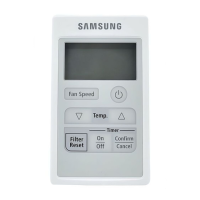

 To Next Page