22
English
Wired Remote Controller Installation/Service Mode
22
Service Mode
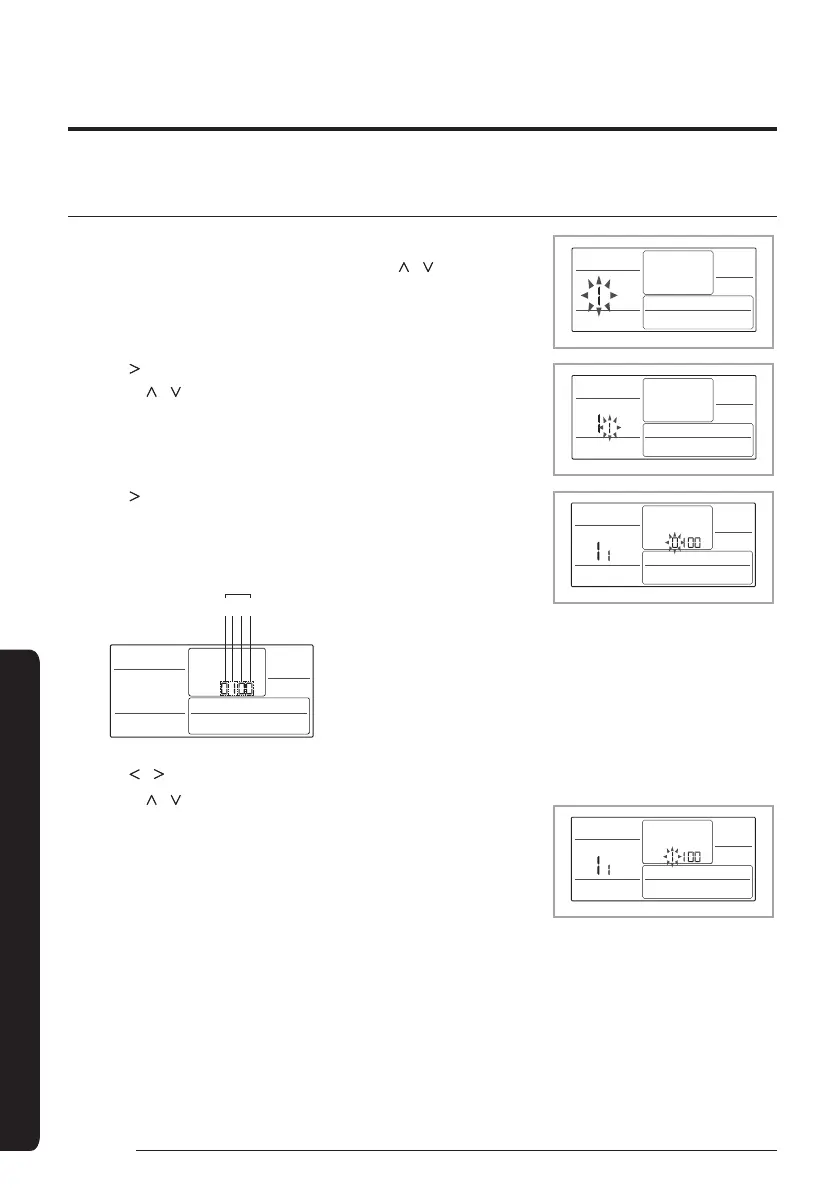
The example of Wired Remote Controller option setting method
1
Press Delete and Set buttons at the same time for more than 3 seconds.
• (Main menu) will be displayed and then press the [
]/[ ] button to select
no.1.
2
Press [
] button to select the number you will set.
•Press [
]/[ ] button and select no.1
3
Press [
] button to enter the data setting stage.
• When you enter the setting stage, the current setting value will be
displayed.
123
4
Data1: Both cooling and heating of an indoor unit
Data2: Use wireless remote controller
Data3: Master wired remote controller
Data4: Temperature display – Celsius (°C)
Data bit
Example of data setting stage display
4
Press [
]/[ ] button to select the desired Data1.
•Press [
]/[ ] button to select no.1.
• The wired remote controller option is set from both cooling and heating to
cooling only.
5
Press Set button to complete the option setting.
• Save the setting value and exit to sub menu.
6
Press ESC button to exit to normal mode.











 To Next Page