7
English
7
Installation
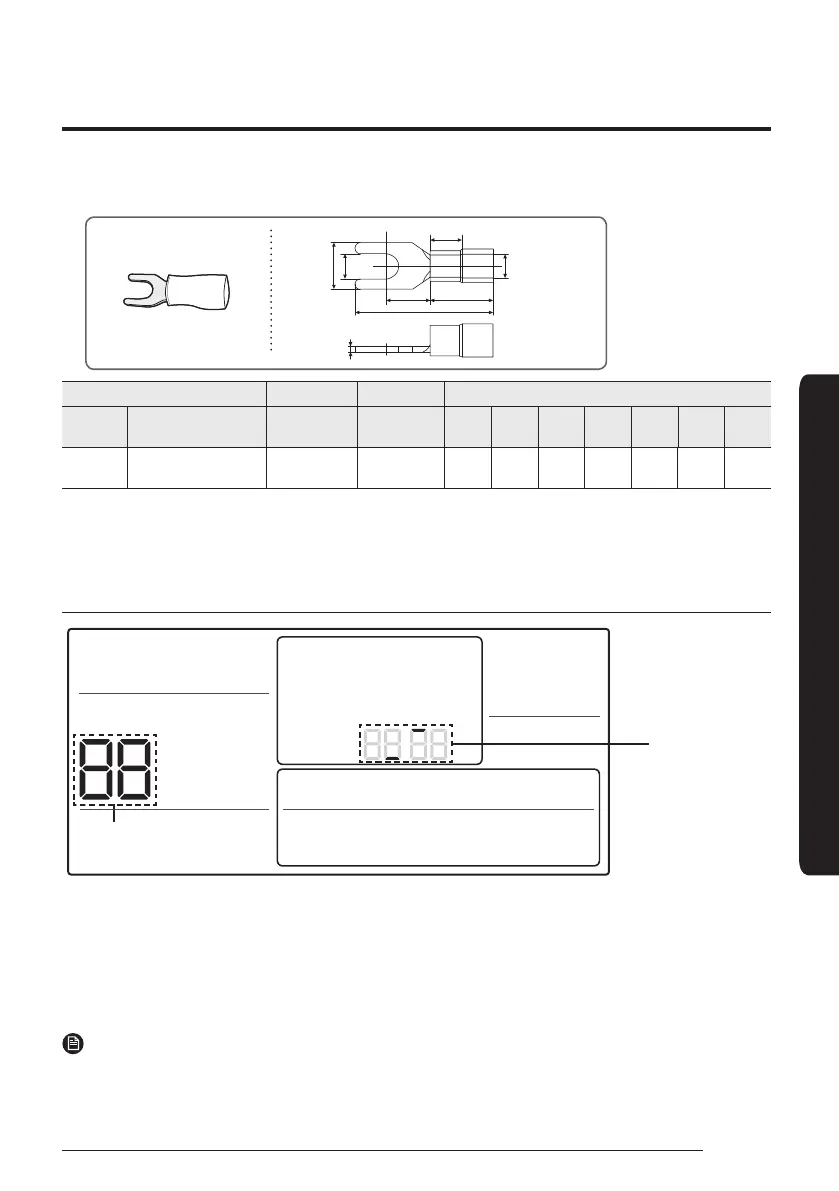
• The following are the specs of the compression ring terminal connected to your Wired Remote Controller PCB.
W
t
G
E
F
L
Stud
ØD
ŵɇ˝ʪͱ˙ťʪθϩϩʪʒǮθʪϑ Rated Size Stud Size Basic Size [mm (inch)]
AWG
mm²
(inch²)
mm²
(inch²)
mm
(inch)
tØDG E F W L
22~16
0.25~1.65
(0.0003 ~ 0.0025)
1.5 (0.0023) 3 (0.1181)
0.7
(0.0275)
3.8
(0.1496)
10.0
(0.3937)
4.5
(0.1771)
6.5
(0.2559)
6.0
(0.2362)
21.2
(0.8346)
࢘đɇуЇʒϑϩɇʀʪ˙ͱθʀͱʪʀϩ˝ʀͱЇʀɇϩͱɇʒΧͱиʪθʀɇɵʪࡠߢߡߡ࣍ߤߣߩ˙ϩ࣎
• Screws on the PCB terminal must be tightened with less than 6N-cm tightening torque. If the tightening torque is
greater, it may damage the screw thread.
Tracking Your Indoor Unit from the Wired Remote Controller
Indicates tracking
in progress
Displays the total number of
units searched
1
Tracking of your Wired Remote Controller will automatically start when you turn on the power after installation.
2
If you want to perform tracking again after installation, then press the Delete and ESC buttons at the same time for
more than five seconds.
• The system will reset, and tracking will start again.
3
During tracking, the total number of currently searched indoor units and ventilator(ERV) will be displayed.
4
It may take about 5 minutes at initial installation or when you re-set the Master setting.
NOTE
• If you want to perform tracking again after installation, then press the Delete and ESC buttons at the same time
for more than five seconds.
• Only the master Wired Remote Controller can display the total number of indoor units and ventilator(ERV).
– Slave Wired Remote Controllers do not display the total number of units.











 To Next Page