19
ENGLISH
Option setting Status
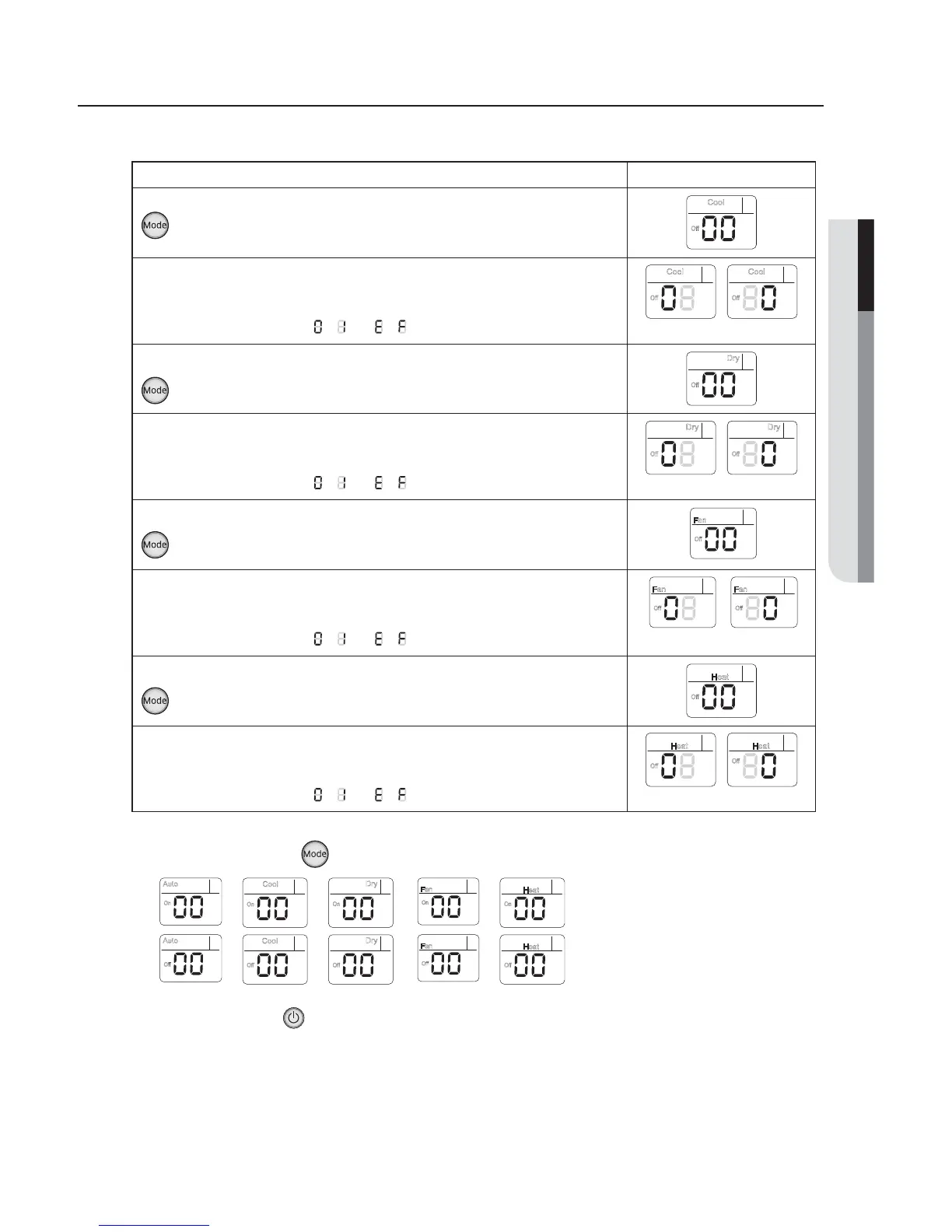
12. Setting Cool mode
Press Mode button to be change to Cool mode in the OFF status.
Cool
Off
4FUUJOH4&(4&(PQUJPO
1SFTT-PX'BOCVUUPO
∨
UPFOUFS4&(WBMVF
1SFTT)JHI'BOCVUUPO
∧
UPFOUFS4&(WBMVF
&BDIUJNFZPVQSFTTUIFCVUUPO
⋯
will be selected in rotation.
Cool
Off
Cool
Off
14. Setting Dry mode
Press Mode button to be change to Dry mode in the OFF status.
Off
Dry
4FUUJOH4&(4&(PQUJPO
1SFTT-PX'BOCVUUPO
∨
UPFOUFS4&(WBMVF
1SFTT)JHI'BOCVUUPO
∧
UPFOUFS4&(WBMVF
&BDIUJNFZPVQSFTTUIFCVUUPO
⋯
will be selected in rotation.
Off
Dry
Off
Dry
4FUUJOH'BONPEF
Press Mode button to be change to Fan mode in the OFF status.
Off
Fan
4FUUJOH4&(4&(PQUJPO
1SFTT-PX'BOCVUUPO
∨
UPFOUFS4&(WBMVF
1SFTT)JHI'BOCVUUPO
∧
UPFOUFS4&(WBMVF
&BDIUJNFZPVQSFTTUIFCVUUPO
⋯
will be selected in rotation.
Off
Fan
Off
Fan
18. Setting Heat mode
1SFTT.PEFCVUUPOUPCFDIBOHFUP)&"5NPEFJOUIF0''TUBUVT
Off
Heat
4FUUJOH4&(4&(NPEF
1SFTT-PX'BOCVUUPO
∨
UPFOUFS4&(WBMVF
1SFTT)JHI'BOCVUUPO
∧
UPFOUFS4&(WBMVF
&BDIUJNFZPVQSFTTUIFCVUUPO
⋯
will be selected in rotation.
Off
Heat
Off
Heat
4&(
4&(
4&(
4&(
4&(
4&(
4&(
4&(
Step 4. Input option
Press operation button with the direction of remote control for set.
For the correct option setting, you must input the option twice.
Step 5. Check operation
3FTFUUIFJOEPPSVOJUCZQSFTTJOHUIF3&4&5CVUUPOPGJOEPPSVOJUPSPVUEPPSVOJU
2. Take the batteries out of the remote controller and insert them again and then press the operation button.
Step 3. Check the option you have set
"GUFSTetting option, press
button to check whether the option code you input is correct or not.
On
Auto
¤
¤
¤
¤
¤
¤
¤
¤
¤
On
Cool
On
Dry
On
Fan
On
Heat
Auto
Off
Cool
Off Off
Dry
Off
Fan
Off
Heat


 To Next Page
 Loading...