AA
20
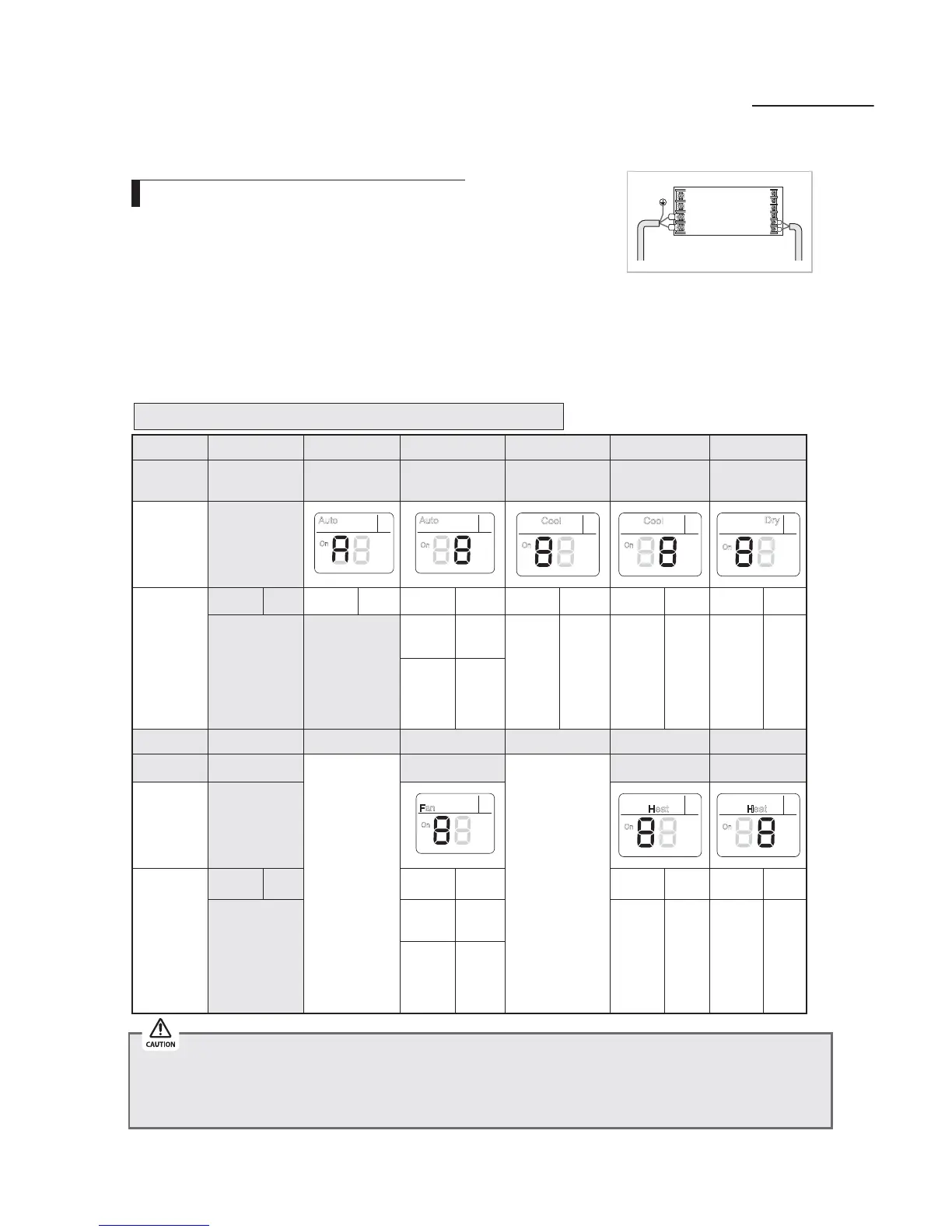
Setting an indoor unit address (MAIN/RMC)
1.
Check whether power is supplied or not.
8IFOUIFJOEPPSVOJUJTOPUQMVHHFEJOUIFSFTIPVMECFBEEJUJPOBM
power supply in the indoor unit.
2.
5IFQBOFMEJTQMBZTIPVMECFDPOOFDUFEUPBOJOEPPSVOJUUPSFDFJWFPQUJPO
3.
Before installing the indoor unit, assign an address to the indoor unit according to the air conditioning
system plan.
4. "TTJHOBOJOEPPSVOJUBEESFTTCZXJSFMFTTSFNPUFDPOUSPMMFS
5IFJOJUJBMTFUUJOHTUBUVTPGJOEPPSVOJU"%%3&44."*/3.$JTi"w
Option No. : 0AXXXX-1XXXXX-2XXXXX-3XXXXX
X When “A”~”F” is entered to SEG5~6, the indoor unit MAIN ADDRESS is not changed.
X If you set the SEG 3 as 0, the indoor unit will maintain the previous MAIN ADDRESS even if you input the option value of SEG5~6.
X If you set the SEG 9 as 0, the indoor unit will maintain previous RMC ADDRESS even if you input the option value of SEG11~12.
X You cannot set SEG11 and SEG12 as F value at the same time.
*OEPPS6OJU
1(L)
F2
F1
2(N)
Option
4&( 4&( 4&( 4&( 4&( 4&(
&YQMBOBUJPO
1"(& Mode Setting Main address
EJHJUPGJOEPPS
unit address
EJHJUPGJOEPPS
unit
The unit digit of
an indoor unit
Remote
Controller
Display
Auto
On
On
Auto
Cool
On
Cool
On
On
Dry
Indication
and Details
Indication Details Indication Details Indication Details Indication Details Indication Details Indication Details
0 "
0
/P.BJO
address
_ EJHJU _ EJHJU _
"VOJU
digit
1
Main
address
setting
mode
Option
4&( 4&( 4&( 4&( 4&( 4&(
&YQMBOBUJPO
1"(&
__
Setting RMC address
__
(SPVQDIBOOFM (SPVQBEESFTT
Remote
Controller
Display
On
Fan
On
Heat
On
Heat
Indication
and Details
Indication Details Indication Details Indication Details Indication Details
1
0
/P3.$
address
RMC1 _' RMC2 _'
1
RMC
address
setting
mode
Setting an indoor unit address and installation option


 To Next Page
 Loading...