English - 79
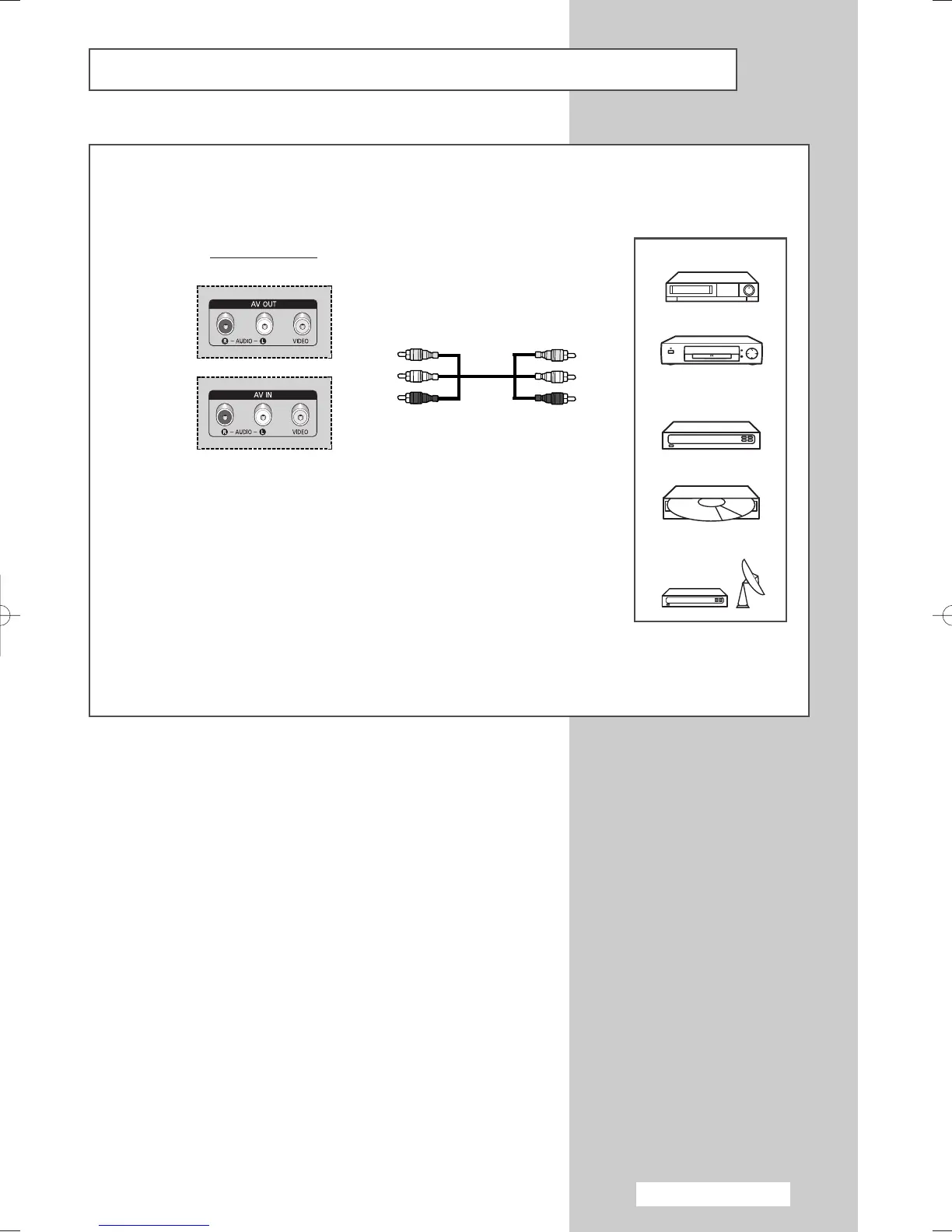
Connecting to the AV Output
“AV OUT” are used for the equipment with an RGB output, such as video game devices or video disc players.
Rear of the TV
①
VCR
Decoder /
Video Game Device
Video Disc Player
Satellite Receiver
DVD
②
③
①
This end can be fitted with:
◆ Three RCA connectors (VIDEO + AUDIO L/R)
②
If you have a second VCR and wish to copy cassette tapes, connect the
source VCR to
“
AV IN” and the target VCR to “AV OUT” so that you can
redirect the signal from
“
AV IN” to “AV OUT”.
③
When you wish to record a programme, connect the receiver to
“
AV IN”
and the VCR to “AV OUT” so that you can redirect the signal from
“
AV
IN”
to “AV OUT”.
➢
Please be sure to match the colour coded input terminals and cable jacks.
BN68-00889A-00Eng_74-92(TEL) 4/15/05 1:58 PM Page 79



 To Next Page