EasyManua.ls Logo

Samsung PS-WJ6000 - User Manual

Samsung PS-WJ6000
31 pages
Print Icon
To Next Page IconTo Next Page
Loading...
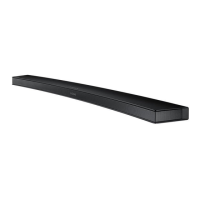
Curved Soundbar




User manual
'This Nanum Gothic Eco font is provided by NAVER'




Questions and Answers

  • A
    alan20Aug 15, 2025
    Why is there no sound coming from my Samsung PS-WJ6000 Speakers?
    • K
      katherinefisherAug 15, 2025
      If your Samsung Speakers aren't producing sound, first check if the Mute function is on. If it is, press the (Mute) button to cancel it. Also, make sure the volume isn't set to the minimum. If it is, adjust the volume to a comfortable level.
  • P
    pthomasAug 18, 2025
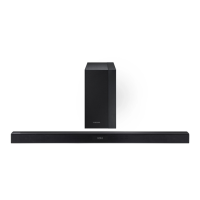
    What to do if the red LED on my Samsung PS-WJ6000 subwoofer blinks and no sound is produced?
    • T
      Timothy CummingsAug 19, 2025
      If the red LED on your Samsung Speakers subwoofer is blinking and no sound is being produced, it might not be properly connected to the main body of the product. Try reconnecting your subwoofer.
  • S
    Sarah JonesAug 21, 2025
    How to fix Samsung PS-WJ6000 TV SoundConnect (TV pairing) failed?
    • J
      Jared HowardAug 21, 2025
      TV SoundConnect is supported by some Samsung TVs released from 2012 on. Check your TV to see if it supports TV SoundConnect. Ensure your TV has the latest firmware. You can also try pressing and holding the p button for 5 seconds to reset the TV SoundConnect connection.
  • M
    Michelle GrantAug 26, 2025
    How to adjust the subwoofer volume on Samsung Speakers if it drones?
    • T
      tamiwarrenAug 26, 2025
      If your Samsung Speakers subwoofer drones and vibrates noticeably, you can adjust its volume level using the WOOFER button on your remote control. The volume can be adjusted between -12, -6 to +6.
  • T
    Tyrone RamirezAug 28, 2025
    What to do if my Samsung PS-WJ6000 Speakers unit will not turn on?
    • D
      David MillerAug 29, 2025
      If your Samsung Speakers unit will not turn on, ensure that the power plug is securely connected to the outlet.
  • J
    Justin ParkAug 31, 2025
    What to do if the TV SoundConnect (TV pairing) failed on Samsung Speaker System?
    • C
      Carol HuntSep 1, 2025
      First, confirm that your TV supports TV SoundConnect, as it's available on select Samsung TVs released from 2012 onwards. Next, ensure your TV's firmware is updated to the latest version. Also, you can press and hold the & button for 5 seconds to reset the TV SoundConnect connection.
  • J
    Jeffery RodriguezSep 4, 2025
    Why is the red LED on my Samsung Speaker System subwoofer blinking and no sound is produced?
    • R
      Ralph SwansonSep 4, 2025
      Your subwoofer may not be connected to the main body of the product. Try to connect your subwoofer again.
  • M
    michaelmitchellSep 7, 2025
    What to do if my Samsung Speakers remote control does not work?
    • Z
      zgloverSep 8, 2025
      If your Samsung Speakers remote control isn't working, the batteries may be drained, or you might be too far from the main unit. Try replacing the batteries with new ones. If that doesn't work, move closer to the unit and try again.
  • H
    hillfrankSep 12, 2025
    What to do if a function does not work when the button is pressed on my Samsung Speakers?
    • J
      John VillarrealSep 12, 2025
      If a function on your Samsung Speakers doesn't work when the button is pressed, it may be due to static electricity in the air. Disconnect the power plug and then reconnect it.

Summary

GETTING STARTED

FEATURES

Control your Soundbar with an Android smart device and the Samsung Audio Remote app.

LICENSES

Manufactured under license from Dolby Laboratories and DTS Licensing Limited.

SAFETY INFORMATION

SAFETY WARNINGS

To reduce risk of electric shock, do not remove cover. Refer servicing to qualified personnel.

Important Safety Instructions

Read operating instructions carefully before use and keep them for future reference.

PRECAUTIONS

WHATS INCLUDED

Icons used in this manual

Explains icons like Caution and Note used in the manual.

DESCRIPTIONS

TOP; FRONT PANEL

Details the buttons and display on the top and front of the Soundbar.

REAR; BOTTOM PANEL

Identifies all input/output jacks and ports on the rear and bottom.

REMOTE CONTROL

Explains the functions of each button on the remote control.

INSTALLING THE BATTERY IN THE REMOTE CONTROL

Step-by-step guide on how to install the battery in the remote control.

INSTALLATION

INSTALLING THE WALL MOUNT

Precautions and steps for securely mounting the Soundbar on a wall.

ATTACHING THE SOUNDBAR TO YOUR TVS STAND

Instructions for attaching the Soundbar to a compatible TV stand.

INSTALLING THE SOUNDBAR AS A FREE-STANDING UNIT

Guidance for placing the Soundbar on a flat surface in front of the TV.

CONNECTIONS

CONNECTING THE SUBWOOFER

Details automatic and manual procedures for linking the subwoofer wirelessly.

CONNECTING TO A TV

Guides for connecting the Soundbar to a TV via optical or HDMI cables.

CONNECTING TO EXTERNAL DEVICES

Instructions for connecting HDMI, Optical, Analog, and USB devices.

FUNCTIONS

INPUT MODE

Selects the desired input mode like D.IN, AUX, HDMI, BT, TV, USB.

BLUETOOTH

Connects the Soundbar to Bluetooth devices for wireless audio.

USING THE SAMSUNG AUDIO REMOTE APP

Download and use the app to control the Soundbar with a smart device.

SOFTWARE UPDATE

How to update the Soundbar's system firmware using a USB device.

TROUBLESHOOTING

The unit will not turn on.

Solutions for when the unit fails to power on.

Sound is not produced.

Solutions when no sound is emitted from the Soundbar.

The TV SoundConnect (TV pairing) failed.

Solutions when TV SoundConnect pairing fails.

The red LED on the subwoofer blinks and the subwoofer is not producing sound.

Solutions when the subwoofer LED blinks and no sound is produced.

APPENDIX

SPECIFICATIONS

Details technical specifications like USB, weight, dimensions, and power output.

Important Note About Service

Notes regarding service calls, fees, and troubleshooting recommendations.

WARRANTY

LIMITED WARRANTY TO ORIGINAL PURCHASER

Covers manufacturing defects in materials and workmanship for a limited period.

Samsung PS-WJ6000 Specifications

General IconGeneral
BrandSamsung
ModelPS-WJ6000
CategorySpeakers
LanguageEnglish

Related product manuals