ENG - 37
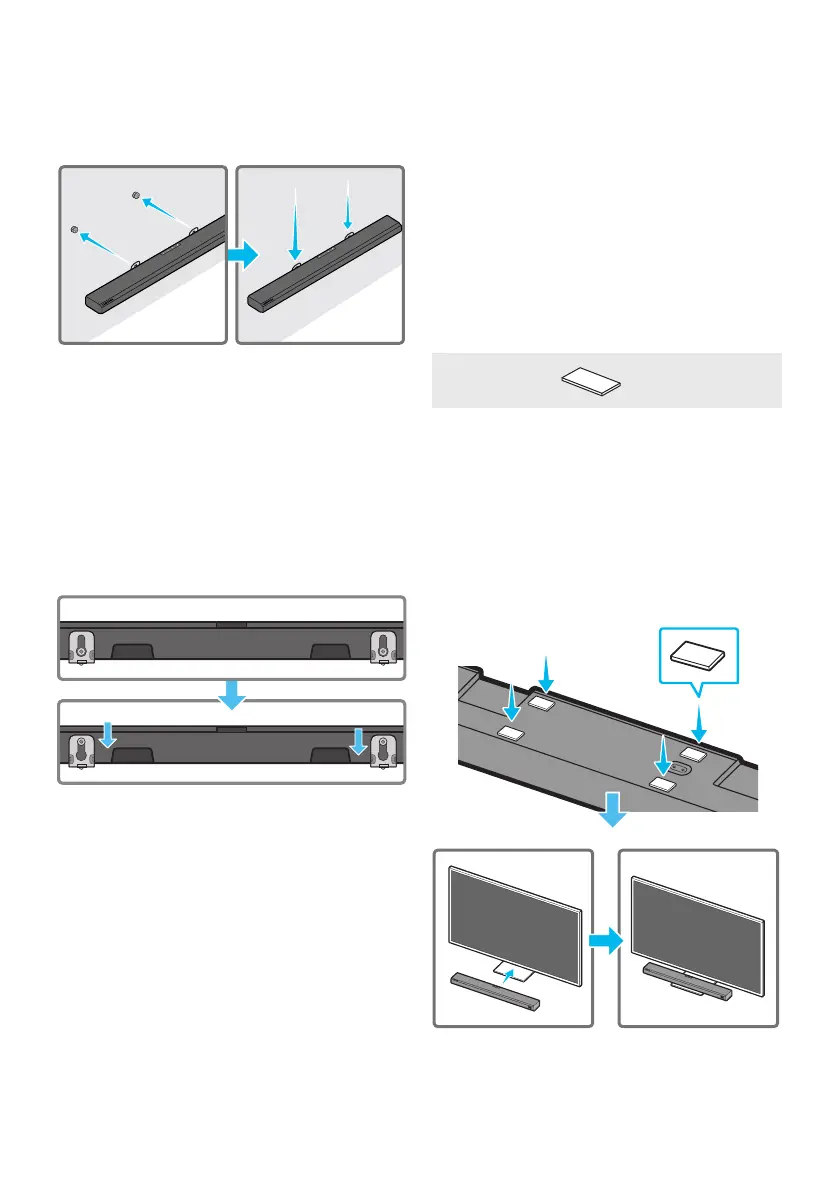
7. Install the Soundbar with the attached
Bracket-Wall Mounts by hanging the
Bracket-Wall Mounts on the Holder-Screws
on the wall.
8. Slide the Soundbar down as shown below so
that the Bracket-Wall Mounts rest securely
on the Holder-Screws.
• Insert the Holder-Screws into the wide
(bottom) part of the Bracket-Wall
Mounts, and then slide the Bracket-Wall
Mounts down so that the Bracket-Wall
Mounts rest securely on the
Holder-Screws.
10 INSTALLING THE
SOUNDBAR
ABOVE A TV
STAND
Component
x 4
Rubber-Foot
(BN67-00398L)
To install, attach the Rubber-Feet to the bottom
of the Soundbar before placing it in position
above the TV stand. Make sure you attach the
Rubber-Feet so that they are beyond the outside
edges of the TV stand. Refer to the gure below.
Rubber-Foot



 To Next Page