14_ operating
• If you plan to go away for a signicant time, empty the refrigerator and turn it off.
Wipe the excess moisture from the inside of the appliance and leave the doors
open. This helps keep odor and mold from developing.
•
If the refrigerator is not to be used for a long period of time, pull out the power plug.
- Deterioration in the insulation may cause re.
WARNING
Before removing any accessories, make sure that no food is in the way.
When possible, remove the food altogether to reduce the risk of accidents.
To get the best energy efciency of this product, please leave all selves,
drawers and baskets on their original position like as illustration in page (13.)
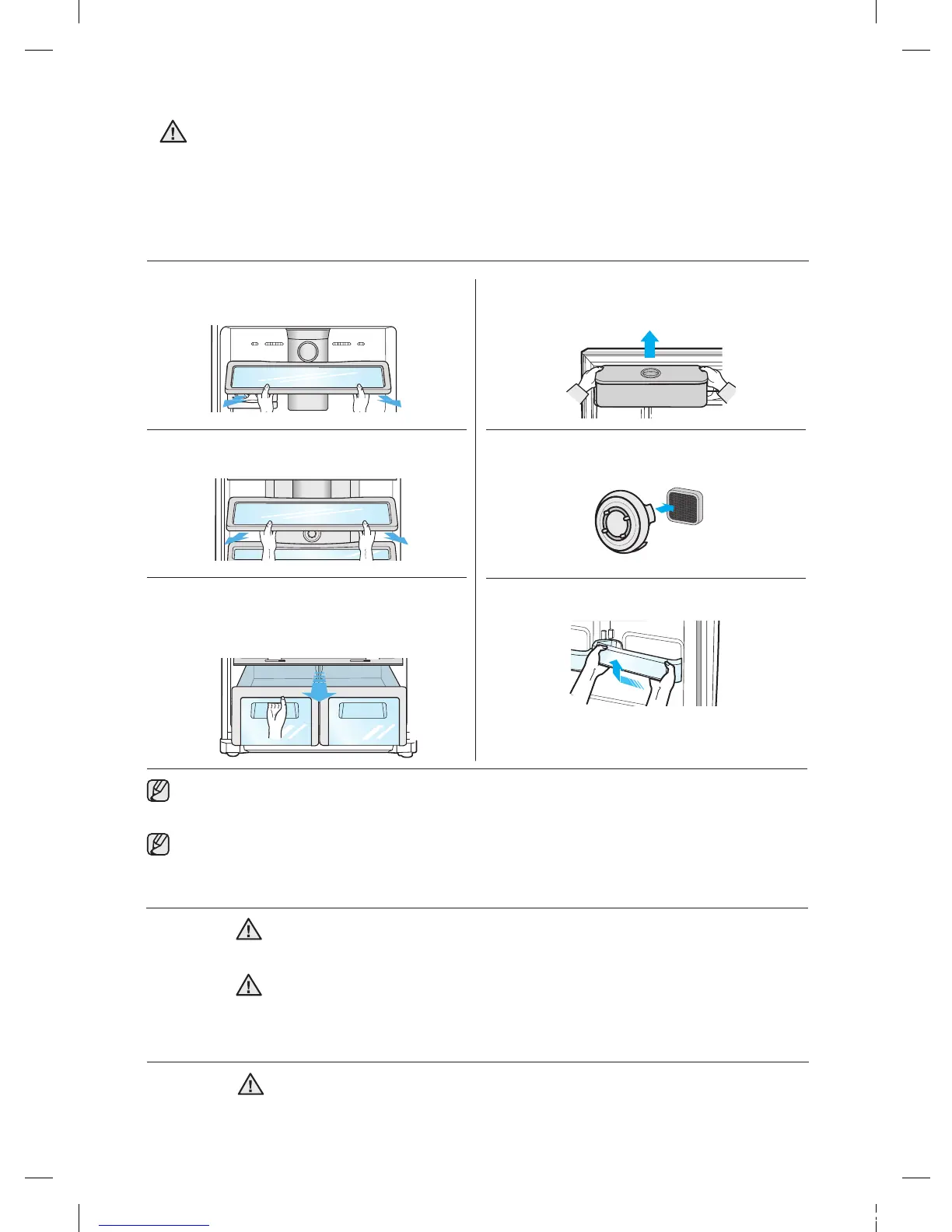
3. Lift up the vegetable bin lid and pull it forward.
Pull out vegetable box while lifting it up pulling
forward after it has reached the middle of the
slide.
4. Lift up and pull out the water tank(optional)
as shown in the diagram.
5. Pull it out while pressing the end of the sill
on the low temperature catalyzing deodorizer.
6. Lift up and pull out the door guards.
2. Lift up the fridge shelf and pull it forward up
the fridge shelf and pull it forward.
REMOVING THE REFRIGERATOR ACCESSORIES
1. Pull out the ice tray rst and then lift up the
front part of freezer shelf and pull it out forward.
Do not spray the refrigerator with water while it is plugged in, as it may
cause an electric shock. Do not clean the refrigerator with benzene,
thinner or car detergent for risk of re.
CAUTION
CLEANING THE REFRIGERATOR
WARNING
Do not use Benzene, Thinner or Clorox™ for cleaning. They may
damage the surface of the appliance and can create a risk of re.
REPLACING THE INTERIOR LIGHT
For LED lamp, please contact service engineer to replace it.
CAUTION


 To Next Page