SETTING UP THE REFRIGERATOR
Now that you have your new refrigerator installed and in place, you are ready to set up and
enjoy the full features and functions of the appliance.
By completing the following steps, your refrigerator should be fully operational. If not, rst check
the power supply and electricity source or try the troubleshooting section at the back of this
user guide. If you have any further questions, contact your Samsung Electronics service center.
1.
Place the refrigerator in an appropriate location with reasonable clearance between
the wall and the refrigerator. Refer to installation instructions in this manual.
2. Once the refrigerator is plugged in, make sure the interior light comes on when
you open the doors.
3. Set the temperature control to the coldest temperature and wait for an hour.
The freezer should get slightly chilled and the motor should run smoothly.
4.
After powering the refrigerator, it will take a few hours to reach the appropriate temperature.
Once the refrigerator temperature is sufciently cool, you can store food and
drink in the refrigerator.
8_
operating
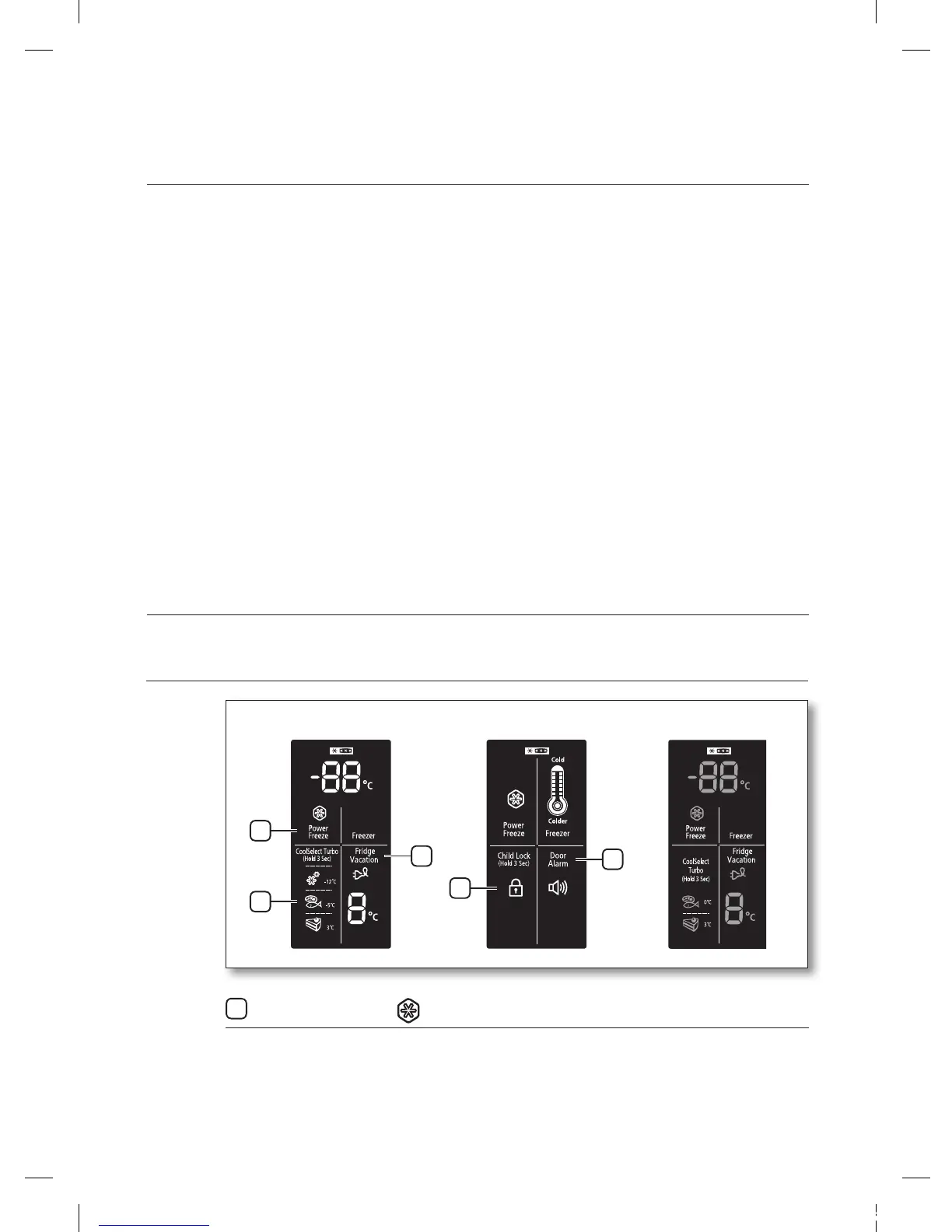
USING THE DIGITAL DISPLAY
Power Freeze
This icon will light up when you activate the “Power freeze” feature. “Power freeze” is great for
times when you need a lot of ice. Press the Power freeze button and ice production will increase.
When you have enough, just press the button again to cancel the “Power freeze” mode.
1
<TYPE 1> <TYPE 3>
1
2
3
<TYPE 2>
4
5
operating the SAMSUNG
refrigerator


 To Next Page