Alignment and adjustment
5-27
Samsung Electronics
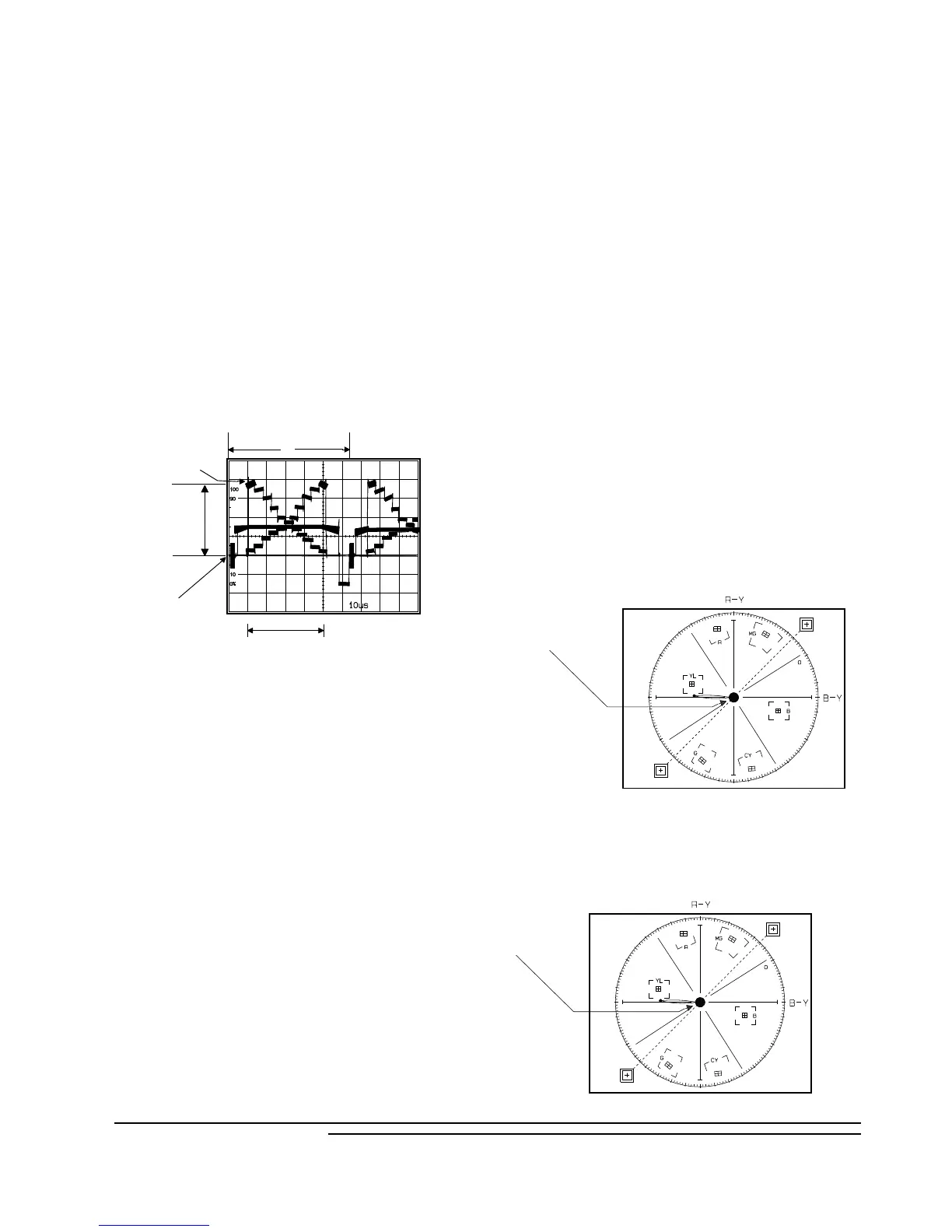
6. Auto white balance
1) Camera ÒE-EÓ, 3100¡K/5100¡K gray-scale chart.
2) Video(output) jack and AF MICOM.
4) Connect vectorscope input jack to video(output)
jack.
3) Press the ÒMENU (MODE UP)/DATE
(MODE DOWN)Ó button so that the OSD state is
ÒCF WBA XX XXÓ.
a. W/B Indoor
a-1. Aim the camera at a 3100¡K gray-scale chart
illuminated at 1500 to 2000 lx. (40us)
a-2. Press ÒTITLE (CONFIRM)Ó button so that
the white vector moves to the center on screen of
the vectorscope.
a-3. The OSD shows ÒOK!Ó.
b. W/B Outdoor
b-1. Aim the camera at a 5100¡K gray-scale chart
illuminated at 1500 to 2000 lx. (40us)
b-2. Press ÒTITLE (CONFIRM)Ó button so
that the white vector moves to the center on
screen of the vectorscope.
b-3. The OSD shows ÒOK!Ó.
Match the white luminance
point with the
black luminance
point
5. AUTO IRIS
1) Camera ÒE-EÓ, 3100¡K gray-scale chart.
2) Video(output) jack and AF MICOM.
3) Connect video(output) jack to waveform monitor
input jack and monitor TV jack respectively.
4) Press the ÒMENU (MODE UP)/DATE
(MODE DOWN)Ó button so that the OSD state is
ÒCE IRISA XX XXÓ.
5) Press ÒTITLE(confirm)Ó Button.
6) Then, the micro process will work;
- IRIS open, IRIS control minimum Value found.
- IRIS close, IRIS control minimum Value found.
- Store the data to mode 84 and mode 85.
7) The OSD shows ÒO.KÓ.
Center of
white level
100IRE
Optical
black level
H
40US
7. Pre white balance (I)
1) Camera ÒE-EÓ, 3100¡K gray-scale chart.
2) Video(output) jack and AF MICOM.
3) Connect vectorscope input jack to video(output)
jack.
4) Press the ÒMENU (MODE UP)/DATE
(MODE DOWN)Ó button so that the OSD state is
Ò1C CWBR XX XXÓ.
5) Aim the camera at a 3100¡K gray-scale chart
illuminated at 1500 to 2000 lx.
6) Adjust the Ò DISPLAY (DATA UP)/ C.RESET
(DATA DOWN)Ó button so that the white vector
moves to the B-Y axial on screen of the
vectorscope.
7) The OSD shows ÒOK!Ó.
Match the white luminance
point with the
black luminance
point



 To Next Page