Alignment and adjustment
5-26 Samsung Electronics
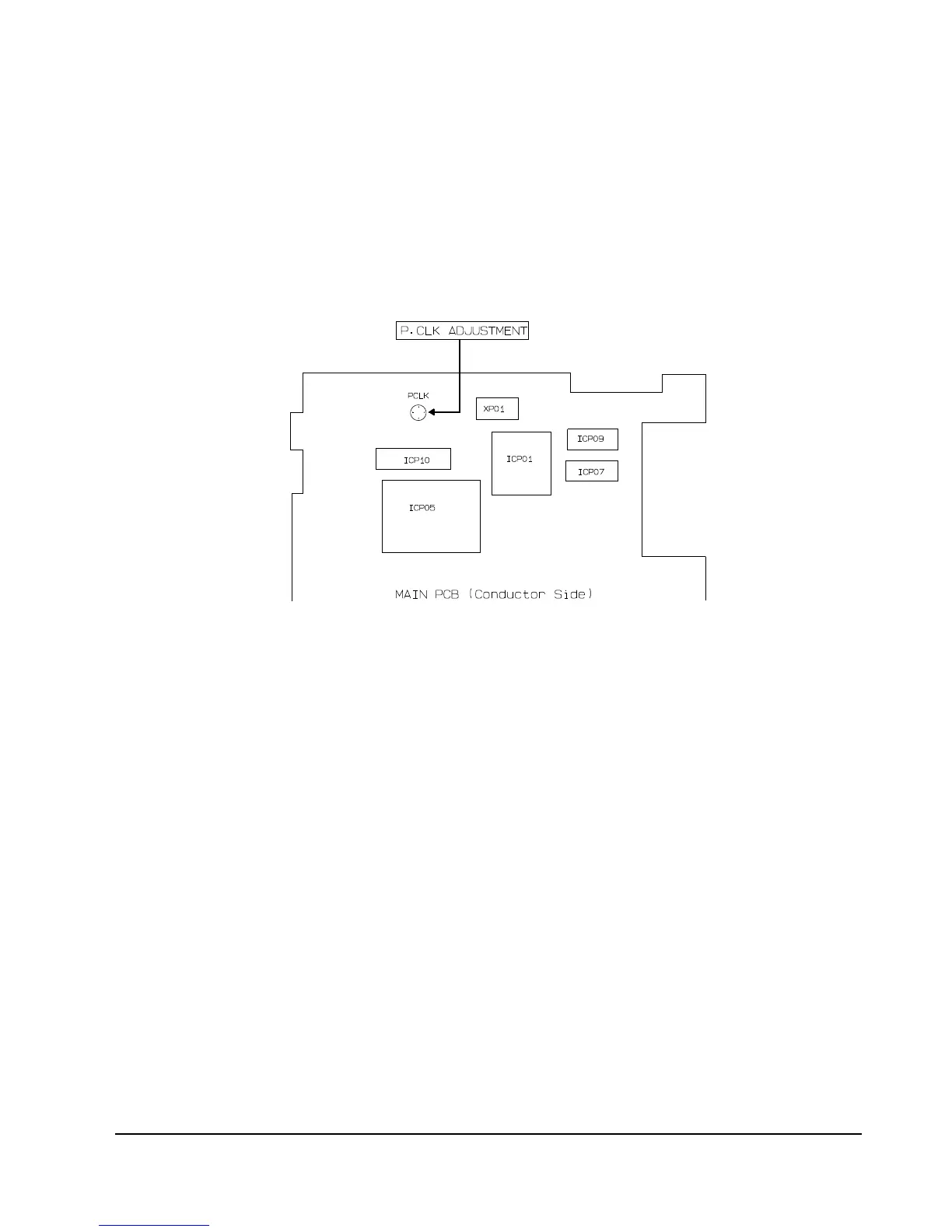
2. P. CLK Adjustment
1) ÒCameraÓ, no signal input.
2) P.CLK and AF MICOM.
3) Connent a frequency counter to P.CLK.
4) Press the ÒMENU (MODE UP)/DATE (MODE DOWN)Ó button so that the OSD state is Ò05 P.CLK XX XXÓ.
5) Adjust the Ò DISPLAY (DATA UP)/ C.RESET (DATA DOWN)Ó button so that frequency is
NTSC : SCL100/SCL150 --> 9.534964MHz ± 50Hz.
PAL : VP-L100/VP-L150 --> 9.453125MHz ± 50Hz.
4. Auto hall
1) Camera ÒE-EÓ, 3100¡K gray-scale chart.
2) Video(output) jack and EVR.
3) Connect monitor TV to video(output) jack.
4) Press the ÒMENU (MODE UP)/DATE
(MODE DOWN)Ó button so that the OSD state is
ÒCD HALLA XX XXÓ.
5) Press ÒTITLE (CONFIRM)Ó button.
6) Then, the microprocessor will work ;
- IRIS open, HALL maximum value found,
- IRIS closed, HALL minimum value found,
- IRIS open, HALL maximum value found,
- Store the data to mode 02 and mode 01.
- Store the HALL min./max. data to mode 7F
and mode 80.
3. Zoom VR Center
1) Camera ÒE-EÓ, 3100¡K gray-scale chart.
2) Video(output) jack and EVR.
3) Connect monitor TV to video(output) jack.
4) Press the ÒMENU (MODE UP)/DATE
(MODE DOWN)Ó button so that the OSD state is
ÒD6 Z, CHK XX XXÓ.
5) Press ÒTITLE (CONFIRM)Ó button.
6) Then, the microprocessor will work ;
- Find the Zoom VR Centerposition
- Store the data to mode D6.



 To Next Page