Home
Samsung
Digital Camera
SMARTCAMERA WB150
Page 6
Samsung SMARTCAMERA WB150 - Page 6
84 pages
Manual
Save Page as PDF
To Next Page
To Next Page
To Previous Page
To Previous Page
Loading...
{
{
{
{;{
}
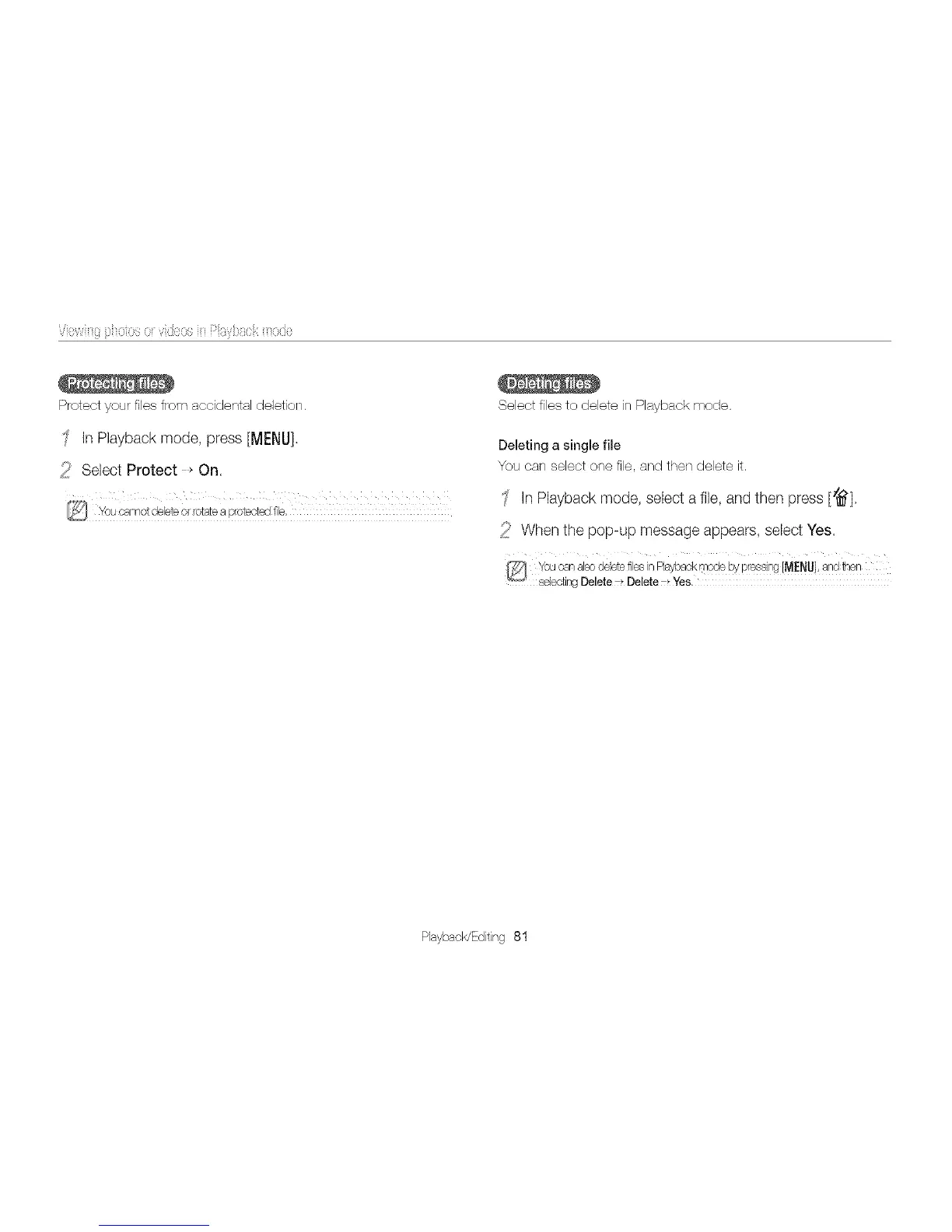
Protect
your
files
from
acddental
deletion.
In
Playback
mode,
press
[MENU],
_'
Select
Protect
_
On.
You
cannot
debte
or
rotate
a
proteot÷J
fie:
Select
files
to
delete
in
Playback
mode.
Deleting
a
single
file
You
can
select
one
file,
and
then
delete
it.
'
in
Playback
mode,
select
a
file,
and
then
press
[_].
When
the
pop-up
message
appears,
select
Yes,
You
ca-,
also
delete
files
in
Playback
mode
by
pressir
q
[MENU],
aid
fl-_en
selecting
Delete
7_
Delete
7_
Yes,
PlaybacWEditing
81
5
7
Table of Contents
Main Page
Viewingphotosor Videosin Playbackmode
2
Starting Playback Mode
2
Viewing Photos
8
Playing a Video
10
Editing a Photo
12
Resizing Photos
12
Rotating a Photo
12
Applying Smart Filter Effects
13
Viewingfiles on Atv
16
Disconnecting the Camera
21
Connecting to a WLAN
25
Usingphotoor Video Sharingwebsites
29
Accessing a Website
29
Uploading Photos or Videos
29
Sendingphotosor Videosvia Email
31
Changing Email Settings
31
Uploadingphotosto a Cloud Server
37
Usingauto Backupto Send Photosor Videos
38
Installing the Program for Auto Backup on Your PC
38
Sending Photos or Videos to a PC
38
Aboutthe Wakeupon LAN(WOL) F Eature
43
Accessing the Settings Menu
46
Error Messages
52
Camera Maintenance
54
Cleaning Your Camera
54
Using or Storing the Camera
55
Before Contacting a Service Center
63
Related product manuals
Samsung SMARTCAMERA DV300
87 pages
Samsung WB150
160 pages
Samsung SMARTCAM
39 pages
Samsung WISENET SMARTCAM
14 pages
Samsung S85
110 pages
Samsung ST66
132 pages
Samsung S760
94 pages
Samsung S850
90 pages
Samsung SL30
98 pages
Samsung ST70
109 pages
Samsung S 85
114 pages
Samsung S630
105 pages