operating _33
03 OPERATING
Timer Reservation
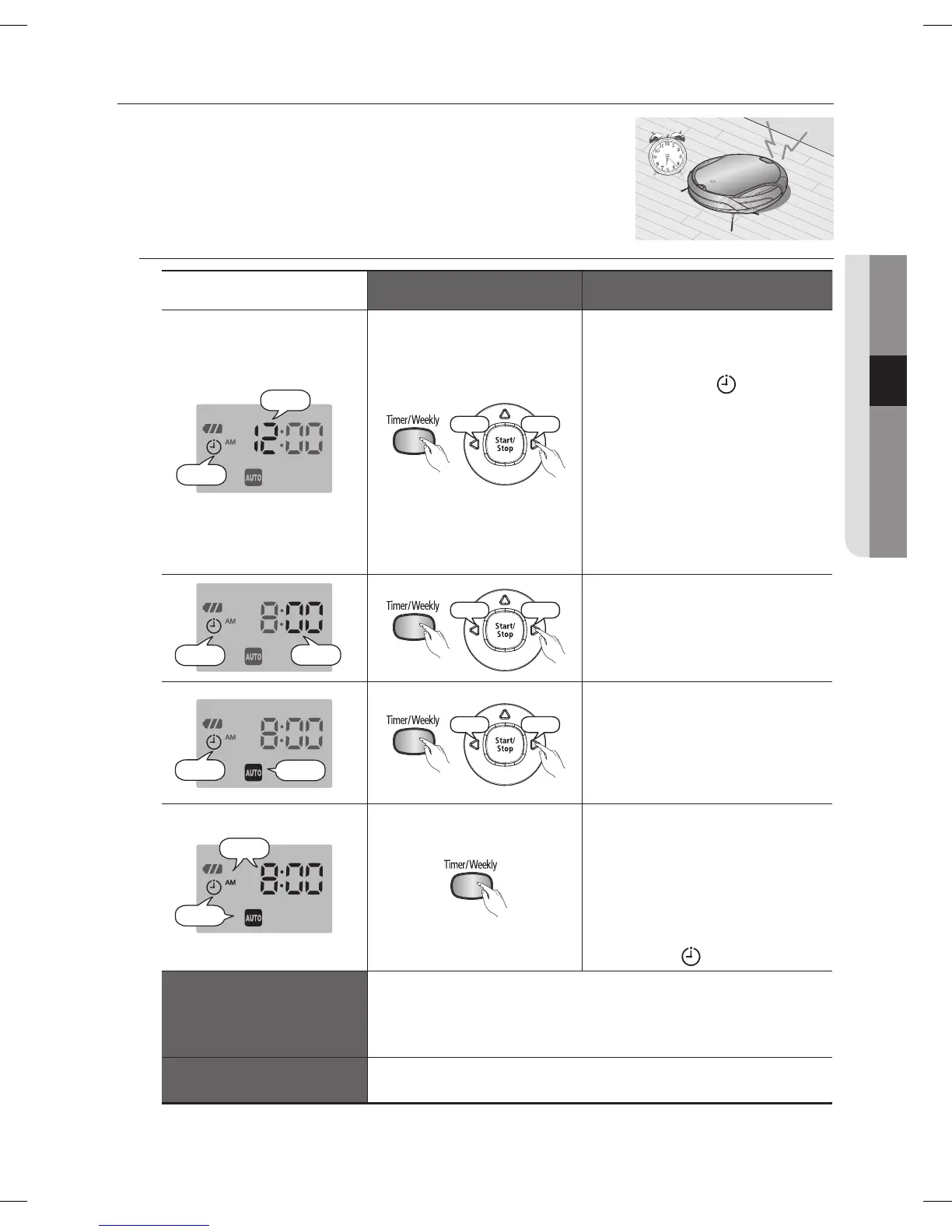
In this mode, you can schedule the cleaner to start a once-off
cleaning run from a particular time.
A scheduled cleaning run is only performed when the cleaner is
■
docked to the charger station.
Remote Control Confi guration Sequence
Blinks
Blinks
Decrease
Increase
Press the Timer/Weekly 1.
button.
The current setting is -
displayed and blinks.
Press the
Y
or
Z
button to
set the hour.
Cleaning Mode
❈
If there is no previous -
reservation, the cleaning
mode is set to Auto mode. If
a reservation exists, cleaning
mode is set to the confi gured
mode.
Blinks
Blinks
Decrease
Increase
Press the Timer/Weekly 2.
button.
The time increases/decreases -
by 5 minutes. Press the
Y
or
Z
button to set the minutes.
Blinks
Blinks
Decrease
Increase
Press the Timer/Weekly 3.
button. Press the
Y
or
Z
button to set the cleaning
mode.
You can select either Auto or -
Max cleaning mode.
Blinks
Blinks
Press the Timer/Weekly 4.
button.
The value you set will -
blink and the settings are
completed.
When the settings are -
completed, the confi gured
time and
are displayed.
Canceling the Settings
If you press the Start/Stop button while the cleaner is charging -
or you are setting the time, the settings are canceled.
Please take note that the settings are canceled if the cleaner -
is detached from the charger station.
Timeout
If there is no input for 1 minute while you are setting the time, -
the cleaner exits Time Set mode automatically.
DJ68-00664E.indb 33DJ68-00664E.indb 33 2012.7.19 11:54:15 AM2012.7.19 11:54:15 AM



 To Next Page