88_ web viewer
web viewer
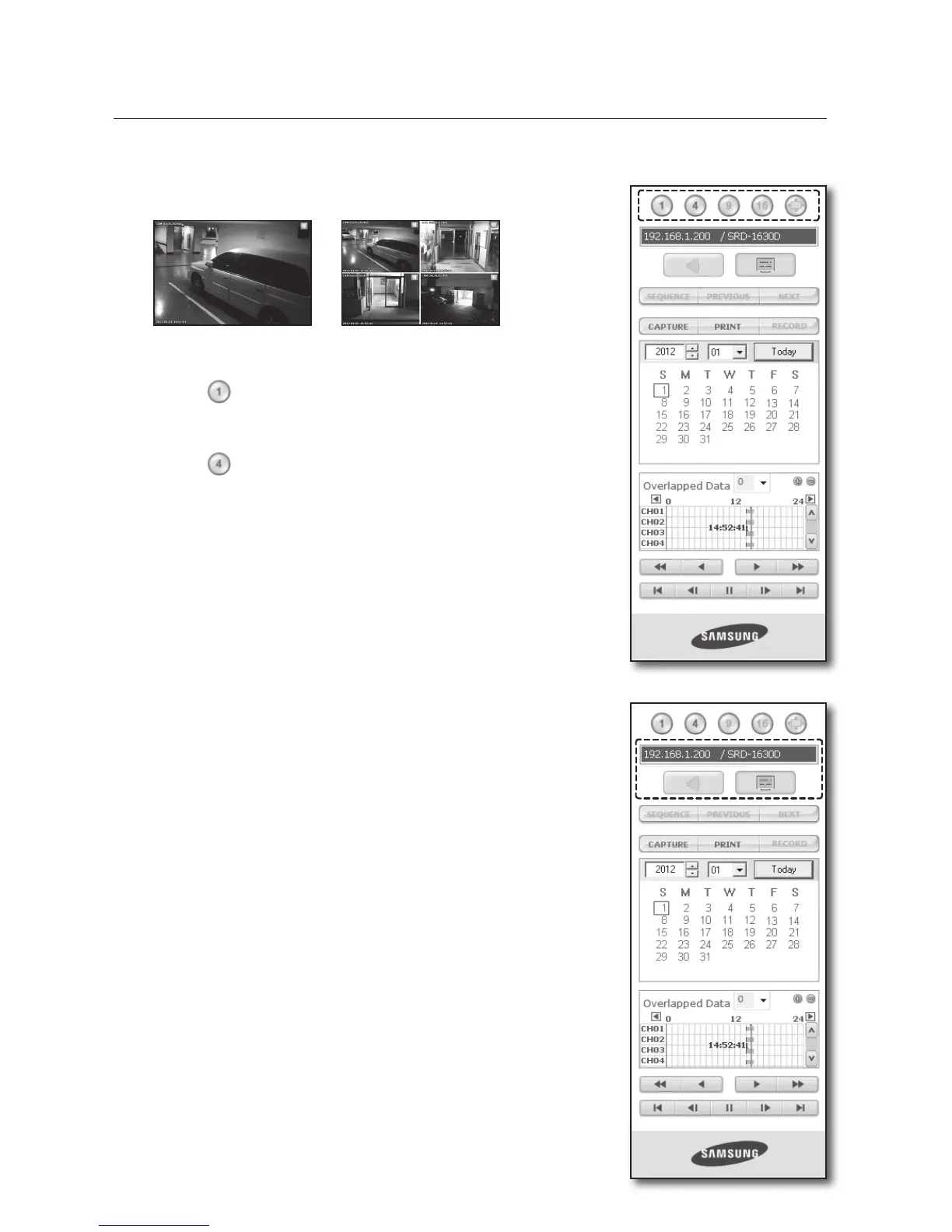
Split-Screen
You can change the split mode by clicking each number icon.
• Click <
> button.
The screen displays the selected camera connected to the DVR in
“SINGLE MODE”.
• Click <
> button.
The screen displays the selected camera connected to the DVR in
“QUAD MODE”.
M
Only SINGLE and QUAD MODE are available in SEARCH menu.
If 16 channel DVR is connected, you can select a mode from SINGLE to
SIXTEEN MODE.
Connected DVR
The IP of the connected DVR will be displayed. And you can also select to
turn on/off the sound and change the OSD information format to your
preference.
M
Connection failure message
No Response : Appears when the DVR does not respond.
Access Denied : Appears when the maximum number of users is exceeded.
The number of simultaneous connection is limited to 3. (SRD-830/830D/
830DC/850/850D/850DC/1610/1610D/1610DC/1630/1630D/1630DC/
1650/1650D/1650DC)
The number of simultaneous connection is limited to 1. (SRD-870/870D/
870DC/1670/1670D/1670DC)
SINGLE MODE QUAD MODE



 To Next Page