English - 27
OPERATING
CHANGING THE WATER FILTER
Toreduceriskofwaterdamagetoyour
propertyDONOTusegenericbrands
ofwaterltersinyourSAMSUNG
Refrigerator.
USEONLYSAMSUNGBRAND
WATERFILTERS.SAMSUNGisnot
legallyresponsibleforanydamage,
including,butnotlimitedto,property
damagecausedbywaterleakage
fromtheuseofagenericwaterlter.
(Red)
SAMSUNGRefrigeratorsaredesignedtowork
ONLYWITHSAMSUNGWaterFilters.
TheFilterlightturnsredtoletyouknowwhenitis
timetochangeyourwaterltercartridge.
Togiveyoutimetogetanewlter,theredlight
comesonjustbeforethecapacityofthecurrent
lterrunsout.
Changingthelterontimeprovidesyouwiththe
freshest,cleanestwaterfromyourrefrigerator.
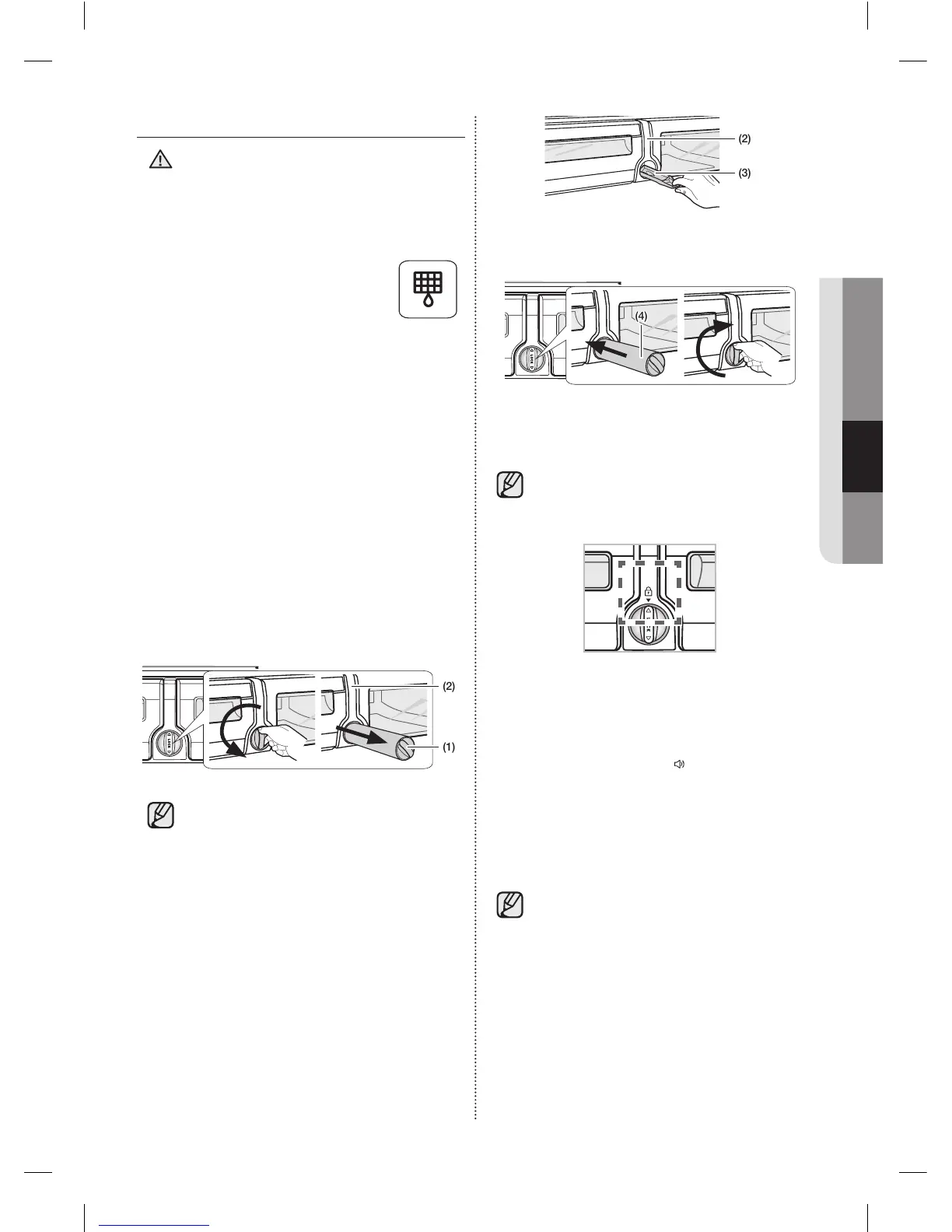
1. Shutoffthewatersupply.Then,turnthewater
lter(1)about1/4turn,counter-clockwise.
2. Pullthewaterlter(1)fromthecaselter(2).
(2)
(1)
• Tochangethewaterltermoreeasily,
shutoffthewatersupplyvalve.
• Sometimes,itishardtodisassemblethewater
lterbecauseimpuritiesinthewatercauseitto
stick.Ifyouarehavingdifculties,gripthewater
lterrmlyandpullithard.
• Whenyoupullthewaterlter,alittlewater
canleakfromtheopening.Thisisnormal.
Tominimizethewaterleaks,keepthelter
cartridgehorizontalwhenyoupullit.
• Topreventoverow,emptythewaterltertray
(3)anddryaroundtheltercase(2).
WARNING
(2)
(3)
3. Insertthenewlterintotheltercase(4).
(4)
4. Pushthelter,andthenturnitclockwiseuntil
itlocks.
• Ifyouhavetroubleinsertingthewater
lterbecauseofhighwaterpressure,
shutoffthewatersupplyvalve.
• Thelockedsymbolshouldbelinedupwiththe
indicatorline.
5. Touchandholdthe“Alarm/hold3secfor
FilterReset”button(
(Filter Reset)
)forabout
3secondstoresetthewaterlterindicator.
Theindicator’sredlightwillturnoff.
6. Ifyouturnedoffthewatersupply,turnitback
on.
Forareplacementwaterlter,visityour
localhomeImprovementcenterorvisit
Samsung’spartsdistributoronlineat:
http://www.samsungparts.com
Besurethereplacementwaterlterhas
theSAMSUNGlogoontheboxandonthe
waterlter.
DA68-02954H (EN)-00-���.indd 27 2016. 3. 14. �� 10:44













 To Next Page