OPERATION
36
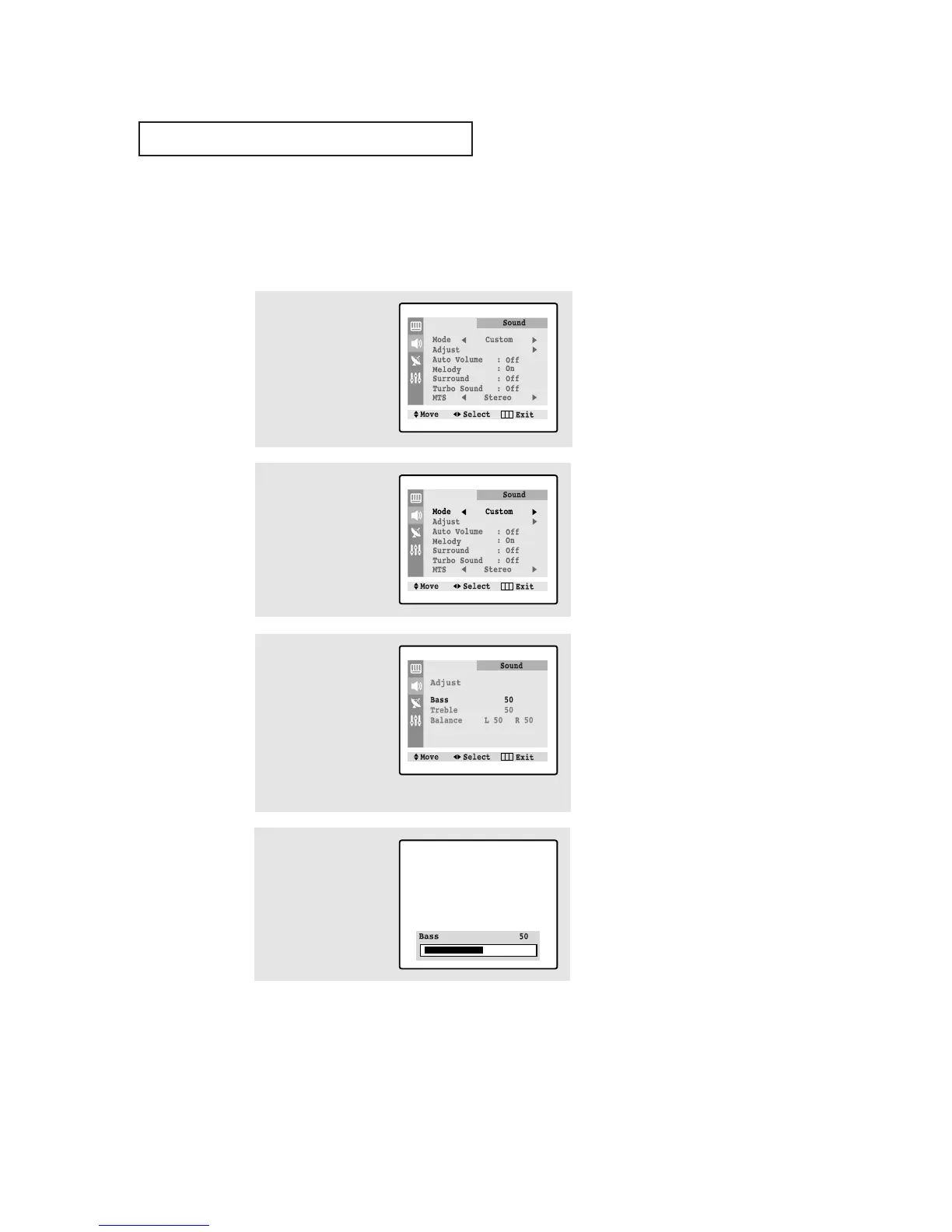
2
Press the
œœ
or
√√
button
repeatedly, until the word
“Custom” is selected.
(When Custom is select-
ed, the words “Adjust”
will appear on the
screen.)
3
Press the ▼ button to
select “Adjust”, then
press the
√√
button. (The
words Bass, Treble, and
Balance will appear on
the screen.)
Press the ▲ or ▼ button
to select a particular item
to be changed.
1
Press the MENU button to
display the menu.
Press the ▼ button to
select “Sound” menu.
Customizing the Sound
You can use the on-screen menus to adjust the bass, treble, and balance according to
individual preference. (Alternatively, you can use one of the “automatic” settings. See
next page.)
4
Press the
œœ
or
√√
button
to increase or decrease
the value of a particular
item.
Press the MENU button
four times to exit.




 To Next Page