48
SPECIAL FEATURES
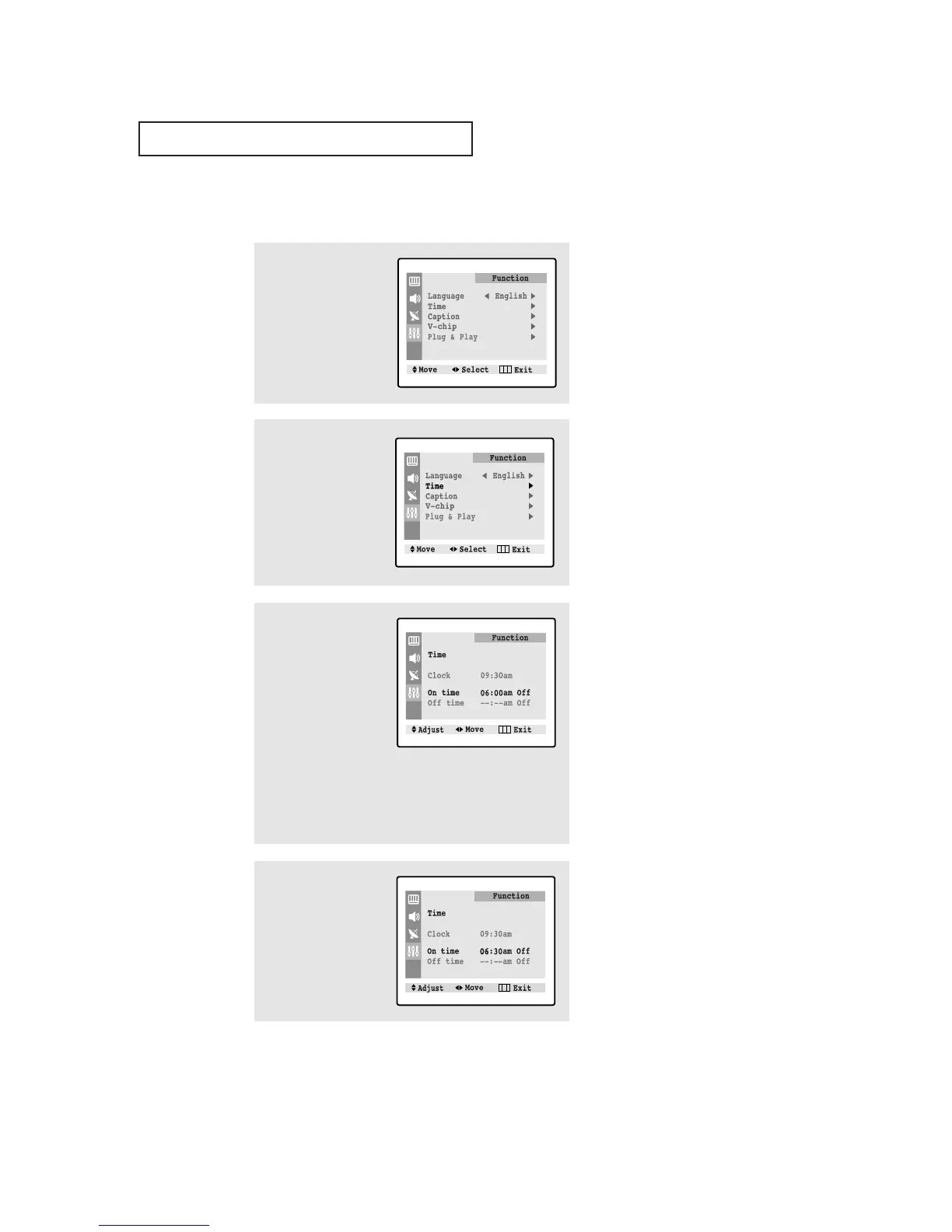
Setting the On/Off Timer
1
Press the MENU button to
display the menu.
Press the ▼ button three
times to select "Function"
menu, then press the
√√
button.
2
Press the ▼ button to
select "Time", then press
the
√√
button.
3
Press the ▼ button to
select "On time".
Press the
√√
button to
select the “On time”
hours.
(The hours digits will be
highlighted.)
Press the ▲ or ▼ button
repeatedly to select the
appropriate hours (i.e., the
hour when the TV will turn
on.)
4
Press
√√
to select the “On
time” minutes.
(The minutes digits will be
highlighted.)
Press ▲ or ▼ to select
the appropriate minutes.
▼
Before using the timer, you must
set the TV’s clock. (See “Setting the
Clock” on page 33).
▼
When you set the hours, make
sure the correct time of day (AM or
PM) appears to the right of the hour.




 To Next Page