EasyManua.ls Logo

Samsung TXN3235F - Fine Tuning Channels

Samsung TXN3235F
58 pages
Print Icon
To Next Page IconTo Next Page
To Previous Page IconTo Previous Page
Loading...
C
HAPTER FOUR:SPECIAL FEATURES
4.4
Fine Tuning Channels
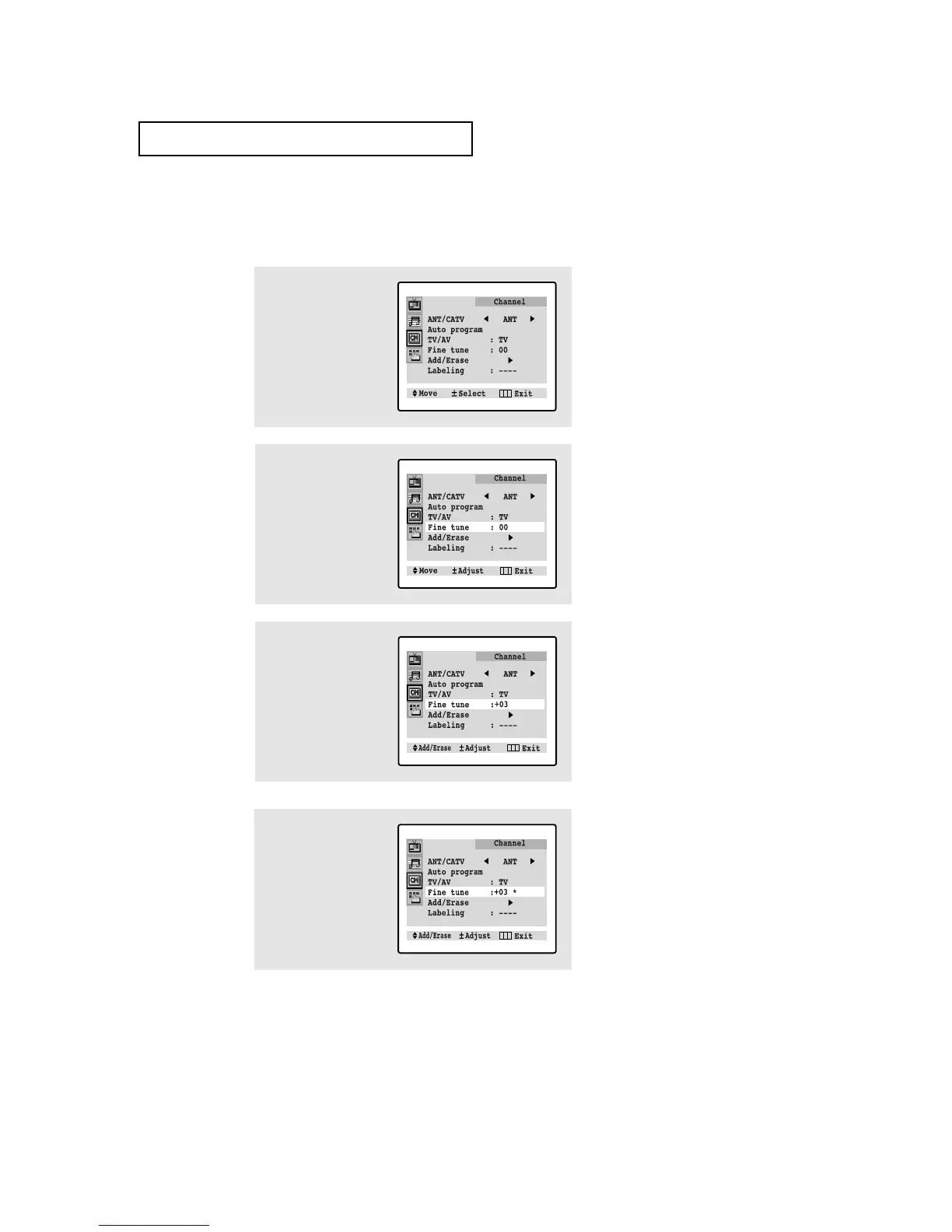
Use fine tuning to manually adjust a particular channel for optional reception.
1
Select the appropriate
channel.
Press MENU to display
the menu.
Press CH ▼ twice to
select the “Channel”
menu.
▼
After you adjust the fine tuning,
“*” will appear when you press DIS-
PLAY while watching this channel.
2
Press VOL+ to select
Channel menu.
Press CH ▼ three times
to select “Fine tune”.
3
Press VOL+ and VOL- to
adjust the fine tuning.
▼
Press the MENU button to
resume normal viewing.
4
To store the fine tuning
setting in the TV’s mem-
ory, press CH ▲. ( “*”
will appear).
To reset the fine tuning
to “oo”, press CH ▼.
SPECIAL FEATURES

Table of Contents