How to Reset the TV after the V-Chip
Blocks a Channel (“Emergency Escape”)
If the TV is tuned to a restricted channel, the V-Chip will block it. The screen will go blank and the following
message will appear: “Excessive rating.”
To resume normal viewing, tune to a different channel using the number buttons. Under certain conditions
(depending on the rating of the local TV programs) the V-Chip might lock out all the channels. In this case, use
the V-Chip function for an “emergency escape”:
Press MENU to display the menu. Press CH ▼ three times to select the “Function” menu and press VOL +.
Press CH ▼ five times to highlight the “V-chip” menu and press VOL +. Enter your PIN number, and press
VOL + to temporarily disable the V-Chip Lock.
5
Repeatedly press the CH ▼
button to select a
particular MPAA category.
(When a category is
selected, its color changes to
blue.) Pressing the CH ▼ button
will cycle through the MPAA
categories:
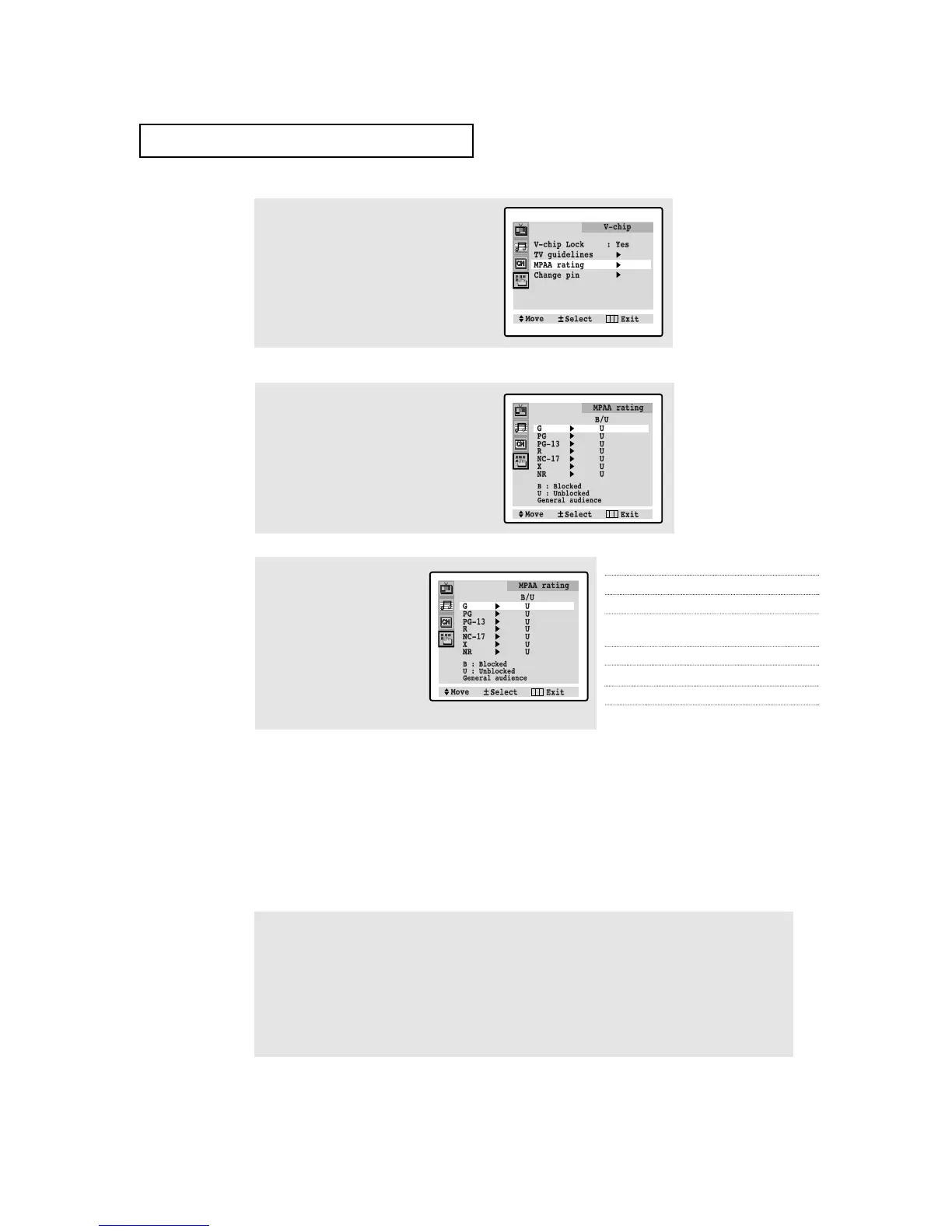
G General audience (no restrictions).
PG Parental guidance suggested.
PG-13 PG-13 (Parents strongly cautioned).
R R (Restricted. Children under 17 should
be accompanied by an adult).
NC-17 No children under age 17.
X X (Adults only).
NR Not rated.
3
The “V-chip” screen will appear. Press the
CH ▼ button twice, and select “MPAA rat-
ing.”
SPECIAL FEATURES
4
While “MPAA rating” is selected, press
the VOL + button. The “MPAA rating”
screen will appear.
While a particular category is selected, press VOL + to activate it.
A letter (“U” or “B”) will be displayed. Press CH ▲ or CH ▼ to select “U” or”B”.
Press MENU four times to save the settings and to clear all screens.
Note: The V-Chip will automatically block any category that is “more restrictive.” For example, if you
block the “PG-13” category, then “R,” “NC-17,” and “X” will automatically be blocked also.
4.17 C
HAPTER FOUR:SPECIAL FEATURES




 To Next Page