C
HAPTER FOUR:SPECIAL FEATURES
4.8
SPECIAL FEATURES
Setting the On/Off Timer
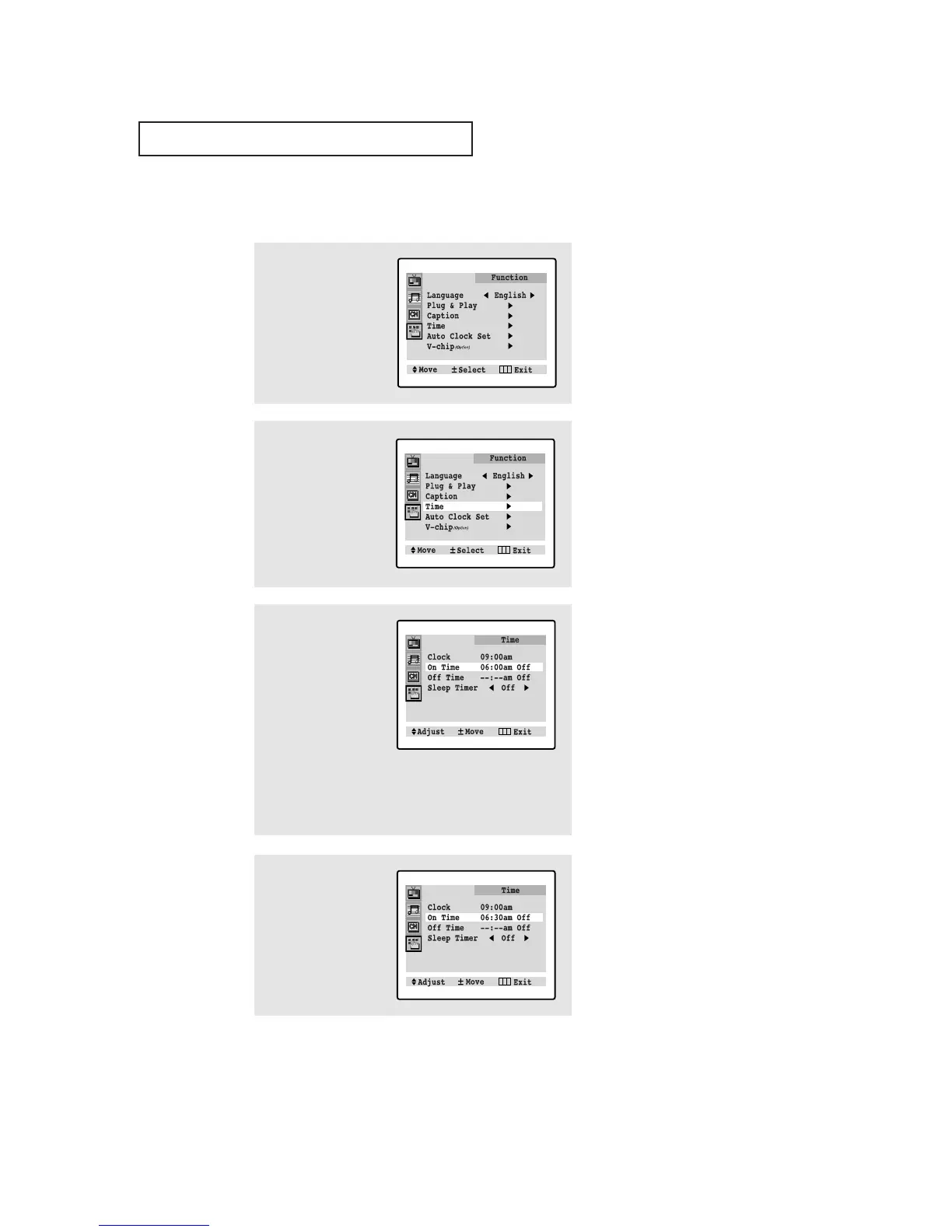
1
Press MENU to display
the menu.
Press CH ▼ three times
to select "Function"
menu.
2
Press VOL+ to select the
“Function” sub-menu.
Press CH ▼ three times
to select "Time".
Press VOL+.
3
Press CH ▼ to select
"On time".
Press VOL+ to select
the “On time” hours.
(The hours digits will be
highlighted.)
Press CH ▲ or CH ▼
repeatedly to select the
appropriate hours (i.e.,
the hour when the TV
will turn on.)
4
Press VOL+ to select
the “On time” minutes.
(The minutes digits will
be highlighted.)
Press CH ▲ or CH ▼ to
select the appropriate
minutes.
▼
Before using the timer, you must
set the TV’s clock. (See “Setting the
Clock” on page 3.10).
When any of the timers are set, the
“Timer” LED will illuminate (front
panel of TV.)
▼
When you set the hours, make
sure the correct time of day (AM or
PM) appears to the left of the hour.




 To Next Page