VESA
wa
ll
mount
kit
no
t
es
and
specifications
You
can install your wall
mount
on
a solid wall perpendicular
to
the
floor. Before attaching the wall
mount
to
surfaces other than plaster board, contact your nearest dealer
for
additional information. If you install the
TV
on
a ceiling
or
slanted wall,
it
may fall and result in
severe
personal injury.
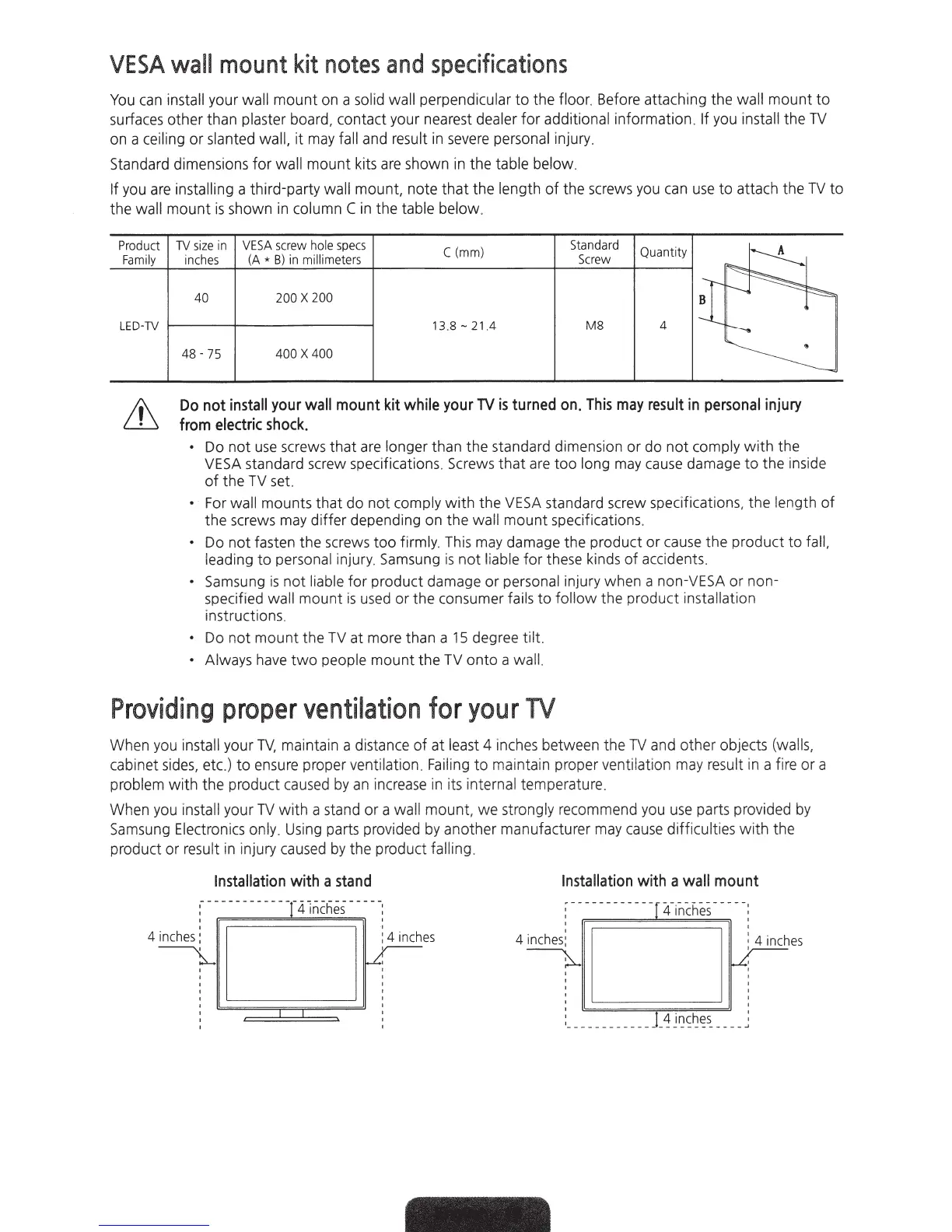
Standard dimensions
for
wall mount kits
are
shown
in
the table below.
If you are installing a third-party wall mount, note
that
the length of the screws you
ca
n
use
to
attach the
TV
to
the wall
mount
is
shown
in
column C
in
the table below.
Product
Family
LED-TV
TV
size
in
VESA
screw
hole
specs
C(mm)
Standard
Quan
tity
~
inches
(A
*
B)
in
millimeters
Screw
40 200 X 2
00
i::~
-
1
3.8-21.4
M8
4
~
48-75
400 X 4
00
~
Do
not
install
your
wall
mount
kit
while
your
TV
is
turned
on
.
This
may
result
in
personal
injury
from
electric
shock.
•
Do
not
use
screws
that
are longer than the standard dimension
or
do
not
comply
with
the
VESA
standard screw specifications. Screws
that
are too long may
cause
damage
to
the
ins
i
de
of
the TV set.
• For wall mounts that do n
ot
comply
with
the
VESA
standard screw specifications,
the
length
of
the screws may differ depending on
th
e wall mount specifications.
•
Do
not
fasten the screws too firmly. This may damage the product
or
cause the product
to
fall,
le
ad
ing
to
personal injury. Samsung is not liable
for
t
he
se kinds of accidents.
• Samsung
is
not liable
for
product da
ma
ge
or
personal injury when a non-VESA or non-
specifi
ed
wall mount is
used
or the consumer fai
ls
to
follow the product insta
ll
ation
instructions.
•
Do
n
ot
mount the TV at more than a
15
deg
re
e
tilt
• Always ha
ve
two
people mount
the
TV o
nt
o a wa
ll.
Providing
proper
ventilation
for
your
TV
When you install your
TV,
maintain a distance of at least 4 inches between the
TV
and other obj
ec
ts (wal
ls,
cabinet si
des,
et
c.
)
to
en
sure proper ventilation.
Fai
ling
to
ma
intain proper ventila
ti
on may
resu
lt in a fire or a
problem
with
the prod
uc
t c
au
s
ed
by an i
nc
r
eas
e in its internal tem
pe
rature.
When you install your
TV
w
it
h a stand or a wall mount, we strongly re
co
mmend you u
se
parts provided by
Samsung Electron
ics
only. Using parts provided by another
ma
nufacturer may
cau
se
diff
i
cu
lties
with
the
product
or
re
sult in inju
ry
ca
us
ed by the product f
all
ing.
Installation
with
a
stand
:-
--
---------T
41
n
cfi
es
----
'
4 inches
4 inches:
~
'
'
'
'
'
'
v.-
Installation
with
a
wall
mount
:------------
r
~fi
n
ch
e
s
----
'
~
es
4 inches:
~
:
__
_
____
__
___
_!_
4 J
~
s~~s_
___
_




 To Next Page