EasyManua.ls Logo

Samsung UN55JU650D - TV Anti-Fall Safety Precautions; Preventing TV Tip-Overs; Cable Management; Using the Cable Guide

Samsung UN55JU650D
27 pages
Print Icon
To Next Page IconTo Next Page
To Previous Page IconTo Previous Page
Loading...
Safety
Precaution:
Securing
the
TV
to
the
wall
to
prevent
falling
Caution:
Pulling,
pushing, or
climbing
on
the
TV
may
cause
the
TV
to
fall.
In
particular,
ensure
your children do not
hang
on
or destabilize the
TV.
This
action
may
cause
the
TV
to tip
over
,
causing
serious
injuries or
death
.
Follow
all
safety
precautions provided
in
the
Safety
Flyer
included
with your
TV
.
For
added
stability
and
safety,
you
can
purchase
and
install
the
anti-fall
device
as
described
below.
Preventing
the
TV
from
falling
These
are
general
instructions.
The
brackets,
screws,
and
string
are
not supplied
by
Samsung.
They
must
be
purchased
separately.
We
suggest consulting
an
installation
serv
i
ce
or
professional
TV
ins
t
al
l
er
for specific
hardware
and
anti
-fa
ll
hardware
installati
on
.
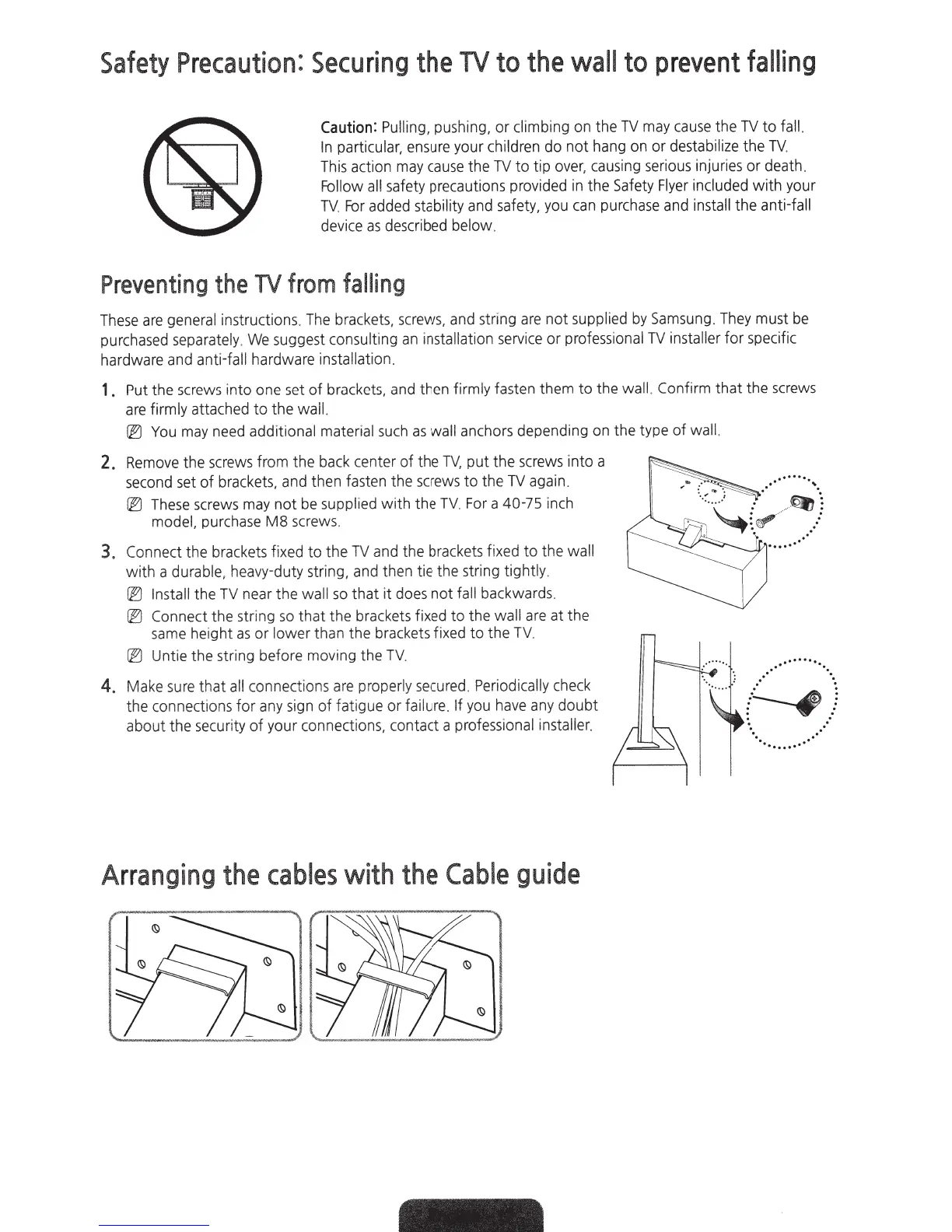
1 .
Put
the
screws
into one
set
of
brackets
,
and
then
firmly
fasten them to the wall.
Confirm that the
screws
are
firmly
attached to the
wall.
[EJ
You
may
need
additi
onal
material
such
as
wall
anchors
depending
on
the type of
wa
l
l.
2.
Remove
the
screws
from the
back
center of the
TV,
put the
screws
into a
second
set
of
brackets
,
and
then
fasten
the
screws
to the
TV
again.
[EJ
These
screws
may
not
be
suppl
ie
d
with the
TV.
For
a 40-75
inch
model,
purc
hase
M8
screws.
3.
C
onn
ec
t the
brackets
fixed to the
TV
and
the
brackets
f
ixed
to the
wall
with a
durable, heavy-duty string,
and
t
hen
tie the string
tightl
y.
[EJ
Install
the
TV
near the
wall
so
that it
does
not
fa
ll
backwards.
[EJ
Connect the string
so
that the
brackets
fixed to the wall
are
at the
same
he
i
gh
t
as
or
lower
th
an
t
he
brackets fixed to the
TV
.
[EJ
Untie the s
tr
ing before
mov
i
ng
the TV.
4.
Make
s
ure
that
all
con
nec
ti
ons
a
re
proper
ly
secured
.
Periodic
ally
c
hec
k
the
connec
ti
ons
for
any
sign
of
fatigue or
failure. If
you
have
any
doubt
about the
secur
ity of your connecti
ons,
contact a
professional
i
nsta
l
ler.
Arranging
the
cables
with
the
Cable
guide
..···········
..
{~)
··
........
··

Related product manuals