EasyManua.ls Logo

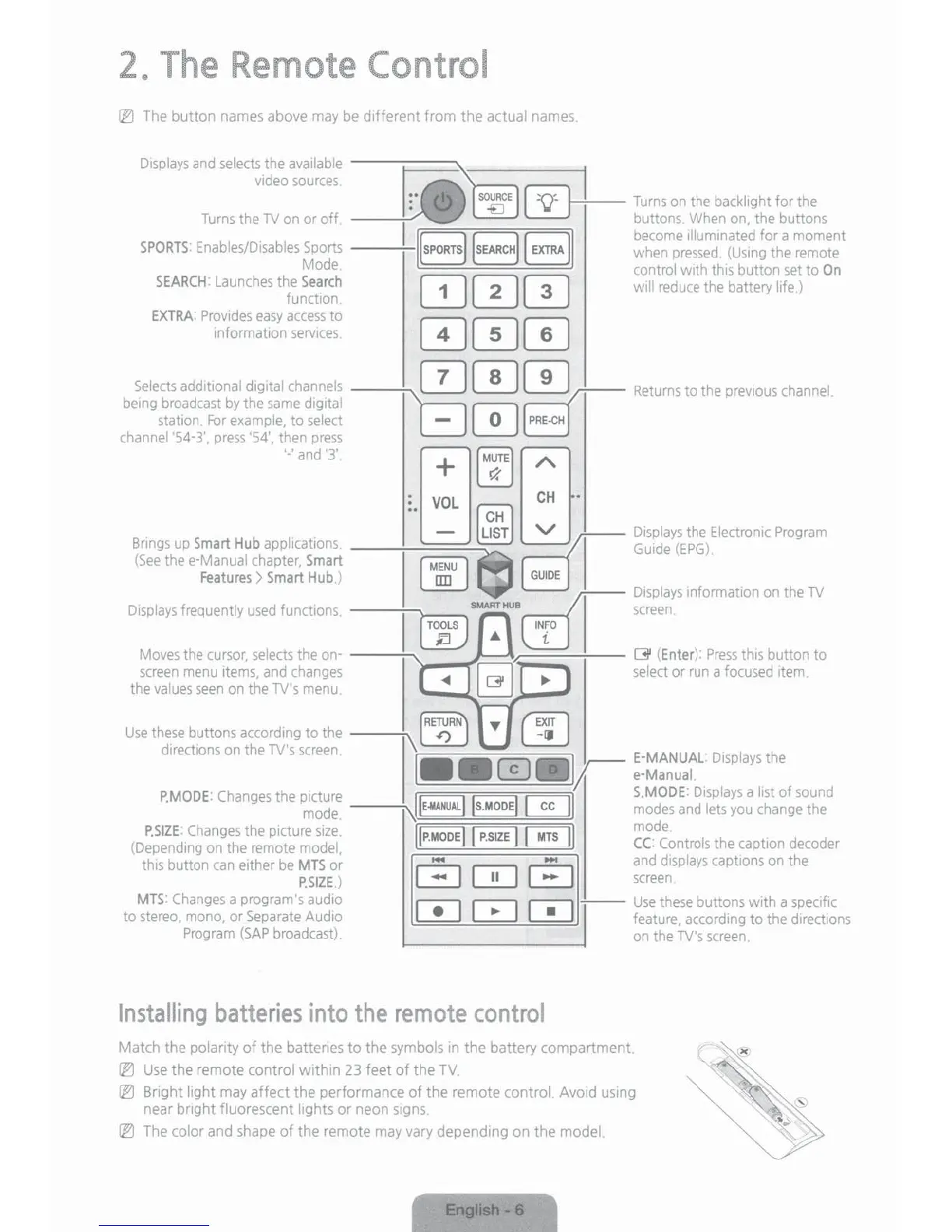
Samsung UN55JU650D - 2. The Remote Control; Remote Control Button Functions; Installing Batteries in the Remote

Samsung UN55JU650D
27 pages
Print Icon
To Next Page IconTo Next Page
To Previous Page IconTo Previous Page
Loading...
2.
The
Remote
Control
~
The
button
names
above
may
be
different
fron
the actual
names
.
A
Use
these
buttons
according
to
the
----;.\rn
T
rn
directions
on
the
TV's
screen
. h
I
••
("';:"')
Ill
E-MANUAL
:
Displays
t e
.
L£.J
r
e-Manual.
P.MO
O
E:
Changes
the
picture
~==~:;;;;:;;::,;;;;;;;;;;~,
S.Mooe·
Displays
a
list
of
sound
mode
.
-----.:..~~
~ ~
modes
and
lets
you
change
the
P.SIZE
Changes
the
picture
size
.
~~
~PSIZE
r.;.;:;;-JMTS
1
mode
.
(Dependmg
on
the
remote
model
·
1P
.
MODE1
I
r
.
~u.r=
I I
m•~
I
CC
Controls
the
caption
decoder
this
button
can
either
be
MTS or - -
and
displays
captions
on
the
P.SIZE) G 0
c=::::J
screen
.
MTS:
Changes
a
program
's
audio
r=-1
r-=-1 r-=-1
--
Use
these
buttons
w1th
a
specific
to
stereo.
mono.
or
Separate
Audio
L!...J
~ ~
feature,
according
to the
d1rections
Program
(SAP
broadcast)
.
on
the
TV's
screen
.
Installing
batte
r
ies
into
the
remote
cont
r
ol
Match the polarity
of
the battenes
to
the
symbols
in
the battery compartment
[lJ
Use
the remote control withm
23
feet
of
the
TV.
IE)
Bright light
may
affect the performance
of
the remote control. Avoid
using
near
bnght fluorescent lights or neon
s1gns
.
~
The
color
and
shape
of the remote
may
vary
dependtng on the model.
--T
..-
~
-
....
""!"'"'
~-
--
--
. I

Related product manuals