EasyManua.ls Logo

Samsung VS28C97 Series - User Manual

Samsung VS28C97 Series
48 pages
Print Icon
To Next Page IconTo Next Page
Loading...
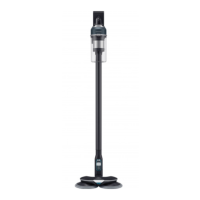
Vacuum cleaner
User manual
VS28C97****/VS25C97****
Before operating this unit, please read the instructions carefully.
For indoor use only
Untitled-5 1 2023-05-02  3:20:49

Questions and Answers

  • C
    Cindy ReedAug 7, 2025
    Why my Samsung Vacuum Cleaner doesn't work?
    • C
      Craig ReynoldsAug 7, 2025
      There are several reasons why your Samsung Vacuum Cleaner might not be working. First, check the battery level and charge it if needed. Ensure the vacuum cleaner is turned on by pressing the Power button. Also, verify the battery is correctly inserted. Check for any blockages in the Telescopic Pipe, dustbin, or brush. Make sure the Washable Micro Filter is properly inserted. If the vacuum hasn't been used for a while, charge the battery. If the battery is dead, it may need replacing.
  • A
    Amanda JohnsonAug 12, 2025
    What to do if the spin brush of my Samsung VS28C97 is not moving?
    • C
      clarkaustinAug 13, 2025
      If the spin brush or disk of your Samsung Vacuum Cleaner accessory isn't moving, and a 'Check Brush' message appears, turn off the vacuum. Check the brush for any obstructions and remove them. Then, restart the vacuum cleaner. If that doesn't work, try turning the vacuum cleaner off and then on again. For the Slim LED Brush+ and Spray Spinning Sweeper, the motor's overheating prevention device may be enabled; allow about 30 minutes for it to cool down.
  • M
    Miranda PearsonAug 19, 2025
    How to stop odor emitting from my Samsung Vacuum Cleaner?
    • R
      Robert SimsSep 12, 2025
      To address an odor coming from your Samsung Vacuum Cleaner, regularly empty the dustbin and clean the filters. Note that new vacuum cleaners may have a slight odor for the first 3 months. Accumulated dirt in the dustbin or dust on the filter can also generate an odor.
  • H
    huanglaurenAug 25, 2025
    Why is my Samsung VS28C97 Spray Spinning Sweeper not spraying water?
    • J
      jasongutierrezAug 26, 2025
      If your Spray Spinning Sweeper isn't spraying water, especially when using it for the first time, the air in the internal pump and tube might be causing a delay. Detach the water tank, press the + button, and check if the pump is operating with a sound. Also, ensure the water tank is filled, attached properly, and then press the + button repeatedly.
  • F
    Frank Cortez DDSAug 31, 2025
    How to prevent static electricity when cleaning a mat with my Samsung VS28C97?
    • J
      Jennifer AndrewsSep 1, 2025
      Static electricity may occur when cleaning certain mats due to their materials. To reduce static electricity, move the brush on a normal floor for a while before cleaning the mat again.

Summary

Safety Information

Important Safety Symbols

Explains safety symbols like WARNING, CAUTION, and NOTE used in the manual.

General Safety Guidelines

Covers general safety instructions and precautions for using the vacuum cleaner.

Vacuum Cleaner Operation Safety

Specific safety warnings and precautions related to the vacuum cleaner's operation.

Operational Safety Precautions

Additional safety advice for operating the vacuum cleaner, including moving parts.

Maintenance Safety Instructions

Safety instructions and warnings to follow during maintenance and cleaning.

Clean Station Safety Guidelines

Safety guidelines and warnings for the proper use of the Clean Station.

Clean Station Operational Safety

Further safety precautions for the Clean Station's electrical and operational aspects.

Battery Safety Precautions

Safety guidelines for handling, charging, and using the product's battery.

Battery Handling and Disposal

Additional battery safety, temperature limits, and disposal instructions.

Preparation

Accessory Overview

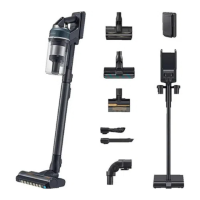
Lists and illustrates the various accessories provided with the vacuum cleaner.

Parts Identification

Diagram and labels identifying all parts of the vacuum cleaner and Clean Station.

Operation

Installing the Clean Station

Step-by-step guide for the correct installation of the Clean Station.

Using the Clean Station

Instructions on how to operate the Clean Station for automatic dustbin emptying.

Clean Station Functionality Details

Further details on the Auto Empty function, LED indicators, and self-diagnosis.

Network Connection Management

How to set up, cancel, reset, and manage network connections.

Factory Reset Procedure

Steps to perform a factory reset on the device for privacy protection.

Battery Charging and Installation

Guide for charging the battery and inserting/ejecting it from the vacuum cleaner.

Additional Battery Charging

Instructions for charging an extra battery using the battery cradle.

Optimizing Battery Usage

Tips and recommendations for maximizing battery lifespan and performance.

Control Panel Overview

Explanation of the vacuum cleaner's buttons, display, and operating modes.

Language Settings

Procedure to select and change the device's language.

Alert and Self-Diagnosis Messages

Guide to understanding and resolving alert and self-diagnosis messages.

Using the Accessory Cradle

Instructions on how to use the accessory cradle for storing attachments.

Attaching and Detaching Accessories

Guide on detaching, attaching, and using various vacuum cleaner accessories.

Spray Spinning Sweeper Operation

Detailed operation and usage instructions for the Spray Spinning Sweeper.

Telescopic Pipe Adjustment

How to adjust the length of the telescopic pipe for optimal use.

Maintenance

Cleaning the Clean Station

Procedures for replacing the dust bag and cleaning filters in the Clean Station.

Clean Station Filter Maintenance

Instructions for cleaning the Premotor and Fine Dust Filters of the Clean Station.

Dustbin and Micro Filter Cleaning

Steps for cleaning the dustbin and the washable micro filter with water.

Fine Dust Filter Maintenance

Detailed guide on disassembling, cleaning, and reassembling the Fine Dust Filter.

Active Dual Brush Cleaning

Instructions for cleaning and maintaining the Active Dual Brush attachment.

Slim LED Brush+ Cleaning

Guide for cleaning and maintaining the Slim LED Brush+ attachment.

Slim LED Brush+ Roller Wheel Maintenance

Instructions for disassembling and cleaning the roller wheels of the Slim LED Brush+.

Rear Roller Wheel Maintenance

Steps for detaching, cleaning, and reassembling the rear roller wheel.

Accessory Maintenance

Maintenance tips for Spray Spinning Sweeper, Pet Tool +, and Extension Crevice Tool.

Appendix

SmartThings App Setup

Guide for setting up the wireless router and downloading the SmartThings app.

Registering Device with SmartThings

Steps for creating a Samsung account and registering the vacuum cleaner.

Software Updates and App Functions

Information on software updates and features controllable via the SmartThings app.

Installation Notes and Cautions

Important safety notes and cautions for installing the Clean Station.

Battery Usage and Care

Guidelines and precautions for battery usage, replacement, and care.

Spray Spinning Sweeper Usage Notes

Additional usage tips and notes for the Spray Spinning Sweeper.

Clean Station Cautions and Maintenance

Safety cautions and maintenance advice specific to the Clean Station.

Spray Spinning Sweeper Cautions

Cautions and usage advice for the Spray Spinning Sweeper, including water use.

General Maintenance Cautions

General maintenance notes and cautions for the vacuum cleaner and Clean Station.

Troubleshooting

Vacuum Cleaner Not Working

Solutions for common issues when the vacuum cleaner fails to operate.

Spin Brush Not Moving

Troubleshooting steps when the spin brush or accessory is not moving.

Odor Issues

Solutions for odors emitted from the vacuum cleaner's air outlet or filter.

Static Electricity Issues

How to resolve static electricity occurrences during cleaning.

Spray Spinning Sweeper Water Spray Issues

Troubleshooting steps for the Spray Spinning Sweeper's water spray function.

Vacuum Cleaner Charging Problems

Solutions for issues related to charging the vacuum cleaner.

AI Mode Malfunction

Troubleshooting steps when the AI mode is not functioning correctly.

Clean Station Emptying;Self-Diagnosis Issues

Solutions for problems with the Clean Station's auto-emptying and self-diagnosis.

Vacuum Cleaner Stops During Cleaning

Reasons and solutions for the vacuum cleaner stopping operation during use.

Reduced Suction Power and Vibrating Sound

Solutions for decreased suction power and vibrating sounds.

Residual Dust from Accessories

How to resolve small dust particles coming out of accessories after cleaning.

SmartThings App Installation Failure

Steps to fix issues when the SmartThings app cannot be installed.

SmartThings App Connection Failure

Troubleshooting for failed connections between the SmartThings app and the Clean Station.

Samsung Account Login Issues

Solutions for problems encountered when logging into the Samsung account.

Wireless Router Detection Failure

How to resolve issues where the wireless router is not detected during registration.

Incorrect Router Password Entry

Steps to correct wrong password entry for wireless router during registration.

Product Registration Failure

Solutions for when product registration repeatedly fails.

Clean Station Wi-Fi Connection Issues

How to resolve problems with the Clean Station not connecting to Wi-Fi.

Smartphone Control Issues

Troubleshooting for inability to operate the product from the smartphone after connection.

SmartThings App Control Issues

Solutions for not being able to turn on the vacuum via the SmartThings app.

Clean Station Offline in App

Troubleshooting for the Clean Station appearing offline in the SmartThings app.

Delayed Smartphone Control Response

Solutions for delayed responses when controlling the product via smartphone.

Product Specification

Charging and Cleaning Time Specifications

Details charging and cleaning times for various models, modes, and accessories.

Samsung VS28C97 Series Specifications

General IconGeneral
BrandSamsung
ModelVS28C97 Series
CategoryVacuum Cleaner
LanguageEnglish

Related product manuals