Removal and Reassembly _ 11
3-2. STANDARD DISASSEMBLY DRAWINGS
► Thisisastandarddisassemblydiagramandmaydifferfromtheactualproduct.
Usethismaterialasareferencewhendisassemblingandreassemblingtheproduct.
Part Figure Description
Disassembling and
Repairing the Rear
Motor
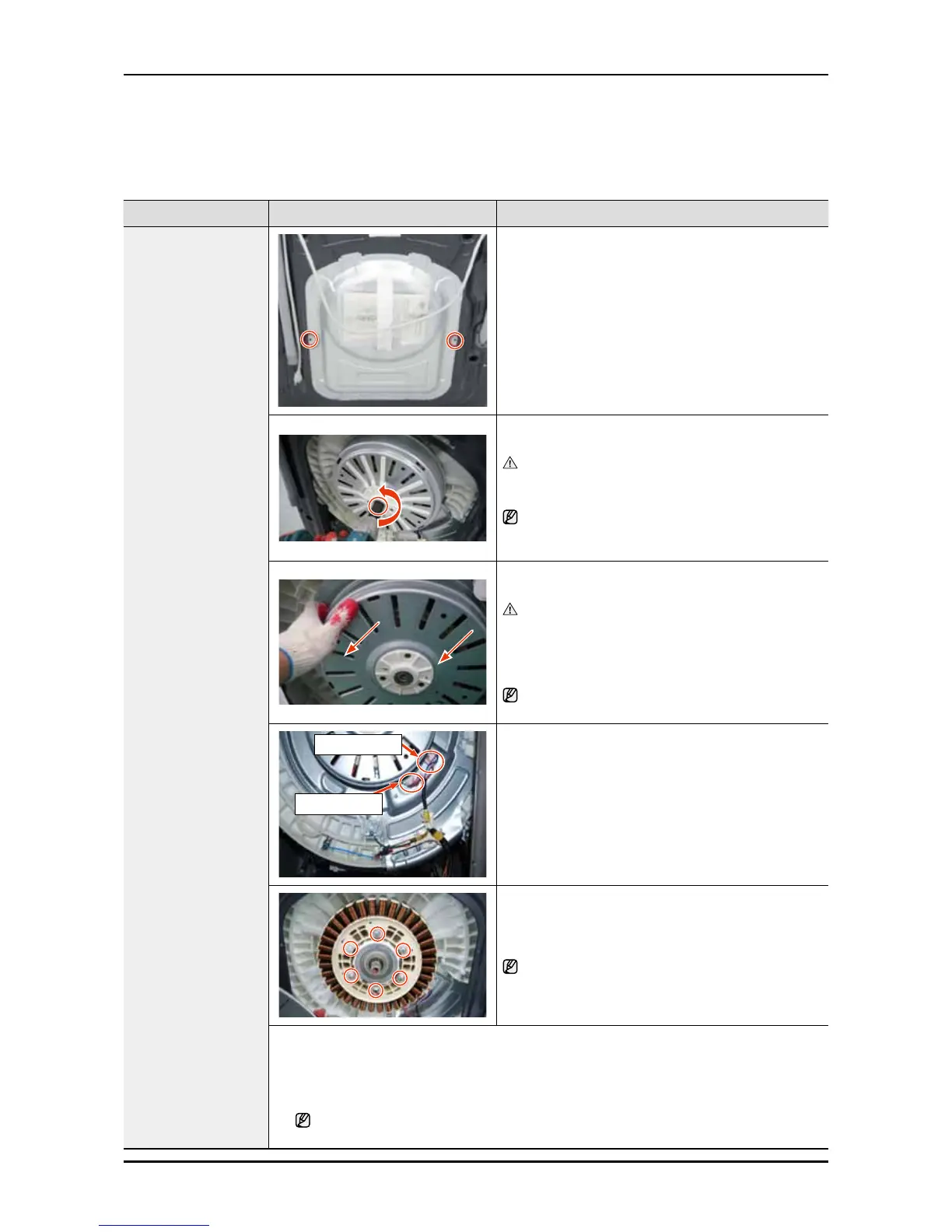
1. Removethe2screwsholdingtheBack-Coverat
thebackofthewashingmachineandseparatethe
Back-Coverpushingitdownwards.
(Assembleitbyliftingitupwards)
2. AfterseparatingtheBack-Cover,removetheM19
nutholdingtheMotor.
Toremoveit,turnitcounter-clockwise.Asthe
Motoralsorotatesifthenutisturnedslowly,torque
itquicklyandrmlyinasingleaction.
Donotremovethenutbyinsertingascrewdriver
intotheMotor,asthismayresultinaproblemwith
themotor.
3. RemovetheM19nutandwasherandthen
separatetheRotor.
Sinceremovingtherotorrequiresalotofstrength
duetothemagneticforceoftheRotorandit
maycomeoffsuddenly,yourhandorarmmay
beinjuredbytheedgeoftheStatororFrame.
Thereforetakeprecautionwhenseparatingit.
Youcanseparatetheconnectorbypressingthe
naveloftheHousingandpullingitoutside.
Motorwire
Hallsensor
4. SeparatetheMotorWireandHallSensorwhile
pressingthenaveloftheHousing.
TakeprecautionwhenyoudothisbecausetheHall
Sensorpartiseasilyshocked.
sensorpartiseasilysho
5. Separatethe6M10screws.→SeparatetheAssy
BracketMotor→SeparatetheStator.
Whenremovingthelastofthe6screws,holdthe
Statorasitmayfallwhenthescrewsareremoved.
* Check Points for Troubleshooting
1. CheckifthereisanyaliensubstancebetweentheRotorandtheStator.
2. Checkifthemotorpower(Blue,White,Red)wireisconnected.
3. CheckiftheHallSensorwireisconnected.
TheorderofthemotorwiresisBlue,White,andRedfromtheright.Checkifthe
resistancebetweenBlue-White,White-Red,andRed-Blueisequalto15Ω.




 To Next Page