Overview
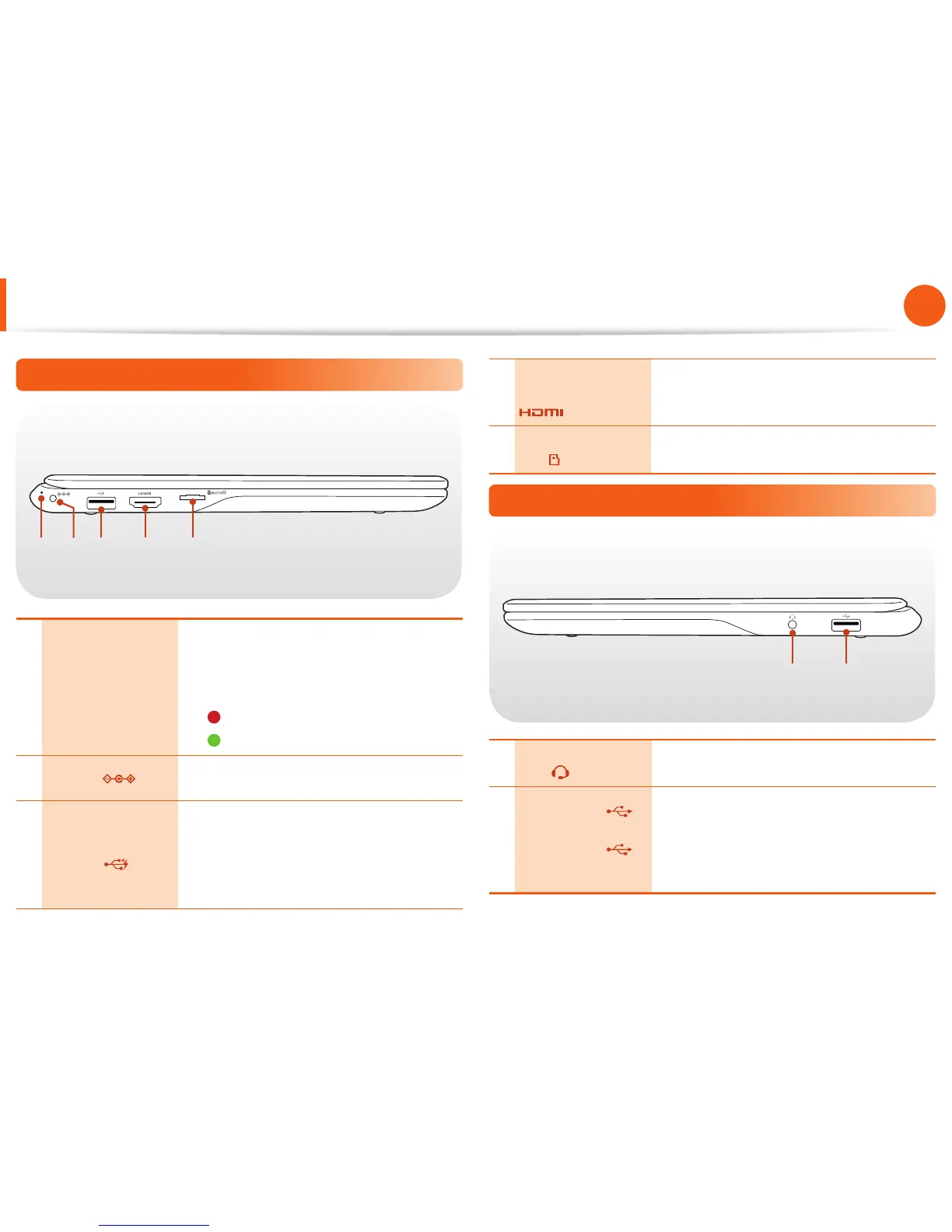
Left View
1 2 3 4 5
1 Power LED
Turns blue while the computer is turned •
on.
Shows the battery’s charging status •
while the computer is turned o.
-
Red: Battery charging is in progress.
-
Green: Battery is fully charged.
2 DC Jack
Connect the AC adapter that supplies
power to the Chromebook.
3
Chargeable USB
3.0 Port
You can connect USB devices to the USB
port such as a keyboard/mouse, digital
camera, etc.
Using a chargeable USB port, you can
access or charge a USB device.
4
Digital Video/
Audio Port (HDMI)
(Optional)
You can connect an HDMI cable to this
port. Using this port, you can enjoy digital
video and audio on the TV.
5
Micro SD Card
Slot
This slot is for micro SD cards.
Right View
1 2
1
Earset / headset
Jack
Use this jack to connect your earset or
headset.
2
USB 2.0 Port
or Chargeable
USB 2.0 Port
(Optional)
You can connect USB devices to the USB
port such as a keyboard/mouse, digital
camera, etc.
Using a chargeable USB port, you can
access or charge a USB device.


 To Next Page