P20D USER MANUAL EDITION 2019 www.samway.com
samwaysales@gmail.com sales@samway.comPage 7
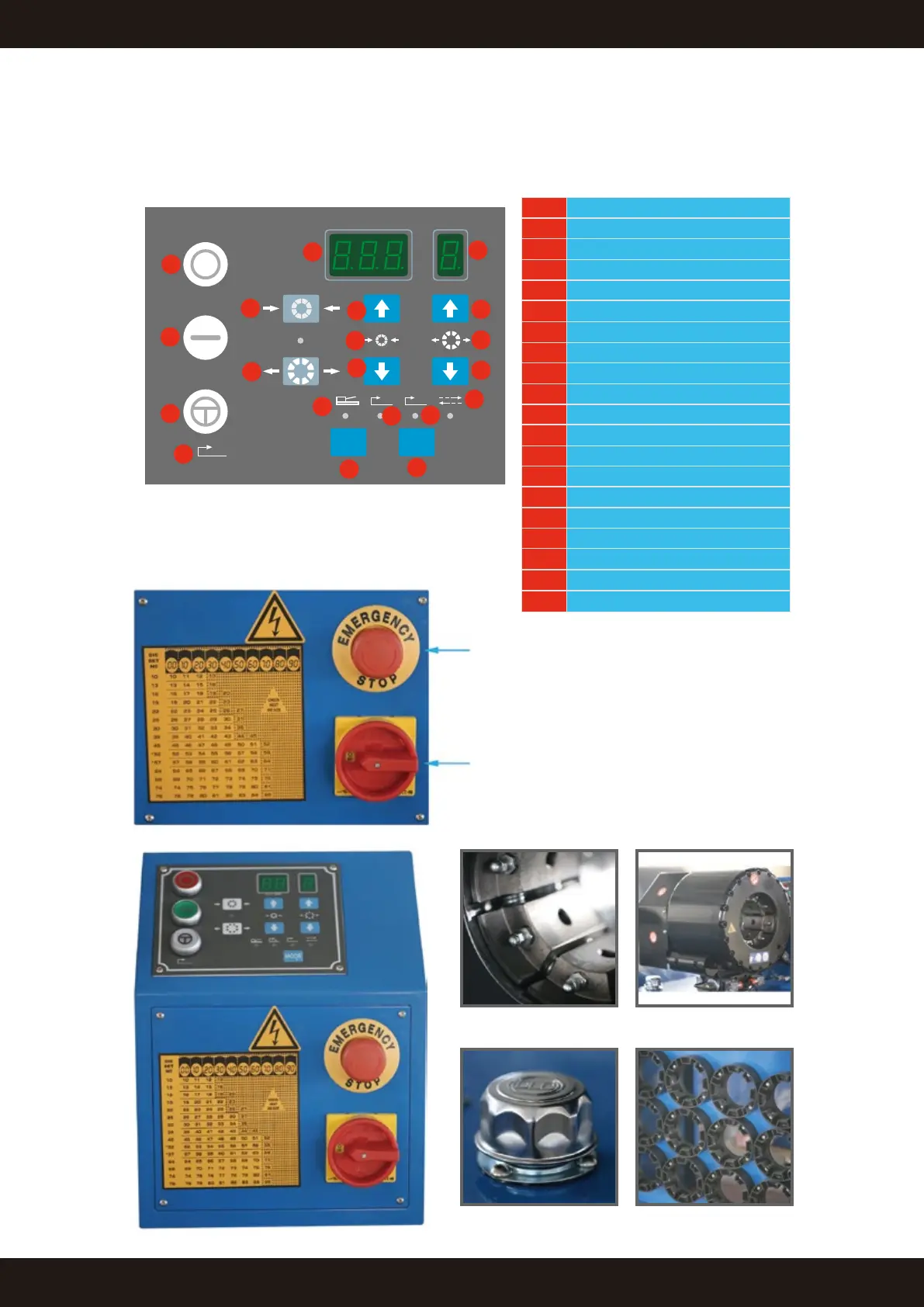
4.3 P20D control panel illustration
Emergency Stop
Main Power Switch
Die base Crimping Head
Die RackOil Cap
1 Motor Stop
2 Motor Start
3 Semi-Automatic Control
4 Semi-Automatic Control Symbol
5 Manual Opening Button
6 Crimping data adjustment
7 Foot Pedal Control Mode
8 Back Stop Control Mode
9 Mode Selection
10 Semi-Automatic Mode
11 Manual Control Mode
12 Opening data adjustment
13 Opening Symbol
14 Opening Data Adjustment
15 Opening Data Digit Display
16 Crimping Data Display
17 Crimping Data Display
18 Manual Crimping Button
19 Crimping Symbol
20 digit position input
SHIFT
L. S
MODE
1
2
3
4
18
5
16
15
14
13
12
11
9
20
8
10
7
17
19
6


 To Next Page