42
ALARM CLOCK
Your HR monitor has an alarm clock, which emits an acoustic signal
when it reaches the wake-up time. Press any button to stop the
alarm.
Alarm clock display
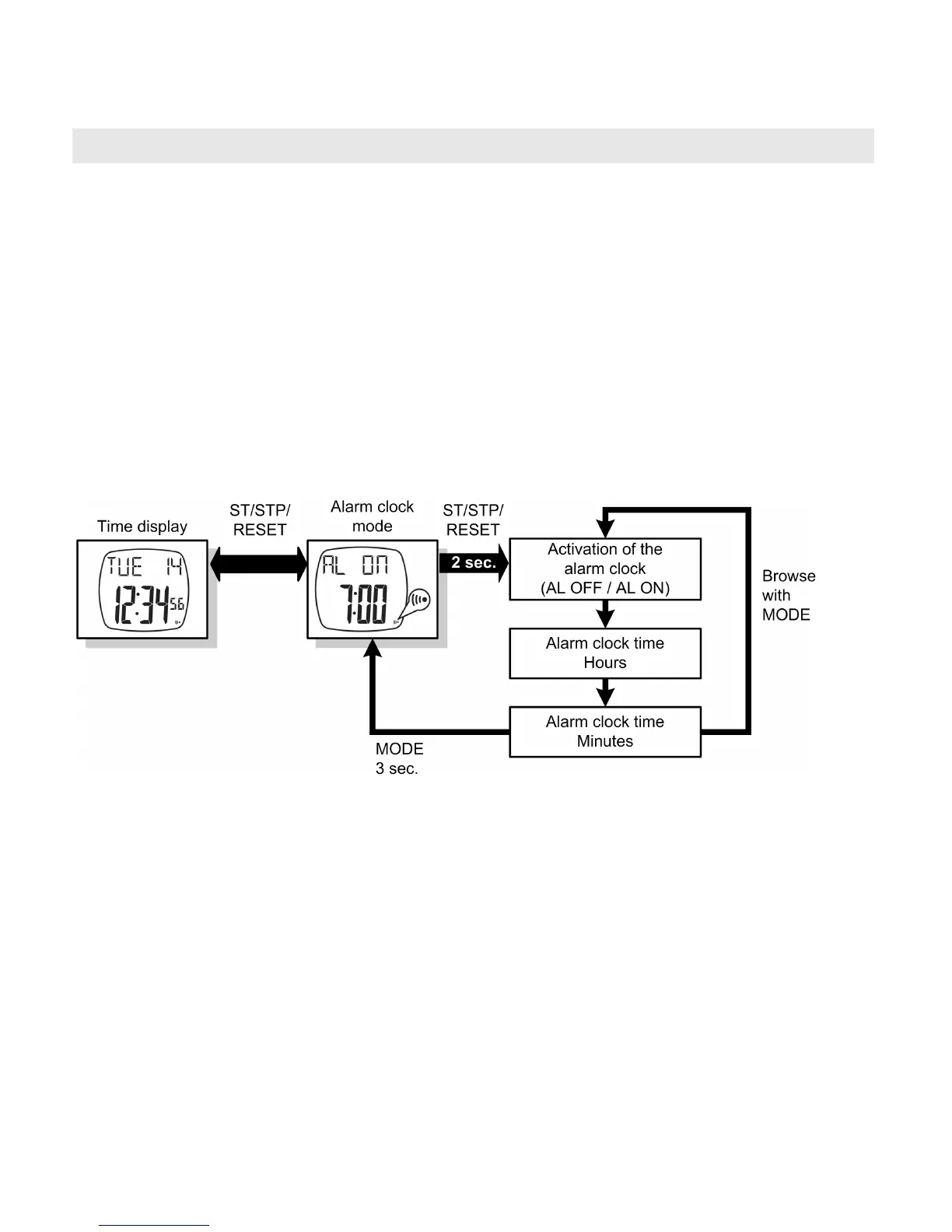
In the time display main menu, press the ST/STP/RESET button.
The set alarm clock time will be displayed along with whether the
alarm clock is activated or deactivated.
As soon as you release the ST/STP/RESET button, you return to the
time display.
Alarm clock settings
Press the ST/STP/RESET button in the time display main menu
for at least 2 sec to reach the settings menu. Browse through the
respective settings with the MODE button. Settings that you can
change will flash. Change the settings with the ST/STP/RESET
and LIGHT buttons.
Leave the settings menu once again by pressing the MODE but-
ton for approx. 3 sec.
TIP: If you hold down the buttons ST/STP/RESET or LIGHT for
more than 2 sec, the relevant setting automatically counts up or
down.


 To Next Page