EasyManua.ls Logo

Sansui A-909 - Operating Procedures; Pre-Operation Control Checks; Record Playback Procedure; P-D30 Turntable Operation

Sansui A-909
12 pages
Print Icon
To Next Page IconTo Next Page
To Previous Page IconTo Previous Page
Loading...
8
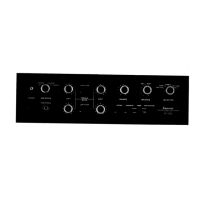
Operating
procedures
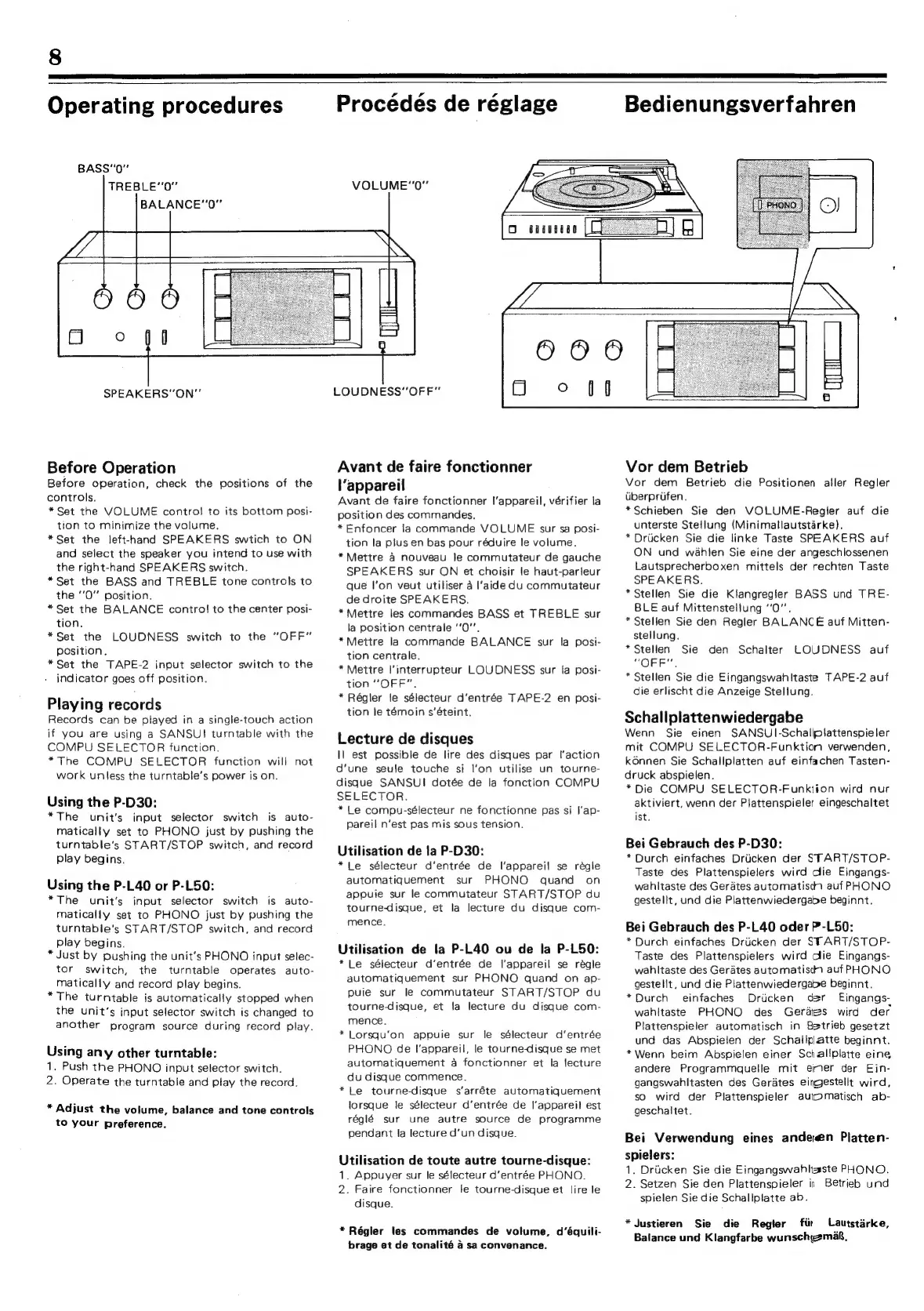
BASS"'0”
TREBLE‘‘0”
BALANCE“‘0”
Procédés
de
réglage
Bedienungsverfahren
VOLUME“'0"
SPEAKERS"ON”
Before
Operation
Before
operation,
check
the
positions
of
the
controls.
*Set
the
VOLUME
control
to
its
bottom
posi-
tion
to
minimize
the
volume.
*Set
the
left-hand
SPEAKERS
swtich
to
ON
and
select
the
speaker
you
intend
to
use
with
the
right-hand
SPEAKERS
switch.
*Set
the
BASS
and
TREBLE
tone
controls
to
the
“0”
position.
*Set
the
BALANCE
contro!
to
the
center
posi-
tion.
*Set
the
LOUDNESS
switch
to
the
“OFF”
Position.
*Set
the
TAPE-2
input
selector
switch
to
the
indicator
goes
off
position.
Playing
records
Records
can
be
played
in
a
single-touch
action
if
you
are
using
a
SANSUI
turntable
with
the
COMPU
SELECTOR
function.
*The
COMPU
SELECTOR
function
will
not
work
unless
the
turntable’s
power
is
on.
Using
the
P-D30:
*The
unit's
input
selector
switch
is
auto-
matically
set
to
PHONO
just
by
pushing
the
turntable’s
START/STOP
switch,
and
record
play
begins.
Using
the
P-L40
or
P-L50:
*The
unit's
input
selector
switch
is
auto-
matically
set
to
PHONO
just
by
pushing
the
turntable's
START/STOP
switch,
and
record
play
begins.
*
Just
by
pushing
the
unit’s
PHONO
input
selec-
tor
switch,
the
turntable
operates
auto-
matically
and
record
play
begins.
*The
turntable
is
automatically
stopped
when
the
unit’s
input
selector
switch
is
changed
to
another program
source
during
record
play.
Using
any
other
turntable:
1,
Push
the
PHONO
input
selector
switch.
2.
Operate
the
turntable
and
play
the
record.
*
Adjust
the
volume,
balance
and
tone
controls
to
your
preference.
LOUDNESS"
OFF”
Avant
de
faire
fonctionner
l'appareil
Avant
de
faire
fonctionner
|'appareil,
vérifier
la
position
des
commandes.
*
Enfoncer
la
commande
VOLUME
sur
sa
posi-
tion
la
plus
en
bas
pour
réduire
le
volume.
*Mettre
a
nouveau
le
commutateur
de
gauche
SPEAKERS
sur
ON
et
choisir
le
haut-parleur
que
l'on
veut
utiliser
4
l'aide
du
commutateur
de
droite
SPEAKERS.
*Mettre
les
commandes
BASS
et
TREBLE
sur
la
position
centrale
‘‘0’’.
*Mettre
la
commande
BALANCE
sur
la
posi-
tion
centrale.
*
Mettre
l’interrupteur
LOUDNESS
sur
la
posi-
tion
“OFF”.
*
Régler
le
sélecteur
d’entrée
TAPE-2
en
posi-
tion
le
témoin
s’éteint.
Lecture
de
disques
Il
est
possible
de
lire
des
disques
par
l’action
d'une
seule
touche
si
l’on
utilise
un
tourne-
disque
SANSU!
dotée
de
la
fonction
COMPU
SELECTOR.
*
Le
compu-sélecteur
ne
fonctionne
pas
si
I‘ap-
pareil
n’est
pas
mis
sous
tension.
Utilisation
de
la
P-D30:
*Le
sélecteur
d’entrée
de
l'appareil
se
régle
automatiquement
sur
PHONO
quand
on
appuie
sur
le
commutateur
START/STOP
du
tourne-disque,
et
la
lecture
du
disque
com-
mence.
Utilisation
de
la
P-L40
ou
de
la
P-L50:
*Le
sélecteur
d’entrée
de
l'appareil
se
régle
automatiquement
sur
PHONO
quand
on
ap-
puie
sur
le
commutateur
START/STOP
du
tourne-disque,
et
Ja
lecture
du
disque
com-
mence.
*
Lorsqu’on
appuie
sur
le
sélecteur
d’entrée
PHONO
de
l'appareil,
le
tourne-disque
se
met
automatiquement
a
fonctionner
et
la
lfecture
du
disque
commence.
*Le
tourne-disque
s‘’arréte
automatiquement
lorsque
le
sélecteur
d’entrée
de
l'appareil
est
réglé
sur
une
autre
source
de
programme
pendant
la
lecture
d’un
disque.
Utilisation
de
toute
autre
tourne-disque:
1.
Appuyer
sur
le
sélecteur
d’entrée
PHONO.
2.
Faire
fonctionner
le
tourne-disque
et
lire
le
disque.
*Régier
les
commandes
de
volume,
d’équili-
brage
et
de
tonalité
4
sa
convenance.
Vor
dem
Betrieb
Vor
dem
Betrieb
die
Positionen
aller
Regler
Uberprifen.
*Schieben
Sie
den
VOLUME-Regler
auf
die
unterste
Stellung
(Minimaliautstarke).
*
Drucken
Sie
die
linke
Taste
SPEAKERS
auf
ON
und
wahien
Sie
eine
der
angeschlossenen
Lautsprecherboxen
mittels
der
rechten
Taste
SPEAKERS.
*
Stellen
Sie
die
Klangregler
BASS
und
TRE-
BLE
auf
Mittenstellung
‘‘O”.
*Stelien
Sie
den
Regler
BALANCE
auf
Mitten-
stellung.
*Stellen
Sie
den
Schalter
“OFF”.
*
Stellen
Sie
die
Eingangswahltaste
TAPE-2
auf
die
erlischt
die
Anzeige
Stellung.
LOUDNESS
auf
Schallplattenwiedergabe
Wenn
Sie
einen
SANSU|I-Schaliplattenspieler
mit
COMPU
SELECTOR-Funktion
verwenden,
k6nnen
Sie
Schallplatten
auf
einfachen
Tasten-
druck
abspielen.
*Die
COMPU
SELECTOR-Funktion
wird
nur
aktiviert,
wenn
der
Plattenspieler
eingeschaltet
ist.
Bei
Gebrauch
des
P-D30:
*
Durch
einfaches
Driicken
der
START/STOP-
Taste
des
Plattenspielers
wird
clie
Eingangs-
wahltaste
des
Gerdtes
automatisch
auf
PHONO
gestellt,
und
die
Plattenwiedergabe
beginnt.
Bei
Gebrauch
des
P-L40
oder
P-L50:
*
Durch
einfaches
Driicken
der
START/STOP-
Taste
des
Plattenspielers
wird
lie
Eingangs-
wahltaste
des
Gerates
automatisch
auf
PHONO
gestellt,
und
die
Plattenwiedergape
beginnt.
*Durch
einfaches
Driicken
der
Eingangs-
wahitaste
PHONO
des
Gerdes
wird
der
Plattenspieler
automatisch
in
Betrieb
gesetzt
und
das
Abspielen
der
Schallplatte
beginnt.
*Wenn
beim
Abspielen
einer
Schaliplatte
eine
andere
Programmquelle
mit
emer
der
Ein-
gangswahltasten
des
Gerates
eingestellt
wird,
so
wird
der
Plattenspieler
automatisch
ab-
geschaltet.
Bei
Verwendung
eines
andeen
Platten-
spielers:
1.
Driicken
Sie
die
Eingangswahltaste
PHONO.
2.
Setzen
Sie
den
Plattenspieler
is
Betrieb
und
spielen
Sie
die
Schallplatte
ab.
*
Justieren
Sie
die
Regier
fir
Lautstarke,
Balance
und
Klangfarbe
wunschgemag,

Related product manuals