EasyManua.ls Logo

Sansui A-909 - Tape Operations; Tape Playback Function; D-77 R;D-77 F Tape Playback; D-99 D Tape Playback

Sansui A-909
12 pages
Print Icon
To Next Page IconTo Next Page
To Previous Page IconTo Previous Page
Loading...
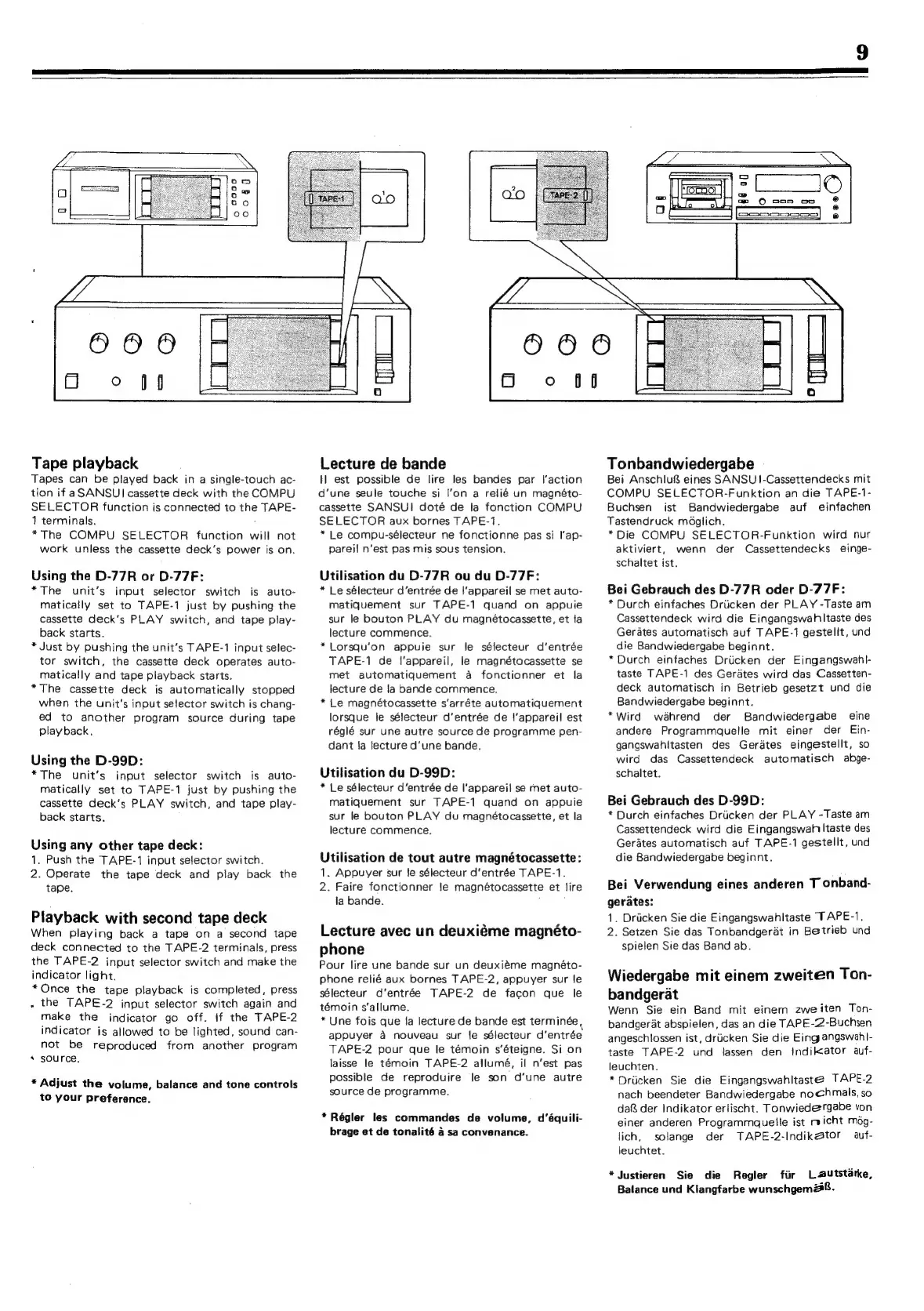
Tape
playback
Tapes
can
be
played
back
in
a
single-touch
ac-
tion
if
aSANSUI
cassette
deck
with
the
COMPU
SELECTOR
function
is
connected
to
the
TAPE-
1
terminals.
é
*The
COMPU
SELECTOR
function
will
not
work
unless
the
cassette
deck’s
power
is
on.
Using
the
D-77R
or
D-77F:
*The
unit’s
input
selector
switch
is
auto-
matically
set
to
TAPE-1
just
by
pushing
the
cassette
deck’'s
PLAY
switch,
and
tape
play-
back
starts.
*
Just
by
pushing
the
unit’s
TAPE-1
input
selec-
tor
switch,
the
cassette
deck
operates
auto-
matically
and
tape
playback
starts.
*The
cassette
deck
is
automatically
stopped
when
the
unit's
input
selector
switch
is
chang-
ed
to
another
program
source
during
tape
playback,
Using
the
D-99D:
*The
unit’s
input
selector
switch
is
auto-
matically
set
to
TAPE-1
just
by
pushing
the
cassette
deck's
PLAY
switch,
and
tape
play-
back
starts.
Using
any
other
tape
deck:
1.
Push
the
TAPE-1
input
selector
switch.
2.
Operate
the
tape
deck
and
play
back
the
tape.
Playback
with
second
tape
deck
When
playing
back
a
tape
on
a
second
tape
deck
connected
to
the
TAPE-2
terminals,
press
the
TAPE-2
input
selector
switch
and
make
the
indicator
light.
*Once
the
tape
playback
is
completed,
press
,
the
TAPE-2
input
selector
switch
again
and
make
the
indicator
go
off.
If
the
TAPE-2
indicator
is
allowed
to
be
lighted,
sound
can-
not
be
reproduced
from
another
program
s
source.
*
Adjust
the
volume,
balance
and
tone
controls
to
your
preference.
Lecture
de
bande
tl
est
possible
de
lire
les
bandes
par
l’action
d‘une
seule
touche
si
I’on
a
relié
un
magnéto-
cassette
SANSUI
doté
de
la
fonction
COMPU
SELECTOR
aux
bornes
TAPE-1.
*
Le
compu-sélecteur
ne
fonctionne
pas
si
l’ap-
pareil
n'est
pas
mis
sous
tension.
Utilisation
du
D-77R
ou
du
D-77F:
*
Le
sélecteur
d’entrée
de
|'appareil
se
met
auto-
matiquement
sur
TAPE-1
quand
on
appuie
sur
le
bouton
PLAY
du
magnétocassette,
et
fa
lecture
commence.
*Lorsqu’on
appuie
sur
le
sélecteur
d’entrée
TAPE-1
de
l'appareil,
le
magnétocassette
se
met
automatiquement
a
fonctionner
et
la
lecture
de
la
bande
commence.
*
Le
magnétocassette
s‘arréte
automatiquement
lorsque
le
sélecteur
d’entrée
de
{’appareil
est
réglé
sur
une
autre
source
de
programme
pen-
dant
fa
lecture
d’une
bande.
Utilisation
du
D-99D:
*
Le
sélecteur
d’entrée
de
l'appareil
se
met
auto-
matiquement
sur
TAPE-1
quand
on
appuie
sur
le
bouton
PLAY
du
magnétocassette,
et
la
lecture
commence.
Utilisation
de
tout
autre
magnétocassette:
1.
Appuyer
sur
Je
sélecteur
d’entrée
TAPE-1.
2.
Faire
fonctionner
le
magnétocassette
et
lire
ja
bande.
Lecture
avec
un
deuxiéme
magnéto-
phone
Pour
lire
une
bande
sur
un
deuxiéme
magnéto-
phone
relié
aux
bornes
TAPE-2,
appuyer
sur
le
sélecteur
d'entrée
TAPE-2
de
facon
que
le
témoin
s’allume.
*
Une
fois
que
la
lecture
de
bande
est
terminée
appuyer
a
nouveau
sur
le
sélecteur
d’entrée
TAPE-2
pour
que
le
témoin
s’éteigne.
Si
on
laisse
le
témoin
TAPE-2
allumé,
il
n’est
pas
possible
de
reproduire
le
son
d‘une
autre
source
de
programme.
*
Régler
les
commandes
de
volume,
d‘équili-
brage
et
de
tonalité
4
sa
convenance.
Tonbandwiedergabe
Bei
Anschlu&
eines
SANSU1I-Cassettendecks
mit
COMPU
SELECTOR-Funktion
an
die
TAPE-1-
Buchsen
ist
Bandwiedergabe
auf
einfachen
Tastendruck
mdglich.
*Die
COMPU
SELECTOR-Funktion
wird
nur
aktiviert,
wenn
der
Cassettendecks
einge-
schaltet
ist.
Bei
Gebrauch
des
D-77R
oder
D-77F:
*
Durch
einfaches
Drticken
der
PLAY
-Taste
am
Cassettendeck
wird
die
Eingangswahltaste
des
Gerates
automatisch
auf
TAPE-1
gestellt,
und
die
Bandwiedergabe
beginnt.
*Durch
einfaches
Driicken
der
Eingangswahl-
taste
TAPE-1
des
Gerates
wird
das
Cassetten-
deck
automatisch
in
Betrieb
gesetzt
und
die
Bandwiedergabe
beginnt.
*Wird
wahrend
der
Bandwiedergabe
eine
andere
Programmaquelle
mit
einer
der
Ein-
gangswahitasten
des
Gerdtes
eingestellt,
so
wird
das
Cassettendeck
automatisch
abge-
schaltet.
Bei
Gebrauch
des
D-99D:
*
Durch
einfaches
Drucken
der
PLAY
-Taste
am
Cassettendeck
wird
die
Eingangswah
Itaste
des
Gerates
automatisch
auf
TAPE-1
gestellt,
und
die
Bandwiedergabe
beginnt.
Bei
Verwendung
eines
anderen
T
onband-
gerates:
1.
Driicken
Sie
die
Eingangswahltaste
TAPE-1,
2.
Setzen
Sie
das
Tonbandgerat
in
Betrieb
und
spielen
Sie
das
Band
ab.
Wiedergabe
mit
einem
zweiten
Ton-
bandgerat
Wenn
Sie
ein
Band
mit
einem
zweiten
Ton-
bandgerat
abspielen,
das
an
die
TAPE-2-Buchsen
angeschlossen
ist,
driicken
Sie
die
Eing
angswah|-
taste
TAPE-2
und
lassen
den
Indilkator
auf-
leuchten.
*Driicken
Sie
die
Eingangswahltaste@
TAPE-2
nach
beendeter
Bandwiedergabe
nochmals,
so
da
der
Indikator
erlischt.
Tonwiedergabe
von
einer
anderen
Programmquelle
ist
micht
mog-
lich,
solange
der
TAPE-2-Indikator
auf-
leuchtet.
*Justieren
Sie
die
Regler
fiir
Lautstarke,
Balance
und
Klangfarbe
wunschgem28.

Related product manuals