EasyManua.ls Logo

Sansui AU-2200 - Troubleshooting Guide; Power Supply Troubleshooting; Audio Section Troubleshooting

Sansui AU-2200
12 pages
Print Icon
To Next Page IconTo Next Page
To Previous Page IconTo Previous Page
Loading...
Sy-ptom
Check
Point
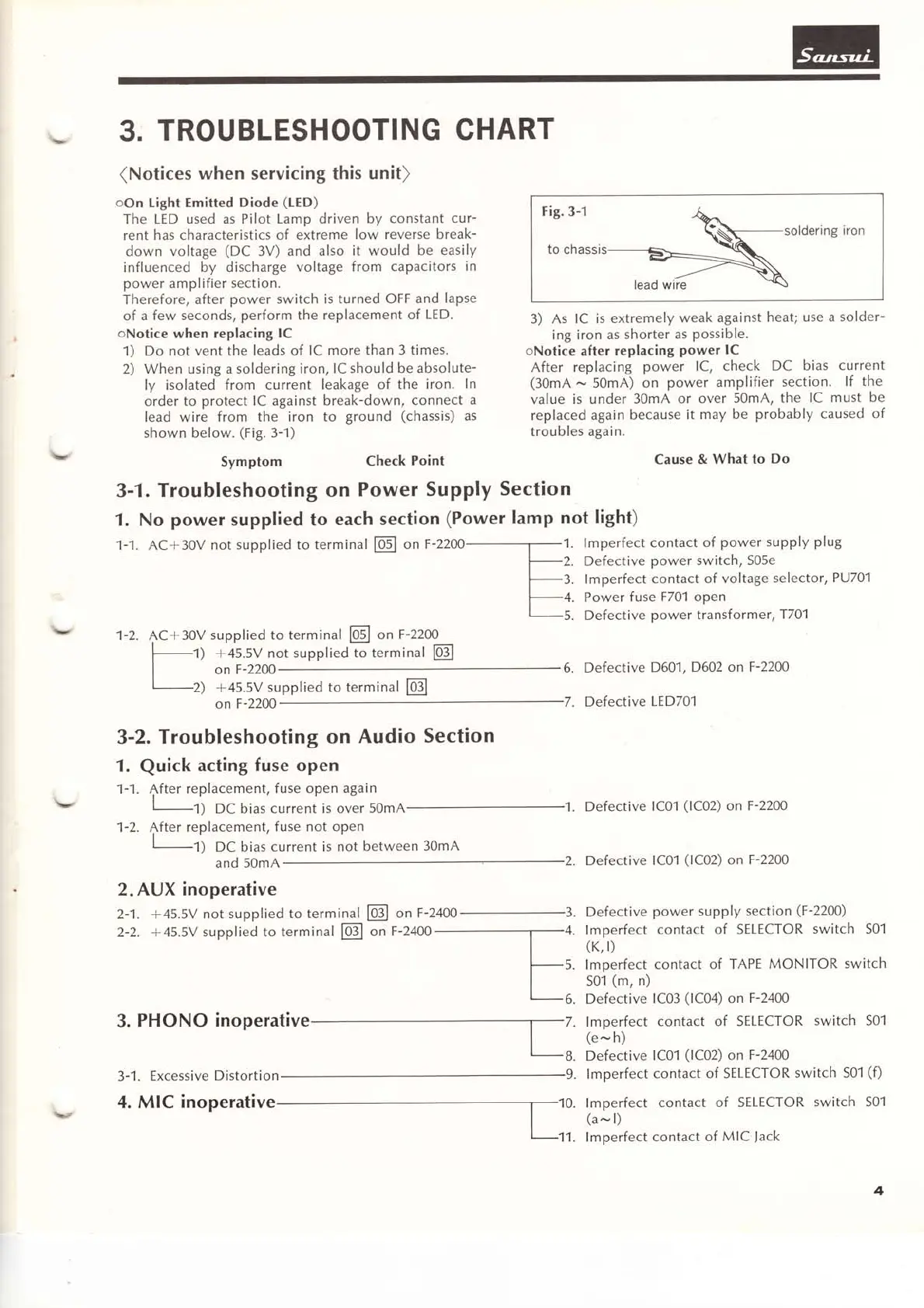
3-1. Troubleshooting
on
Power
Supply
Section
1. No
poweÍ
supplied to
each
section
(Power
lamp
not
lighQ
3.
TROUBLESHOOTING
CHART
(Notices
when
servicing
this
unit)
oon
tight Emitted
Diode
(tED)
The
LED used as Pilot
Lamp driven
by
constant
cur-
rent
has characteristics
of extreme
low
reverse break-
down
voltage
(DC
3V) and
also
it would
be
easily
influenced
by discharge
voltage
from capacitors
in
power
amplifier
section.
Therefore, after
power switch is
turned OFF
and
lapse
of
a
few
seconds,
perform
the
replacement
of
LED.
oNotice
when replacing
lC
1)
Do not vent the
leads of
lC more
than 3 times.
2)
When using a
soldering iron,
lC
should
be
absolute-
ly
isolated
from current
leakage
of
the
iron.
ln
order
to
protect lC
against
break-down,
connect
a
lead wire
from the
iron to
ground
(chassis)
as
shown below.
(Fig.
3-1)
1-1. AC+30V
not
supplied to
terminal
@
on
F-2200
1-2. AC
+ 30V
supplied to
terminal
E
on
F-2200
+45.5V not
supplied
to terminal
@J
on
F
-2200
+45.5V
supplied to terminal
E
on
F
-2240
3-2.
Troubleshooting
on
Audio
Section
"1.
Quick
acting
fuse
open
1-1.
{fter
replacement,
f use
open
again
|
-1)
DC bias
current is over
5omA
1-2.
After
replacement,
fuse not open
I
r)
DC bias
current is
not
between
30mA
and
50mA
2. AUX inoperative
@
on
F
-2400
on
F
-2400
3.
PHONO
inoperative
3-1.
Excessive
Distortion
F ig.
3-1
to chassis
soldering
iron
lead wire
3)
As
lC is extremely
weak
against
heat;
use a
solder-
ing
iron
as
shorter
as
possible.
oNotice
after
replacing
power lC
After
replacing
power
lC, check
DC
bias
current
(30mA
^.,
50mA)
on
power amplifier
section.
If the
value
is under
30mA
or
over
50mA, the
IC
must
be
replaced
again
because
it
may
be
probably caused
of
troubles
again.
Cause
&
What
to
Do
1.
lmperfect contact
of
power supply
plug
2.
Defective
power switch, S05e
3.
lmperfect
contact
of
voltage
selector,
PU701
4. Power
fuse
F70'l open
5.
Defective
power
transf
orm
er,
T701
6. Defective
D601,
D602 on
F-2240
7.
Defective
LED701
1.
Defective
lC01
(1C02)
on
F-2200
2.
Defective
lC01
(1C02)
on
F-22A0
3.
Defective
power supply
section
(F-2200)
4. Imperfect
contact
of SELECTOR
switch
S01
(K,
I)
5. lmperfect
contact
of
TAPE
MONITOR
switch
S01
(m,
n)
6.
Defective
lC03
(1C04)
on
F-2400
7
.
Im
perfect
contact
of SELECTOR
switch S01
(e
^,
h)
B.
Defective
lC01
(1C02)
on
F-2400
9.
lmperfect
contact
of SELECTOR
switch S01
(f)
1)
2)
2-1.
+45.5V
not supplied
to terminal
2-2.
+45.5V
supplied
to terminal
@
lm
perfect
(a
^,
l)
lm
perfect
contact
of SELECTOR
switch S01
contact
of
MIC
Jack
4
4. MIC
inoperative

Related product manuals