EasyManua.ls Logo

Sansui AU-719 - Page 34

Sansui AU-719
41 pages
Print Icon
To Next Page IconTo Next Page
To Previous Page IconTo Previous Page
Loading...
34
Input
Selector
phono-2
o
phono-1e
tuner
o
aux
o
Tape
Play
source
|
tape-1
Ty
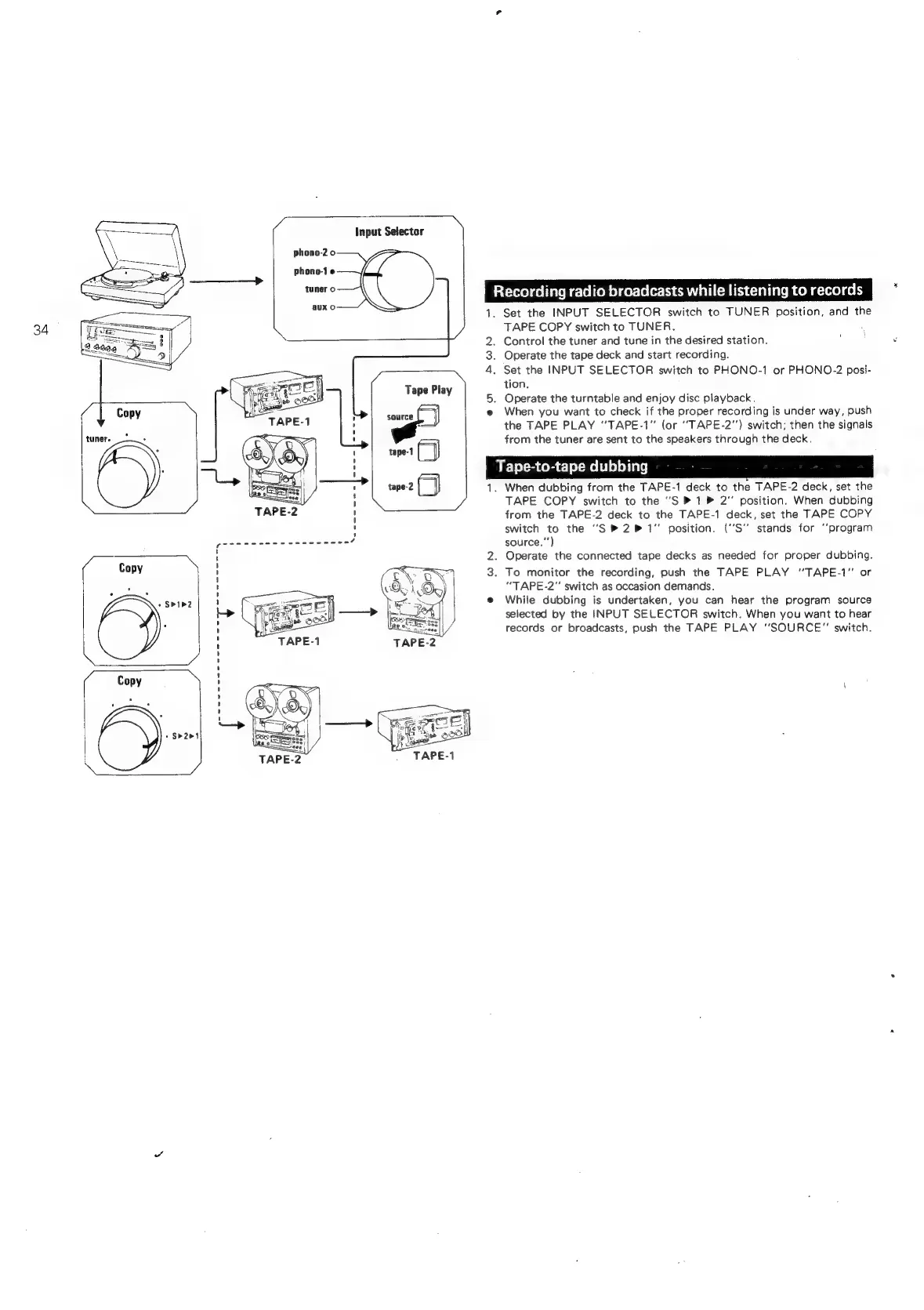
Recording
radio
broadcasts
while
listening
to
records
i“
1.
WON
eo
Aes
wn
Set
the
INPUT
SELECTOR
switch
to
TUNER
position,
and
the
TAPE
COPY
switch
to
TUNER.
Control
the
tuner
and
tune
in
the
desired
station.
;
Operate
the
tape
deck
and
start
recording.
Set the
INPUT
SELECTOR
switch
to
PHONO-1
or
PHONO-2
posi-
tion.
.
Operate
the
turntable
and
enjoy
disc
playback.
When
you
want
to
check
if
the
proper
recording
is
under
way,
push
the
TAPE
PLAY
“TAPE-1”
(or
“TAPE-2"’)
switch;
then
the
signals
from
the
tuner
are
sent
to
the
speakers
through
the
deck.
BE
TerScomele-Meltlelelini¢)
When
dubbing
from
the
TAPE-1
deck
to
the
TAPE-2
deck,
set
the
TAPE
COPY
switch
to
the
“S
»
1
®
2”
position.
When
dubbing
from
the
TAPE-2
deck
to
the
TAPE-1
deck,
set
the
TAPE
COPY
switch
to
the
"S
®2P
1"
position.
('S"
stands
for
‘‘program
source,"’)
.
Operate
the
connected
tape
decks
as
needed
for
proper
dubbing.
To
monitor
the
recording,
push
the
TAPE
PLAY
'’TAPE-1”
or
“TAPE-2”
switch
as
occasion
demands.
While
dubbing
is
undertaken,
you
can
hear
the
program
source
selected
by
the
INPUT
SELECTOR
switch.
When
you
want
to
hear
records
or
broadcasts,
push
the
TAPE
PLAY
“SOURCE”
switch.

Related product manuals