EasyManua.ls Logo

Sansui AU-G55X - Adjustment Procedures; Driver Circuit Adjustment; Peak Power Indicator Balance Adjustment

Sansui AU-G55X
15 pages
Print Icon
To Next Page IconTo Next Page
To Previous Page IconTo Previous Page
Loading...
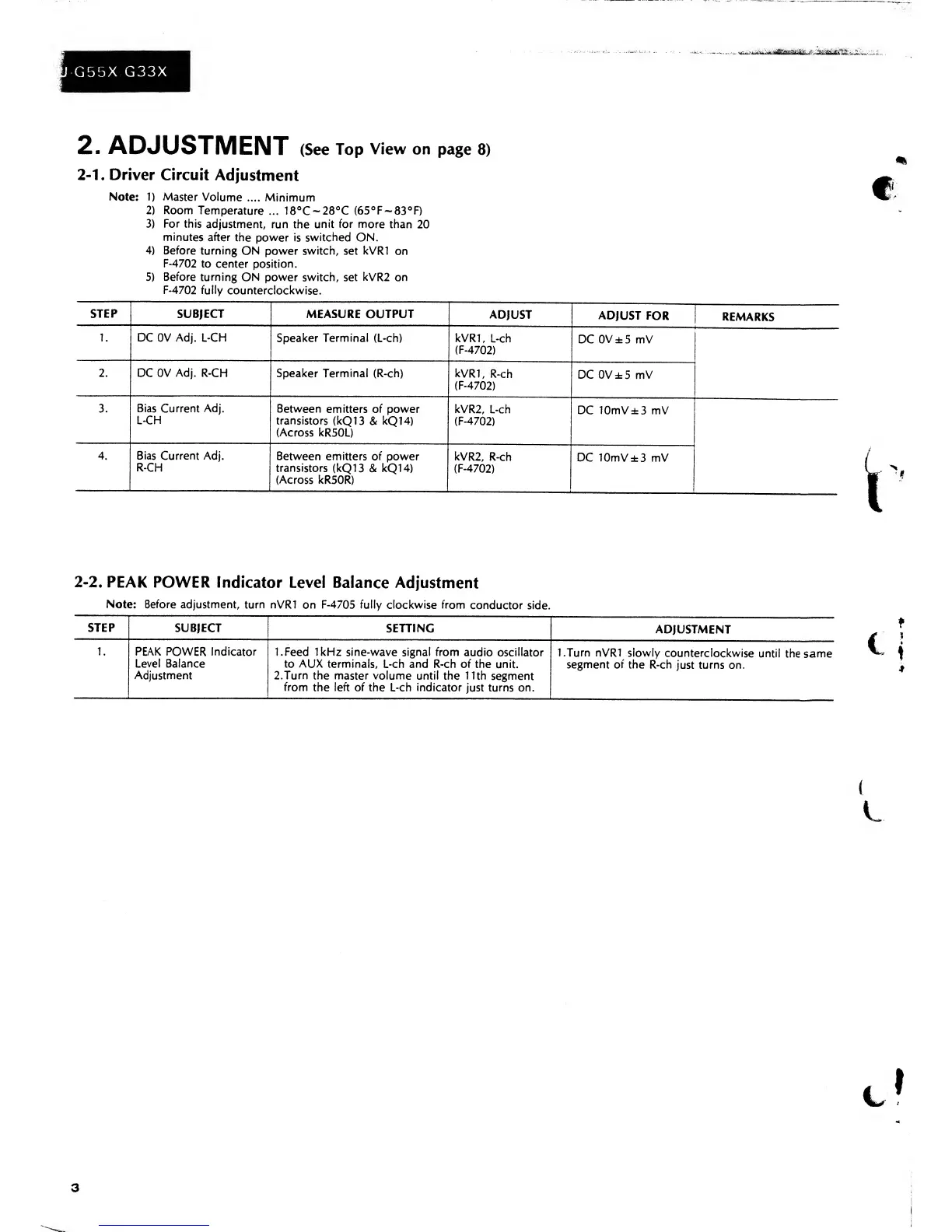
2.
ADJUSTMENT
(See
Top
View
on
page
8)
2-1.
Driver Circuit
Adjustment
Note:
1)
Master
Volume
.... Minimum
2)
Room
Temperature
... 18°C~28°C
(65°F~83°F)
3)
For this
adjustment,
run the
unit
for
more than
20
minutes
after
the
power is
switched ON.
4)
Before turning
ON power
switch,
set
kVRI
on
F-4702
to
center position.
5)
Before
turning
ON power switch, set
kVR2
on
F-4702 fully
counterclockwise.
STEP
SUBJECT MEASURE OUTPUT
ADJUST
ADJUST FOR
REMARKS
1 .
DC 0V Adj. L-CH
Speaker
Terminal
(L-ch)
kVRI
,
L-ch
(F-4702)
DC
0V±5
mV
2. DC 0V
Adj.
R-CH Speaker
Terminal
(R-ch)
kVRI,
R-ch
(F-4702)
DC
0V±5
mV
3. Bias Current Adj.
L-CH
Between
emitters of power
transistors (kQI
3
&
kQI
4)
(Across
kR50L)
kVR2,
L-ch
(F-4702)
DC
10mV±3
mV
4.
Bias Current Adj.
R-CH
Between
emitters of power
transistors (kQI
3 &
kQI
4)
(Across kR50R)
kVR2,
R-ch
(F-4702)
DC 10mV±3
mV
2-2.
PEAK
POWER
Indicator
Level Balance
Adjustment
Note: Before
adjustment, turn nVRl
on
F-4705
fully
clockwise
from
conductor
side.
STEP
SUBJECT
SETTING
ADJUSTMENT
1 .
PEAK
POWER
Indicator
Level Balance
Adjustment
1.
Feed
1kHz sine-wave signal from
audio
oscillator
to
AUX terminals,
L-ch
and R-ch of the
unit.
2.
Turn
the
master volume until
the
11th
segment
from
the left of
the L-ch
indicator
just turns on.
I.Turn
nVRl
slowly
counterclockwise
until the
same
segment of the
R-ch
just turns on.
3

Related product manuals