EasyManua.ls Logo

Sansui D-99D - Page 10

Sansui D-99D
16 pages
Print Icon
To Next Page IconTo Next Page
To Previous Page IconTo Previous Page
Loading...
10
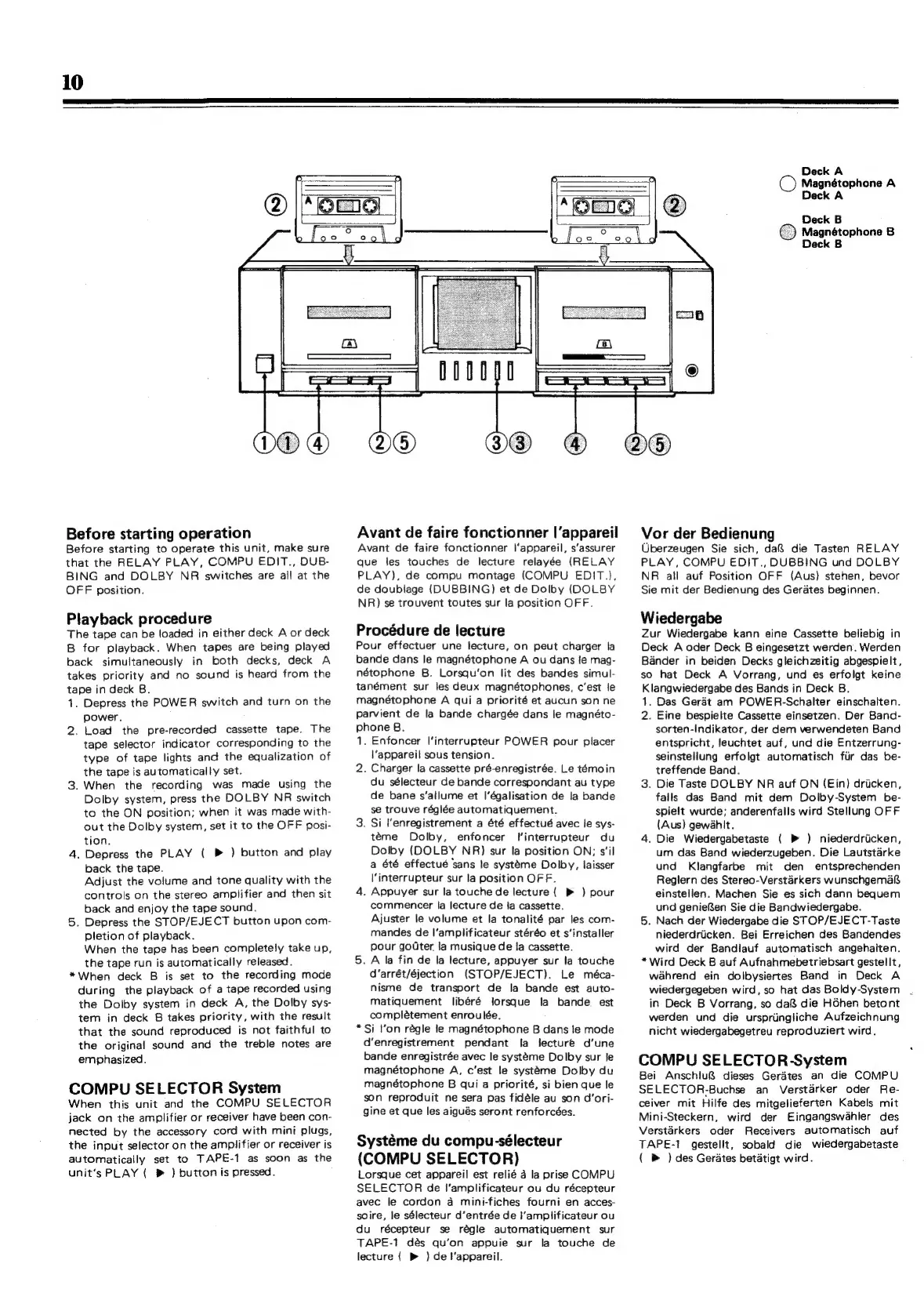
Before
starting
operation
Before
starting
to
operate
this
unit,
make
sure
that
the
RELAY
PLAY,
COMPU
EDIT.,
DUB-
BING
and
DOLBY
NR
switches
are
all
at
the
OFF
position.
Playback
procedure
The
tape
can
be
loaded
in
either
deck
A
or
deck
B
for
playback.
When
tapes
are
being
played
back
simultaneously
in
both
decks,
deck
A
takes
priority
and
no
sound
is
heard
from
the
tape
in
deck
B.
1.
2.
Depress
the
POWER
switch
and
turn
on
the
power.
Load
the
pre-recorded
cassette
tape.
The
tape
selector
indicator
corresponding
to
the
type
of
tape
lights
and
the
equalization
of
the
tape
is
automatically
set.
.
When
the
recording
was
made
using
the
Dolby
system,
press
the
DOLBY
NR
switch
to
the
ON
position;
when
it
was
made
with-
out
the
Dolby
system,
set
it
to
the
OFF
posi-
tion.
.
Depress
the
PLAY
(
P
)
button
and
play
back
the
tape.
Adjust
the
volume
and
tone
quality
with
the
controls
on
the
stereo
amplifier
and
then
sit
back
and
enjoy
the
tape
sound.
.
Depress
the
STOP/EJECT
button
upon
com-
pletion
of
playback.
When
the
tape
has
been
completely
take
up,
the
tape
run
is
automatically
released.
*When
deck
B
is
set
to
the
recording
mode
during
the
playback
of
a
tape
recorded
using
the
Dolby
system
in
deck
A,
the
Dolby
sys-
tem
in
deck
8
takes
priority,
with
the
result
that
the
sound
reproduced
is
not
faithful
to
the
original
sound
and
the
treble
notes
are
emphasized.
COMPU
SELECTOR
System
When
this
unit
and
the
COMPU
SELECTOR
jack
on
the
amplifier
or
receiver
have
been
con-
nected
by
the
accessory
cord
with
mini
plugs,
the
input
selector
on
the
amplifier
or
receiver
is
automatically
set
to
TAPE-1
as
soon
as
the
unit’s
PLAY
(
®
)
button
is
pressed.
Avant
de
faire
fonctionner
|’appareil
Avant
de
faire
fonctionner
l'appareil,
s’assurer
que
les
touches
de
lecture
relayée
(RELAY
PLAY),
de
compu
montage
(COMPU
EDIT.),
de
doublage
(DUBBING)
et
de
Dolby
(DOLBY
NR)
se
trouvent
toutes
sur
la
position
OFF.
Procédure
de
lecture
P
b
n
our
effectuer
une
lecture,
on
peut
charger
la
ande
dans
le
magnétophone
A
ou
dans
{fe
mag-
étophone
B.
Lorsqu‘on
lit
des
bandes
simul-
tanément
sur
les
deux
magnétophones,
c'est
le
magnétophone
A
qui
a
priorité
et
aucun
son
ne
Pp
p
TV
2.
*
arvient
de
la
bande
chargée
dans
le
magnéto-
hone
B.
Enfoncer
l’interrupteur
POWER
pour
placer
{‘appareil
sous
tension.
Charger
la
cassette
pré-enregistrée.
Le
témoin
du
sélecteur
de
bande
correspondant
au
type
de
bane
s’allume
et
I’égalisation
de
la
bande
se
trouve
régiée
automatiquement.
.
Si
Menregistrement
a
été
effectué
avec
le
sys-
téme
Dolby,
enfoncer
Tinterrupteur
du
Dolby
(DOLBY
NR)
sur
la
position
ON;
s'il
a
été
effectué
sans
le
systéme
Dolby,
laisser
\‘interrupteur
sur
la
position
OFF.
.
Appuyer
sur
la
touche
de
lecture
(
»
)
pour
commencer
la
lecture
de
ja
cassette.
Ajuster
le
volume
et
la
tonalité
par
les
com-
mandes
de
I’ampiificateur
stéréo
et
s‘installer
pour
gouter.
la
musique
de
fa
cassette.
.
A
la
fin
de
la
lecture,
appuyer
sur
la
touche
d’arrét/éjection
(STOP/EJECT).
Le
méca-
nisme
de
transport
de
la
bande
est
auto-
matiquement
libéré
lorsque
ja
bande.
est
complétement
enroulée.
Si
l’on
régle
le
magnétophone
B
dans
le
mode
d’enregistrement
pendant
fa
lecture
d’une
bande
enregistrée
avec
le
systéme
Dolby
sur
le
magnétophone
A,
c'est
le
systeme
Dolby
du
magnétophone
B
qui
a
priorité,
si
bien
que
le
son
reproduit
ne
sera
pas
fidéle
au
son
d’ori-
gine
et
que
les
aigués
seront
renforcées.
Systéme
du
compu-sélecteur
(
COMPU
SELECTOR)
Lorsque
cet
appareil
est
relié
a
la
prise
COMPU
SELECTOR
de
I’amplificateur
ou
du
récepteur
avec
le
cordon
a
mini-fiches
fourni
en
acces-
soire,
le
sélecteur
d’entrée
de
I’amplificateur
ou
d
u
récepteur
se
régle
automatiquement
sur
TAPE-1
dés
qu’on
appuie
sur
la
touche
de
lecture
{
)
de
l'appareil.
Deck
A
O
Magnétophone
A
Deck
A
Deck
B
Magnétophone
B
Deck
B
Vor
der
Bedienung
Uberzeugen
Sie
sich,
da
die
Tasten
RELAY
P
LAY,
COMPU
EDIT.,
DUBBING
und
DOLBY
NR
all
auf
Position
OFF
(Aus)
stehen,
bevor
Ss
ie
mit
der
Bedienung
des
Gerates
beginnen.
Wiedergabe
Zur
Wiedergabe
kann
eine
Cassette
beliebig
in
Deck
A
oder
Deck
B
eingesetzt
werden.
Werden
Bander
in
beiden
Decks
gleichzeitig
abgespielt,
so
hat
Deck
A
Vorrang,
und
es
erfolgt
keine
Klangwiedergabe
des
Bands
in
Deck
B.
1;
2.
*
Das
Gerat
am
POWER-Schalter
einschalten.
Eine
bespielte
Cassette
einsetzen.
Der
Band-
sorten-Indikator,
der
dem
verwendeten
Band
entspricht,
leuchtet
auf,
und
die
Entzerrung-
seinstellung
erfolgt
automatisch
fiir
das
be-
treffende
Band.
.
Die
Taste
DOLBY
NR
auf
ON
(Ein)
dricken,
fails
das
Band
mit
dem
Dolby-System
be-
spielt
wurde;
anderenfails
wird
Stellung
OFF
(Aus)
gewahit.
.
Die
Wiedergabetaste
(
»
)
niederdriicken,
um
das
Band
wiederzugeben.
Die
Lautstarke
und
Klangfarbe
mit
den
entsprechenden
Reglern
des
Stereo-Verstarkers
wunschgemaf&
einstellen.
Machen
Sie
es
sich
dann
bequem
und
geniefen
Sie
die
Bandwiedergabe.
.
Nach
der
Wiedergabe
die
STOP/EJECT-Taste
niederdriicken.
Bei
Erreichen
des
Bandendes
wird
der
Bandlauf
automatisch
angehalten.
Wird
Deck
B
auf
Aufnahmebetriebsart
gestellt,
wahrend
ein
dolbysiertes
Band
in
Deck
A
wiedergegeben
wird,
so
hat
das
Boldy-System
in
Deck
B
Vorrang,
so
da
die
HGhen
betont
werden
und
die
urspriingliche
Aufzeichnung
nicht
wiedergabegetreu
reproduziert
wird.
COMPU
SELECTOR-System
Bei
SELECTOR-Buchse
an
Verstarker
oder
Re-
ceiver
mit
Hilfe
des
mitgelieferten
Kabels
mit
Mini-Steckern,
wird
der
Eingangswahler
des
Verstarkers
oder
TAPE-1
(
»
)
des
Gerates
betatigt
wird.
Anschlu&
dieses
Geraétes
an
die
COMPU
Receivers
automatisch
auf
gestelit,
sobald
die
wiedergabetaste

Related product manuals