EasyManua.ls Logo

Sansui D-99D - Recording Procedure

Sansui D-99D
16 pages
Print Icon
To Next Page IconTo Next Page
To Previous Page IconTo Previous Page
Loading...
Before
starting
operation
Before
starting
to
operate
this
unit,
make
sure
that
the
RELAY
PLAY,
COMPU
EDIT.,
DUB-
BING
and
DOLBY
NR
switches
are
all
at
the
Avant
de
faire
fonctionner
!’appareil
Avant
de
faire
fonctionner
|’appareil,
s’assurer
que
les
touches
de
lecture
relayée
(RELAY
PLAY),
de
compu
montage
(COMPU
EDIT.),
Vor
der
Bedienung
Uberzeugen
Sie
sich,
da®
die
Tasten
RELAY
PLAY,
COMPU
EDIT.,
DUBBING
und
DOLBY
NR
all
auf
Position
OFF
(Aus)
stehen,
bevor
de
doublage
(DUBBING)
et
de
Dolby
(DOLBY
NR)
se
trouvent
toutes
sur
la
position
OFF.
Sie
mit
der
Bedienung
des
Gerates
beginnen.
OFF
position.
Aufnahme
Aufnahmen
k6nnen
nur
auf
einem
Band
_
in
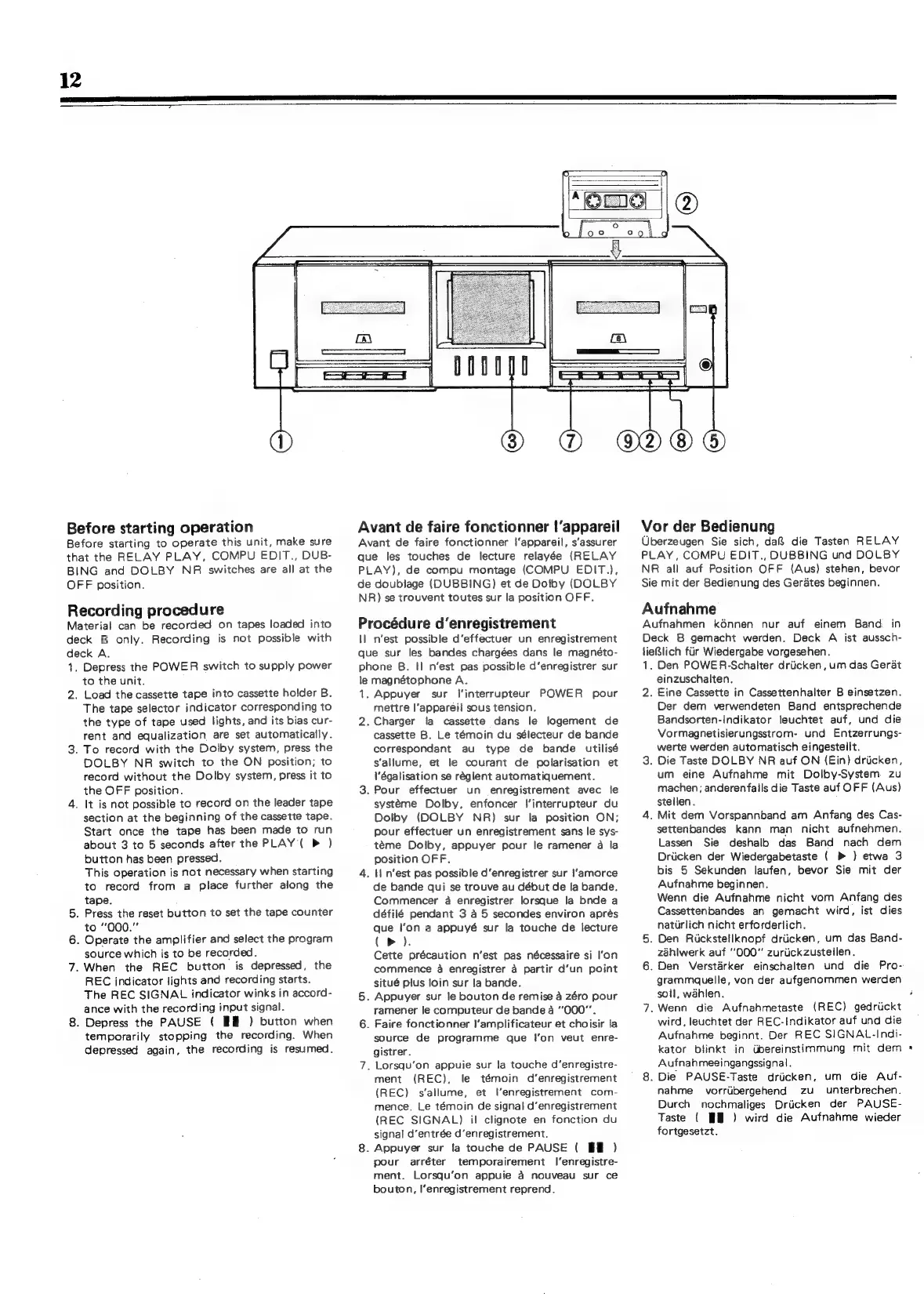
Recording
procedure
Material
can
be
recorded
on
tapes
loaded
into
Procédure
d’enregistrement
deck
B
only.
Recording
is
not
possible
with
deck
A.
1.
Depress
the
POWER
switch
to
supply
power
to
the
unit.
n'est
possible
d‘effectuer
un
enregistrement
que
sur
les
bandes
chargées
dans
le
magnéto-
phone
B.
!I
n’est
pas
possible
d’enregistrer
sur
le
magnétophone
A.
Deck
B
gemacht
werden.
Deck
A
ist
aussch-
lieBlich
fir
Wiedergabe
vorgesehen.
As
Den
POWER-Schalter
driicken,
um
das
Gerat
einzuschalten.
2.
Load
the
cassette
tape
into
cassette
holder
B.
1.
Appuyer
sur
|'interrupteur
POWER
pour
2.
Eine
Cassette
in
Cassettenhalter
B
einsetzen.
The
tape
selector
indicator
corresponding
to
mettre
l'appareil
sous
tension.
Der
dem
verwendeten
Band
entsprechende
the
type
of
tape
used
lights,
and
its
bias
cur-
2.
Charger
la
cassette
dans
le
logement
de
Bandsorten-Indikator
leuchtet
auf,
und
die
rent
and
equalization,
are
set
automatically.
cassette
B.
Le
témoin
du
sélecteur
de
bande
Vormagnetisierungsstrom-
und
Entzerrungs-
3.
To
record
with
the
Dolby
system,
press
the
correspondant
au
type
de
bande
utilisé
werte
werden
automatisch
eingestellt.
DOLBY
NR
switch
to
the
ON
position;
to
s'allume,
et
le
courant
de
polarisation
et
3.
Die
Taste
DOLBY
NR
auf
ON
(Ein)
driicken,
record
without
the
Dolby
system,
press
it
to
\'égalisation
se
réglent
automatiquement.
um
eine
Aufnahme
mit
Dolby-System.
zu
the
OFF
position.
3.
Pour
effectuer
un
enregistrement
avec
le
machen;
anderenfalls
die
Taste
auf
OFF
(Aus)
4.
It is
not
possible
to
record
on
the
leader
tape
systeme
Dolby,
enfoncer
|‘interrupteur
du
stellen.
section
at
the
beginning
of
the
cassette
tape.
Dolby
(DOLBY
NR)
sur
la
position
ON;
4.
Mit
dem
Vorspannband
am
Anfang
des
Cas-
Start
once
the
tape
has
been
made
to
run
pour
effectuer
un
enregistrement
sans
le
sys-
settenbandes
kann
man
nicht
aufnehmen.
about
3
to
5
seconds
after
the
PLAY
(
P
)
téme
Dolby,
appuyer
pour
le
ramener
a
la
Lassen
Sie
deshalb
das
Band
nach
dem
button
has
been
pressed.
position
OFF.
Driicken
der
Wiedergabetaste
(
>
)
etwa
3
This
operation
is
not
necessary
when
starting
4.
i
n'est
pas
possible
d‘enregistrer
sur
l'amorce
bis
5
Sekunden
laufen,
bevor
Sie
mit
der
to
record
from
a
place
further
along
the
de
bande
qui
se
trouve
au
début
de
la
bande.
Aufnahme
beginnen.
tape.
Commencer
a
enregistrer
lorsque
la
bnde
a
Wenn
die
Aufnahme
nicht
vom
Anfang
des
5.
Press
the
reset
button
to
set
the
tape
counter
défilé
pendant
3
a
5
secondes
environ
aprés
Cassettenbandes
an
gemacht
wird,
ist
dies
to
“000.”
que
Ion
a
appuyé
sur
la
touche
de
fecture
natirlich
nicht
erforderlich.
6.
Operate
the
amplifier
and
select
the
program
(Pp).
5.
Den
Ruckstellknopf
driicken,
um
das
Band-
source
which
is
to
be
recorded.
Cette
précaution
n’est
pas
nécessaire
si
l'on
zahlwerk
auf
“000”
zuruickzustellen.
7.
When
the
REC
button
is
depressed,
the
commence
a
enregistrer
a
partir
d’un
point
6.
Den
Verstarker
einschalten
und
die
Pro-
REC
indicator
lights
and
recording
starts.
situé
plus
loin
sur
la
bande.
grammauelle,
von
der
aufgenommen
werden
The
REC
SIGNAL
indicator
winks
in
accord-
5.
Appuyer
sur
le
bouton
de
remise
a
zéro
pour
soil,
wahlen.
ance
with
the
recording
input
signal.
ramener
le
computeur
de
bande
4
“000”.
7.
Wenn
die
Aufnahmetaste
(REC)
gedriickt
8.
Depress
the
PAUSE
(
I
)
button
when
6.
Faire
fonctionner
I‘amplificateur
et
choisir
fa
wird,
leuchtet
der
REC-Indikator
auf
und
die
temporarily
stopping
the
recording.
When
depressed
again,
the
recording
is
resumed.
source
de
programme
que
I’on
veut
enre-
gistrer.
Aufnahme
beginnt.
Der
REC
SIGNAL-Indi-
kator
blinkt
in
Ubereinstimmung
mit
dem
*
7.
Lorsqu’on
appuie
sur
la
touche
d’enregistre-
Aufnahmeeingangssignal.
ment
(REC),
le
témoin
d’enregistrement
8.
Die
PAUSE-Taste
driicken,
um
die
Auf-
(REC)
s‘allume,
et
l’enregistrement
com-
nahme
vorribergehend
zu
unterbrechen.
mence.
Le
témoin
de
signal
d’enregistrement
(REC
SIGNAL)
i!
clignote
en
fonction
du
signal
d’entrée
d’enregistrement.
.
Appuyer
sur
fa
touche
de
PAUSE
(
BE
)
pour
arréter
temporairement
|’enregistre-
ment.
Lorsqu’on
appuie
a
nouveau
sur
ce
bouton,
l‘enregistrement
reprend.
Durch
nochmaliges
Driicken
der
PAUSE-
Taste
(
WH)
wird
die
Aufnanhme
wieder
fortgesetzt.

Related product manuals