EasyManua.ls Logo

Sansui D-99D - Panel Information

Sansui D-99D
16 pages
Print Icon
To Next Page IconTo Next Page
To Previous Page IconTo Previous Page
Loading...
4
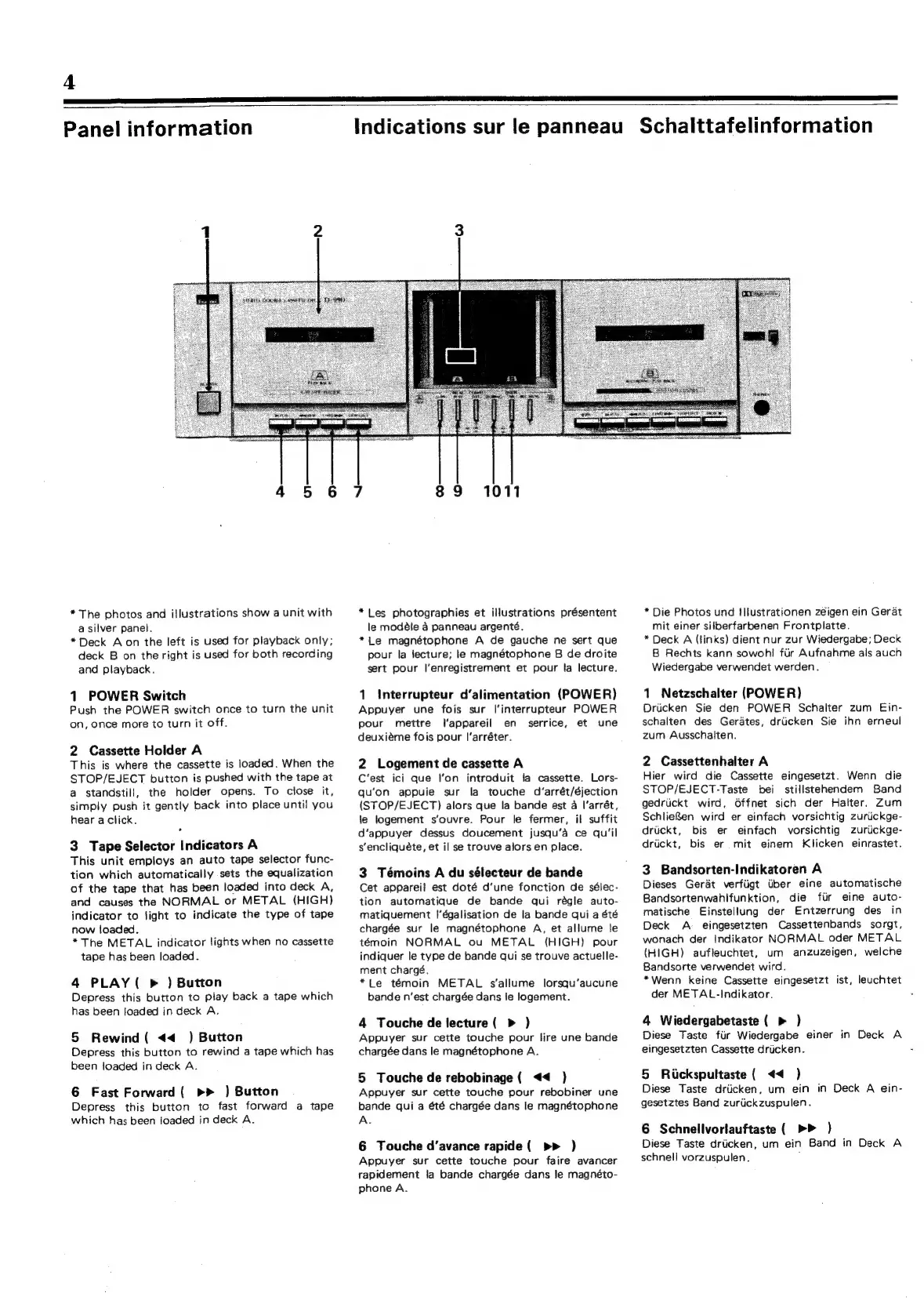
Panel
information
Indications
sur
le
panneau
Schalttafelinformation
*
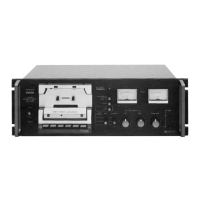
The
photos
and
illustrations
show
a
unit
with
a
silver
panel.
*
Deck
Aon
the
left
is
used
for
playback
only;
deck
B
on
the
right
is
used
for
both
recording
and
playback.
1
POWER
Switch
Push
the
POWER
switch
once
to
turn
the
unit
on,
once more
to
turn
it
off.
2
Cassette
Holder
A
This
is
where
the
cassette
is
loaded.
When
the
STOP/EJECT
button
is
pushed
with
the
tape
at
a
standstill,
the
holder
opens.
To
close
it,
simply
push
it
gently
back
into
place
until
you
hear
a
click.
3
Tape
Selector
Indicators
A
This
unit
employs
an
auto
tape
selector
func-
tion
which
automatically
sets
the
equalization
of
the
tape
that
has
been
loaded
into
deck
A,
and
causes
the
NORMAL
or
METAL
(HIGH)
indicator
to
light
to
indicate
the
type
of
tape
now
loaded.
*The
METAL
indicator
lights
when
no
cassette
tape
has
been
loaded.
4
PLAY
(
>
)
Button
Depress
this
button
to
play
back
a
tape
which
has
been
loaded
in
deck
A.
5
Rewind
(
<4
)
Button
Depress
this
button
to
rewind
a
tape
which
has
been
loaded
in
deck
A.
6
Fast
Forward
(
>>
)
Button
Depress
this
button
to
fast
forward
a
tape
which
has
been
loaded
in
deck
A.
89
1011
*Les
photographies
et
illustrations
présentent
le
modéle
4
panneau
argenté.
*Le
magnétophone
A
de
gauche
ne
sert
que
pour
la
lecture;
te
magnétophone
B
de
droite
sert
pour
l’enregistrement
et
pour
la
lecture.
1
Interrupteur
d’alimentation
(POWER)
Appuyer
une
fois
sur
l'interrupteur
POWER
pour
mettre
I‘appareil
en
serrice,
et
une
deuxiéme
fois
pour
I’arréter.
2
Logement
de
cassette
A
C'est
ici
que
l’on
introduit
ia
cassette.
Lors-
qu’on
appuie
sur
la
touche
d’arrét/éjection
(STOP/EJECT)
alors
que
la
bande
est
a
l’arrét,
le
logement
s’ouvre.
Pour
le
fermer,
il
suffit
d’appuyer
dessus
doucement
jusqu’a
ce
qu’il
s‘encliquéte,
et
il
se
trouve
alors
en
place.
3
Témoins
A
du
sélecteur
de
bande
Cet
appareil
est
doté
d'une
fonction
de
sélec-
tion
automatique
de
bande
qui
régle
auto-
matiquement
|’égalisation
de
la
bande
qui
a
été
chargée
sur
le
magnétophone
A,
et
allume
le
témoin
NORMAL
ou
METAL
(HIGH)
pour
indiquer
le
type
de
bande
qui
se
trouve
actuelle-
ment
chargé.
*Le
témoin
METAL
s’allume
lorsqu’aucune
bande
n'est
chargée
dans
le
logement.
4
Touche
de
lecture
(
>
)
Appuyer
sur
cette
touche
pour
lire
une
bande
chargée
dans
le
magnétophone
A.
5
Touche
de
rebobinage
(
<<
)}
Appuyer
sur
cette
touche
pour
rebobiner
une
bande
qui
a
été
chargée
dans
le
magnétophone
A.
6
Touche
d’avance
rapide
(
pr
)
Appuyer
sur
cette
touche
pour
faire
avancer
rapidement
la
bande
chargée
dans
le
magnéto-
phone
A.
*
Die
Photos
und
I
llustrationen
zéigen
ein
Gerat
mit
einer
silberfarbenen
Frontplatte.
*
Deck
A
(links)
dient
nur
zur
Wiedergabe;
Deck
B
Rechts
kann
sowohl
fir
Aufnahme
als
auch
Wiedergabe
verwendet
werden.
1
Netzschalter
(POWER)
Driicken
Sie
den
POWER
Schalter
zum
Ein-
schalten
des
Gerates,
driicken
Sie
ihn
erneul
zum
Ausschalten.
2
Cassettenhalter
A
Hier
wird
die
Cassette
eingesetzt.
Wenn
die
STOP/EJECT-Taste
bei
stillstehendem
Band
gedrickt
wird,
Offnet
sich
der
Halter.
Zum
SchlieBen
wird
er
einfach
vorsichtig
zuriickge-
druckt,
bis
er
einfach
vorsichtig
zuruckge-
driickt,
bis
er
mit
einem
Klicken
einrastet.
3
Bandsorten-Indikatoren
A
Dieses
Gerat
verfiigt
iiber
eine
automatische
Bandsortenwahlfunktion,
die
fiir
eine
auto-
matische
Einstellung
der
Entzerrung
des
in
Deck
A
_
eingesetzten
Cassettenbands
sorgt,
wonach
der
Indikator
NORMAL
oder
METAL
(HIGH)
aufleuchtet,
um
anzuzeigen,
welche
Bandsorte
verwendet
wird.
*Wenn
keine
Cassette
eingesetzt
ist,
leuchtet
der
METAL-Indikator.
4
Wiedergabetaste
(
>
)
Diese
Taste
fiir
Wiedergabe
einer
in
Deck
A
eingesetzten
Cassette
dricken.
5
Rickspultaste
(
<4
)
Diese
Taste
driicken,
um
ein
in
Deck
A
ein-
gesetztes
Band
zuriickzuspulen.
6
Schnellvortauftaste
(
)
Diese Taste
driicken,
um
ein
Band
in
Deck
A
schnell
vorzuspulen.
:

Related product manuals