EasyManua.ls Logo

Sansui G-5700 - Tape Playback and Recording

Sansui G-5700
49 pages
Print Icon
To Next Page IconTo Next Page
To Previous Page IconTo Previous Page
Loading...
32
73.3
O80
porter
3rrenernrrer—-
TAPE
MONITOR
1
2
SOURCE
SOURCE
TAPE
TAPE
TAPE
MONITOR
1
2
al
TAPE
SOURCE
TAPE
MONITOR
1
2
oO
f
SOURCE
TAPE
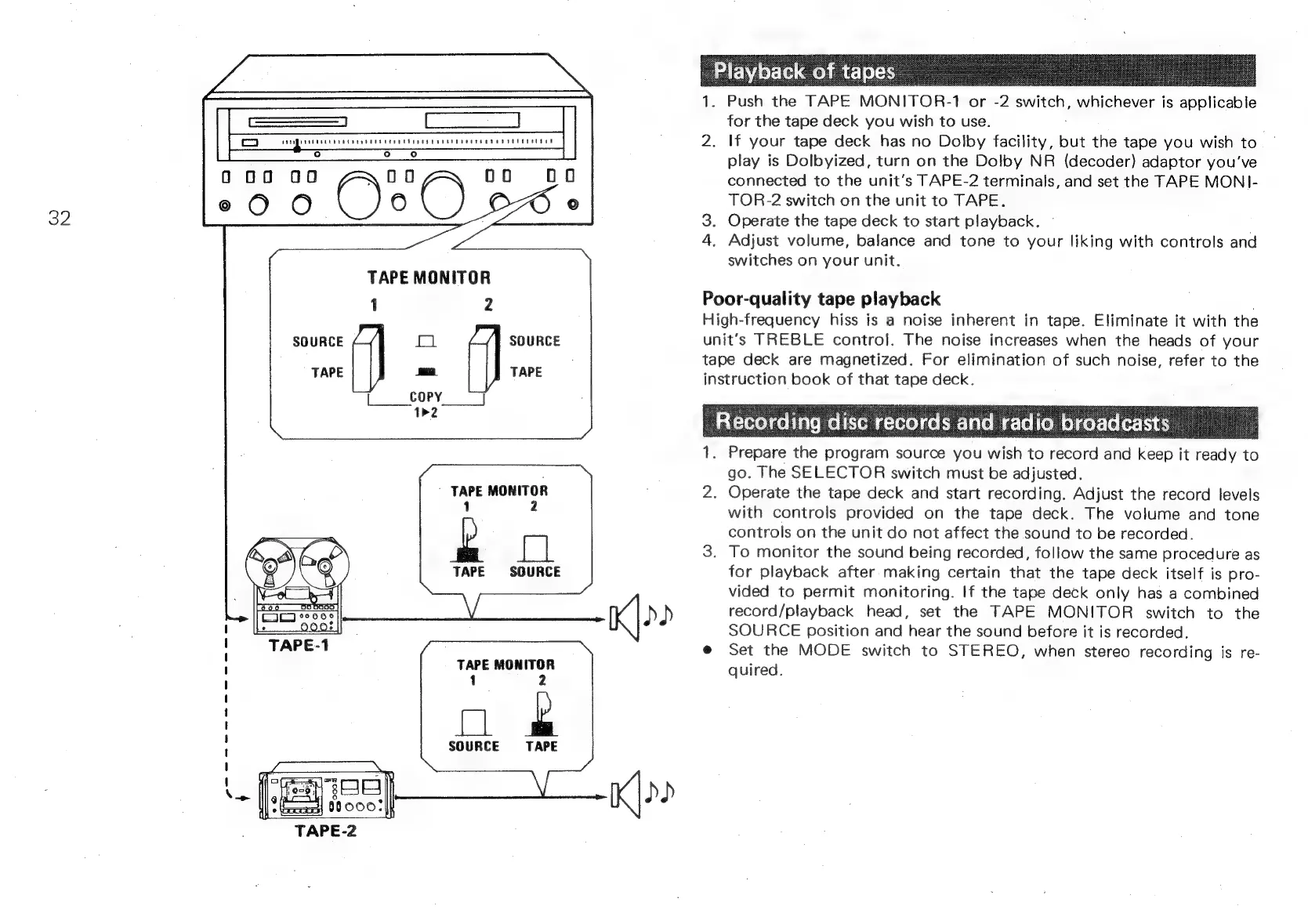
1.
Push
the
TAPE
MONITOR-1
or
-2
switch,
a
icheye
is
applicable
for
the
tape
deck
you
wish
to
use.
2.
If
your
tape
deck
has
no
Dolby
facility,
but
the
tape
you
wish
to
play
is
Dolbyized,
turn
on
the
Dolby
NR
(decoder)
adaptor
you've
connected
to
the
unit’s
TAPE-2
terminals,
and
set
the
TAPE
MONI-
TOR-2
switch
on
the
unit
to
TAPE.
3.
Operate
the
tape
deck
to
start
playback.
©
4.
Adjust
volume,
balance
and
tone
to
your
liking
with
controls
and
switches
on
your
unit.
Poor-quality
tape
playback
.
High-frequency
hiss
is
a
noise
inherent
in
tape.
Eliminate
it
with
the
unit’s
TREBLE
contro].
The
noise
increases
when
the
heads
of
your
tape
deck
are
magnetized.
For
elimination
of
such
noise,
refer
to
the
instruction
book
of
that
tape
deck.
1.
Prepare
the
program
source
you
‘ish
to
fcord
and
fous
it
ready
to
go.
The
SELECTOR
switch
must
be
adjusted.
2.
Operate
the
tape
deck
and
start
recording.
Adjust
the
record
levels
with
controls
provided
on
the
tape
deck.
The
volume
and
tone
controls
on
the
unit
do
not
affect
the
sound
to
be
recorded.
3.
To
monitor
the
sound
being
recorded,
follow
the
same
procedure
as
for
playback
after
making
certain
that
the
tape
deck
itself
is
pro-
vided
to
permit
monitoring.
If
the
tape
deck
only
has
a
combined
record/playback
head,
set
the
TAPE
MONITOR
switch
to
the
SOURCE
position
and
hear
the
sound
before
it
is
recorded.
@
Set
the
MODE
switch
to
STEREO,
when
stereo
recording
is
re-
quired.