EasyManua.ls Logo

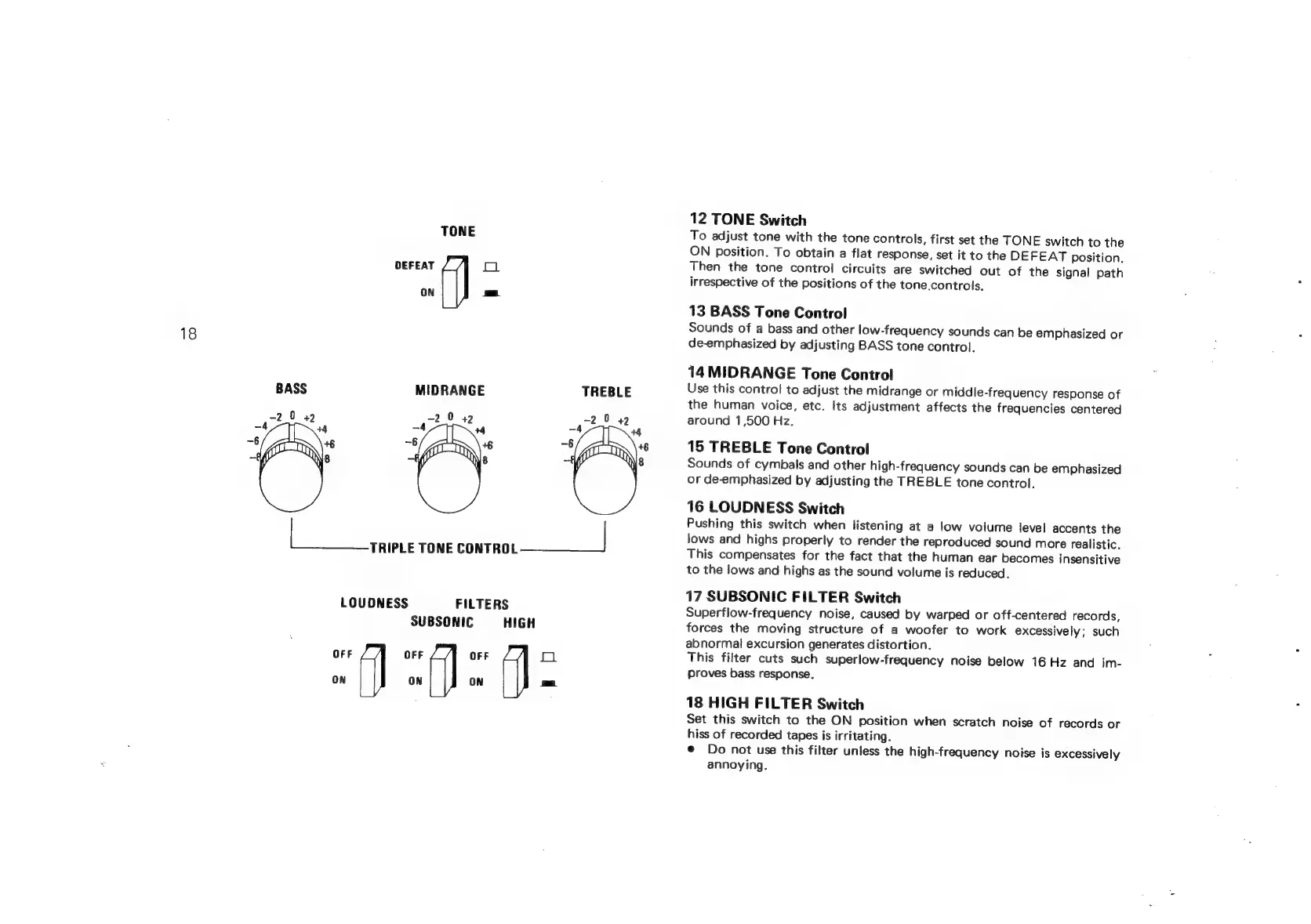
Sansui G-9700 - Tone, Filter, and Loudness Controls; TONE Switch; BASS Tone Control; MIDRANGE Tone Control

Sansui G-9700
50 pages
Print Icon
To Next Page IconTo Next Page
To Previous Page IconTo Previous Page
Loading...
TONE
DEFEAT
o
ON
-_
18
BASS
MIDRANGE
TREBLE
2
0
2
0
a
2
ce
2
+2
eee
ee
TONE
ae
LOUDNESS
FILTERS
SUBSONIC
HIGH
OFF
OFF
OFF
O
ON
ON
ON
-_
12
TONE
Switch
To
adjust
tone
with
the
tone
controls,
first
set
the
TONE
switch
to
the
ON
position.
To
obtain
a
flat
response,
set
it
to
the
DEFEAT
position.
Then
the
tone
control
circuits
are
switched
out
of
the
signal
path
irrespective
of
the
positions
of
the
tone.
controls.
13
BASS
Tone
Control
Sounds
of
a
bass
and
other
low-frequency
sounds
can
be
emphasized
or
de-emphasized
by
adjusting
BASS
tone
control.
14
MIDRANGE
Tone
Control
Use
this
contro!
to
adjust
the
midrange
or
middle-frequency
response
of
the
human
voice,
etc.
Its
adjustment
affects
the
frequencies
centered
around
1,500
Hz.
15
TREBLE
Tone
Control
Sounds
of
cymbals
and
other
high-frequency
sounds
can
be
emphasized
or
de-emphasized
by
adjusting
the
TREBLE
tone
control.
16
LOUDNESS
Switch
Pushing
this
switch
when
listening
at
a
low
volume
level
accents
the
lows
and
highs
properly
to
render
the
reproduced
sound
more
realistic.
This
compensates
for
the
fact
that
the
human
ear
becomes
insensitive
to
the
lows
and
highs
as
the
sound
volume
is
reduced.
17
SUBSONIC
FILTER
Switch
Superflow-frequency
noise,
caused
by
warped
or
off-centered
records,
forces
the
moving
structure
of
a
woofer
to
work
excessively;
such
abnormal
excursion
generates
distortion.
This
filter
cuts
such
superlow-frequency
noise
below
16
Hz
and
im-
proves
bass
response.
18
HIGH
FILTER
Switch
Set
this
switch
to
the
ON
position
when
scratch
noise
of
records
or
hiss
of
recorded
tapes
is
irritating.
©
Do
not
use
this
filter
unless
the
high-frequency
noise
is
excessively
annoying.

Related product manuals