EasyManua.ls Logo

Sansui G-9700 - FM Reception Settings; FM MODE Switch; FM IF BAND Switch; FM AUTO NOISE FIL Switch

Sansui G-9700
50 pages
Print Icon
To Next Page IconTo Next Page
To Previous Page IconTo Previous Page
Loading...
22
FM
MODE
AUTO
ON
OFF
MONO
MUTING
FM
IF
BAND
WIDE
NARROW
FM
AUTO
NOISE
FIL.
ON
OFF
DOLBY
FM
DE-EMPHASIS
OFF
ON
EA
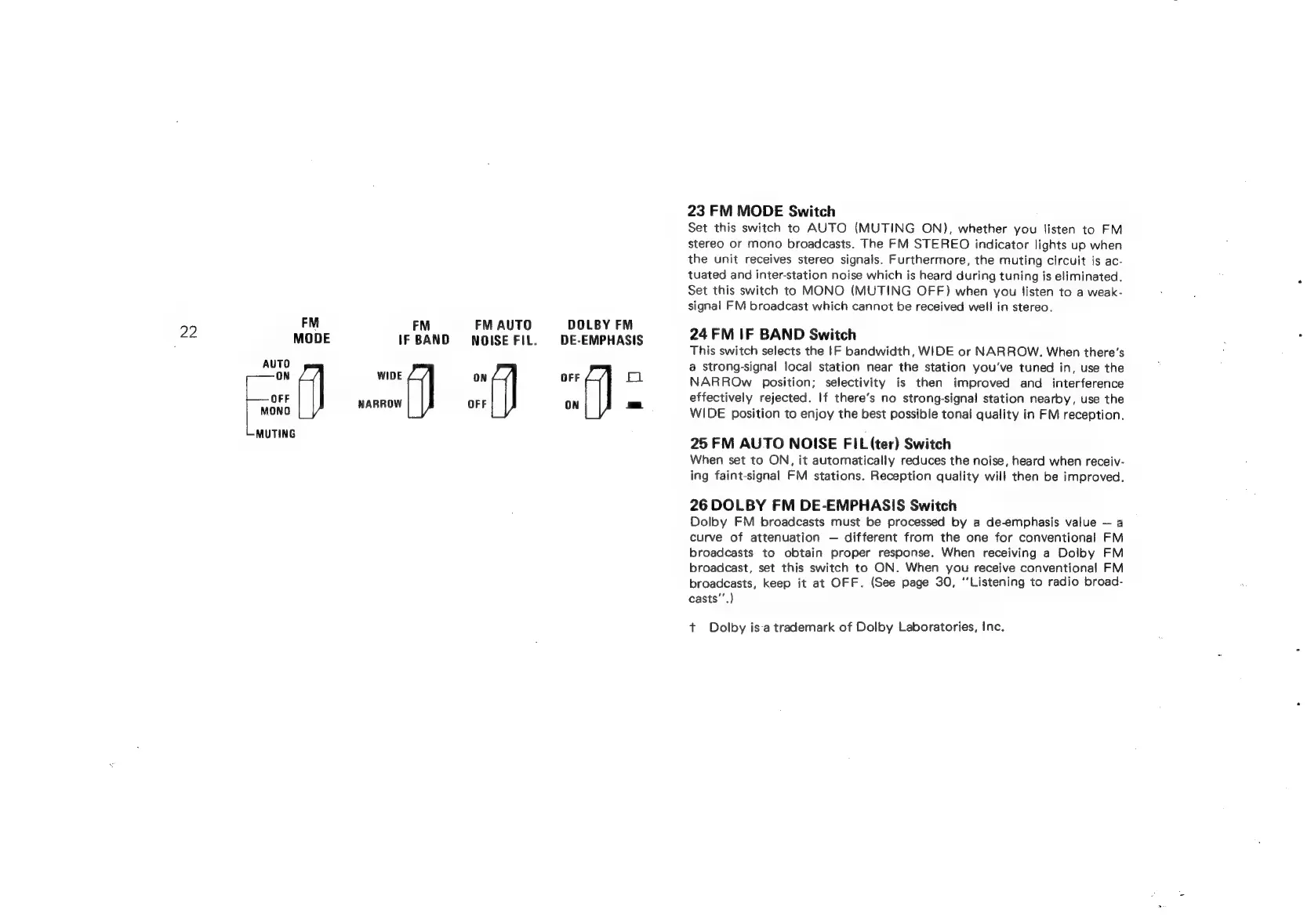
23
FM
MODE
Switch
Set
this
switch
to
AUTO
(MUTING
ON),
whether
you
Jisten
to
FM
stereo
or
mono
broadcasts.
The
FM
STEREO
indicator
lights
up
when
the
unit
receives
stereo
signals.
Furthermore,
the
muting
circuit
is
ac-
tuated
and
inter-station
noise
which
is
heard
during
tuning
is
eliminated.
Set
this
switch
to
MONO
(MUTING
OFF)
when
you
listen
to
a
weak-
signal
FM
broadcast
which
cannot
be
received
well
in
stereo.
24
FM
IF
BAND
Switch
This
switch
selects
the
|F
bandwidth,
WIDE
or
NARROW.
When
there’s
a
strong-signal
local
station
near
the
station
you've
tuned
in,
use
the
NARROw
position;
selectivity
is
then
improved
and
interference
effectively
rejected.
If
there’s
no
strong-signal
station
nearby,
use
the
WIDE
position
to
enjoy
the
best
possible
tonal
quality
in
FM
reception.
25
FM
AUTO
NOISE
FIL
(ter)
Switch
When
set
to
ON,
it
automatically
reduces
the
noise,
heard
when
receiv-
ing
faint-signal
FM
stations.
Reception
quality
will
then
be
improved.
26
DOLBY
FM
DE-EMPHASIS
Switch
Dolby
FM
broadcasts
must
be
processed
by
a
de-emphasis
value
a
curve
of
attenuation
different
from
the
one
for
conventional
FM
broadcasts
to
obtain
proper
response.
When
receiving
a
Dolby
FM
broadcast,
set
this
switch
to
ON.
When
you
receive
conventional
FM
broadcasts,
keep
it
at
OFF.
(See
page
30,
‘Listening
to
radio
broad-
casts’’.)
t+
Dolby
isa
trademark
of
Dolby
Laboratories,
Inc.

Related product manuals