EasyManua.ls Logo

Sansui G-9700 - Operating Procedures

Sansui G-9700
50 pages
Print Icon
To Next Page IconTo Next Page
To Previous Page IconTo Previous Page
Loading...
26
1
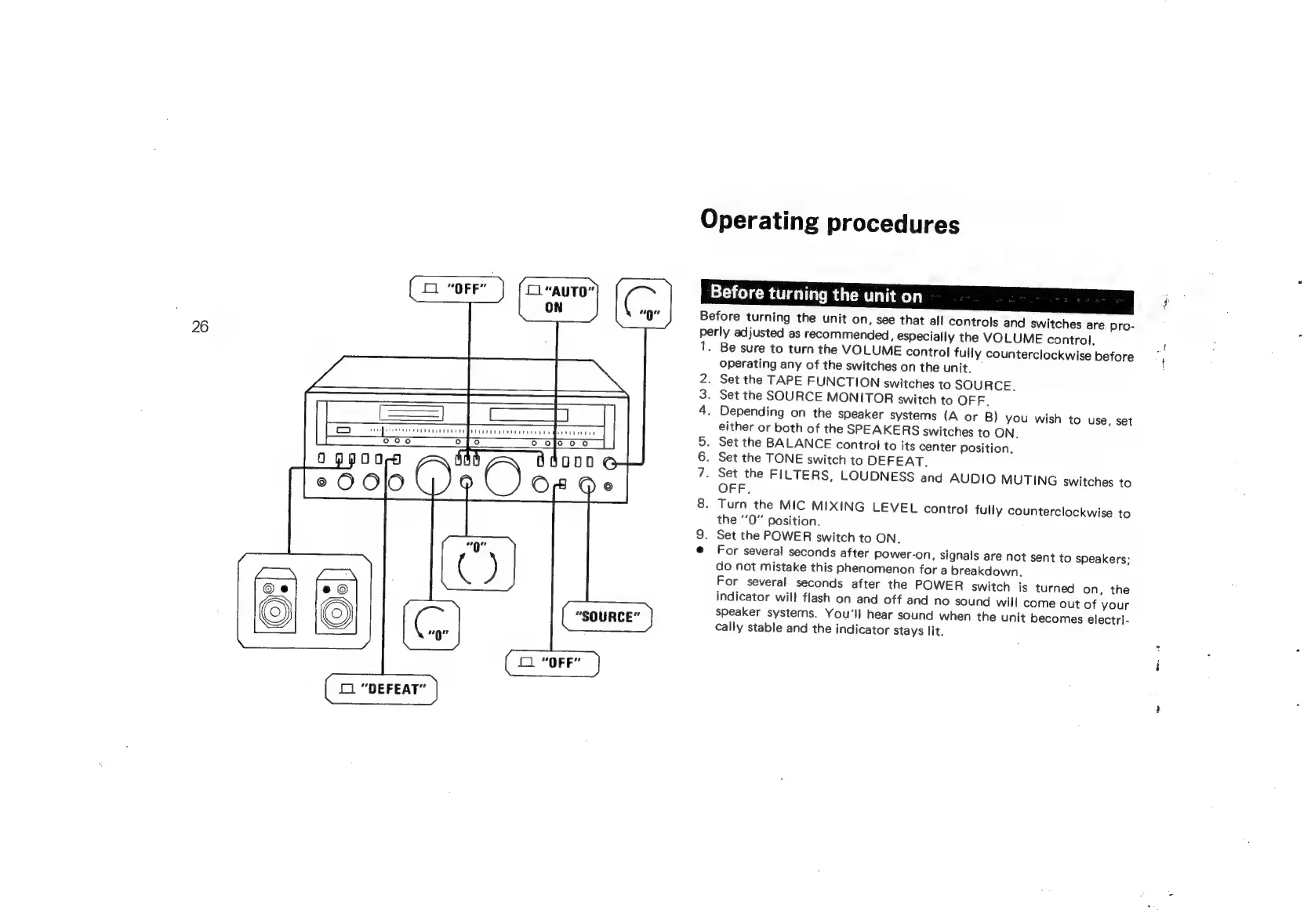
“DEFEAT”
Operating
procedures
Before
turning
the
unit
on
Before
turning
the
unit
on,
see
that
all
controls
and
switches
are
pro-
per
1.
2
3.
4
Nan
ly
adjusted
as
recommended,
especially
the
VOLUME
control.
Be
sure
to
turn
the
VOLUME
control
fully
counterclockwise
before
operating
any
of
the
switches
on
the
unit.
.
Set
the
TAPE
FUNCTION
switches
to
SOURCE.
Set
the
SOURCE
MONITOR
switch
to
OFF.
.
Depending
on
the
speaker
systems
(A
or
B)
you
wish
to
use,
set
either
or
both
of
the
SPEAKERS
switches
to
ON.
Set
the
BALANCE
control
to
its
center
position.
Set
the
TONE
switch
to
DEFEAT.
Set
the
FILTERS,
LOUDNESS
and
AUDIO
MUTING
switches
to
OFF.
.
Turn
the
MIC
MIXING
LEVEL
control
fully
counterclockwise
to
the
‘’0”
position.
Set
the
POWER
switch
to
ON.
For
several
seconds
after
power-on,
signals
are
not
sent
to
speakers;
do
not
mistake
this
phenomenon
for
a
breakdown,
For
several
seconds
after
the
POWER
switch
is
turned
on,
the
indicator
wil!
flash
on
and
off
and
no
sound
will
come
out
of
your
speaker
systems.
You'll
hear
sound
when
the
unit
becomes
electri-
cally
stable
and
the
indicator
stays
lit.

Related product manuals