24
Adjusting the back
lighting
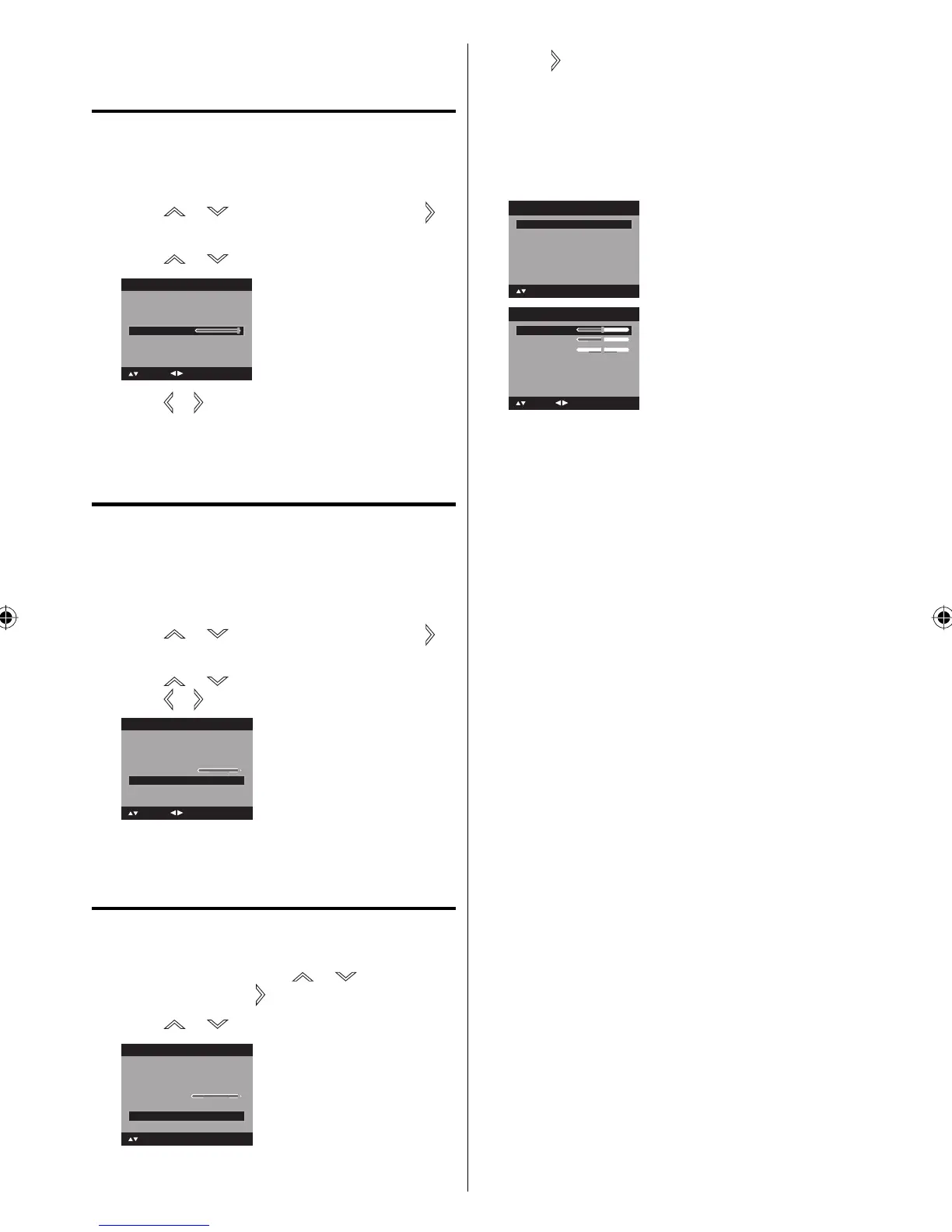
The Backlight feature adjusts the screen
brightness for improved picture clarity.
1
Press MENU. The menu screen will appear.
2
Press or to select “Setup”, then press or
ENTER.
3
Press or to select “Backlight”.
Video Label >>
Auto Shut Off Off
Reset >>
Setup
Closed Caption >>
Language English
: Adjust
: Select
Backlight
16
4
Press or to adjust the setting.
5
Press EXIT to return to the normal screen.
Setting the Auto Shut Off
If the Auto Shut Off feature is On, a station being
viewed stops broadcasting and the TV is not
operated, the TV will automatically shut itself off
after 15 minutes.
1
Press MENU. The menu screen will appear.
2
Press or to select “Setup”, then press or
ENTER.
3
Press or to select “Auto Shut Off”.
Press
or to select “On” or “Off”.
Video Label >>
Backlight
16
Setup
Closed Caption >>
Language English
Reset >>
Auto Shut Off Off
: Adjust
: Select
4
Press EXIT to return to the normal screen.
Resetting your settings
The Reset function returns your settings to the
factory settings.
1
Press MENU. Then press or to select
“Setup” , then press
or ENTER.
2
Press or to select “Reset”.
Video Label >>
Backlight
Auto Shut Off Off
16
Setup
: Select ENTER:Set
Closed Caption >>
Language English
Reset >>
3
Press or ENTER to return your settings to the
factory settings.
4
“Reset” will appear on the screen approx. 3
seconds, then it returns to the normal
NOTE:
You also can reset the settings by pressing RESET
when “Picture” and “Audio” menu is displayed.
Picture Preference Sports
Picture Size >>
Film Mode On
Picture
Picture Setting >>
: Select ENTER:Set
PC Setting >>
DNR On
Treble
Balance
MTS Stereo
Audio Language No info.
Audio
15
0
: Adjust
15
Bass
: Select
NOTE:
“Picture Size” in Picture menu cannot be reset by
this function.
“MTS” and “Audio Language” in Audio menu cannot
be reset by this function.
•
•
•
34C1121B.indb 2434C1121B.indb 24 8/5/08 1:26:13 PM8/5/08 1:26:13 PM


 To Next Page