23
POWER
EJECT
TV/VCR
COUNTER RESET
INPUT SELECT
REC/OTR
SLOW
SPEED
MENU
–+
–
+
SET
SKIP
SEARCH
–+
TRACKING
AUTO
CANCEL
ENTER
STOP
PLAY
F.FWD
REW
TIMER REC
PAUSE/STILL
CHANNEL
CALL
1
2
3
456
78
0
9
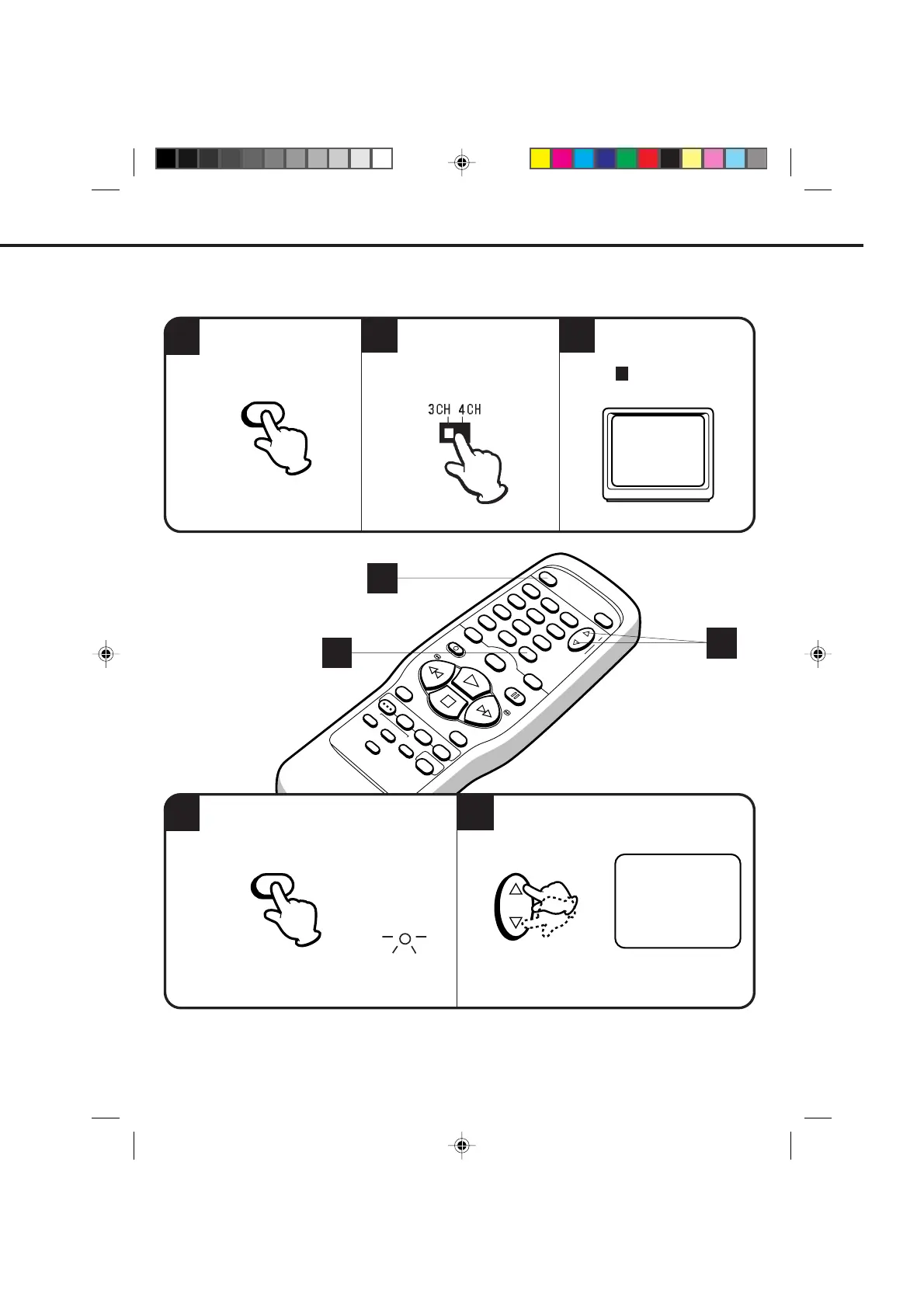
Press the TV/VCR selector button to select the
VCR position.
SETTING THE VIDEO CHANNEL
1
4
3
If CH 3 or 4 corresponding to the video channel cannot be tuned on your TV, proceed as follows: set the VCR 3/4
channel selector and the TV to CH 3 or 4, play back a prerecorded tape and tune the TV to receive a sharp color
picture from the video cassette recorder. Refer to your TV owner's manual for details.
When a TV is connected with an antenna cable only.
Select any channel to receive a TV station in
your area.
TV/VCR
POWER
TV/VCR
5
2
Turn ON the VCR POWER
button.
Set the 3/4 Channel
selector switch (Rear of the
VCR) to CH 3 or 4.
Turn ON the TV and set to
CH 3 or 4 to correspond
with the channel selected
in .
The channel number will appear on the screen about 4
seconds.
The TV/VCR indicator will light.
CHANNEL
For a push-button TV tuner
To view playback of a recorded tape, or to watch a program selected by the VCR's channel selector, the TV
must be set to channel 3 or 4 (video channel).
1
4
5
2
3
OR
4
4C83101A(P20-27) 9*9*99, 10:3523


 To Next Page