39
1 1 0
POWER
EJECT
TV/VCR
COUNTER RESET
INPUT SELECT
REC/OTR
SLOW
SPEED
MENU
–+
–
+
SET
SKIP
SEARCH
–+
TRACKING
AUTO
CANCEL
ENTER
STOP
PLAY
F.FWD
REW
TIMER REC
PAUSE/STILL
CHANNEL
CALL
1
2
3
456
78
0
9
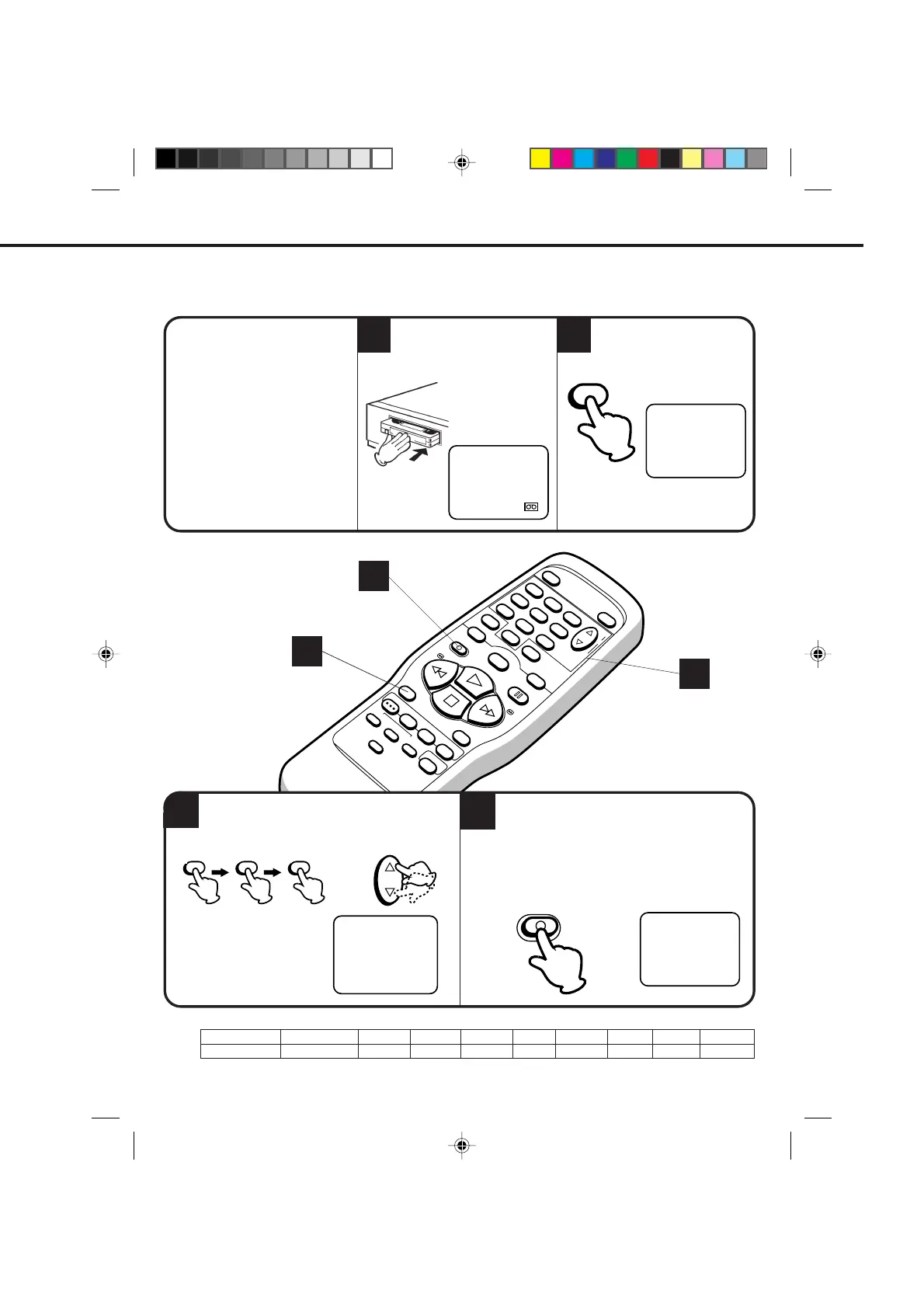
EXAMPLE: One-touch timer recording for 30 minutes.
ONE-TOUCH TIMER RECORDING (OTR)
The one-touch timer recording feature provides a simple and convenient way to make a timed recording.
2
1
4
3
NOTES:
Press
Recording time
4 times
1:30
5 times
2:00
6 times
3:00
7 times
4:00
3 times
1:00
twice
0:30
once
NORMAL REC
9 times
NORMAL REC
8 times
5:00
OTR 0 : 30
CH 125
CHECK BEFORE YOU BEGIN
• Turn ON the TV and set to the
video channel 3 or 4.
• Turn ON the VCR.
When a TV is connected with an
audio/video cable, turn the TV on
and select the video input mode
on the TV.
Press the SPEED selector
button to select the desired
tape speed SP, LP or SLP.
Load a cassette tape with the
erase prevention tab intact.
Press the REC/OTR button to begin recording.
Press the button again to stop recording after
30 minutes. Each additional press of the REC/
OTR button will increase recording time as shown in
the chart below, up to a maximum of 5 hours. The
OTR and recording time will appear on screen about
4 seconds.
4
2
3
00 : 00 : 00 SP
SPEED
The counter and SP, LP or SLP
will appear on the screen about 4
seconds.
Press the direct channel selection buttons or
the CHANNEL ▲ or ▼ button to select the
channel to be recorded.
CH 125
The channel number will
appear on the screen about
4 seconds.
CHANNEL
OR
•
To cancel OTR, press the STOP button or turn off the power.
•
Press the REC/OTR button to increase the time needed for recording. (See the chart below.)
125
4C83101A(P36-41) 9*9*99, 10:3439


 To Next Page