A4b Automatic Dispenser V1.0 6
Do not operate the machine in case the machine shell is removed.
Take out tool box; check the items inside according to the packing list. Preserve the tool box for
next use.
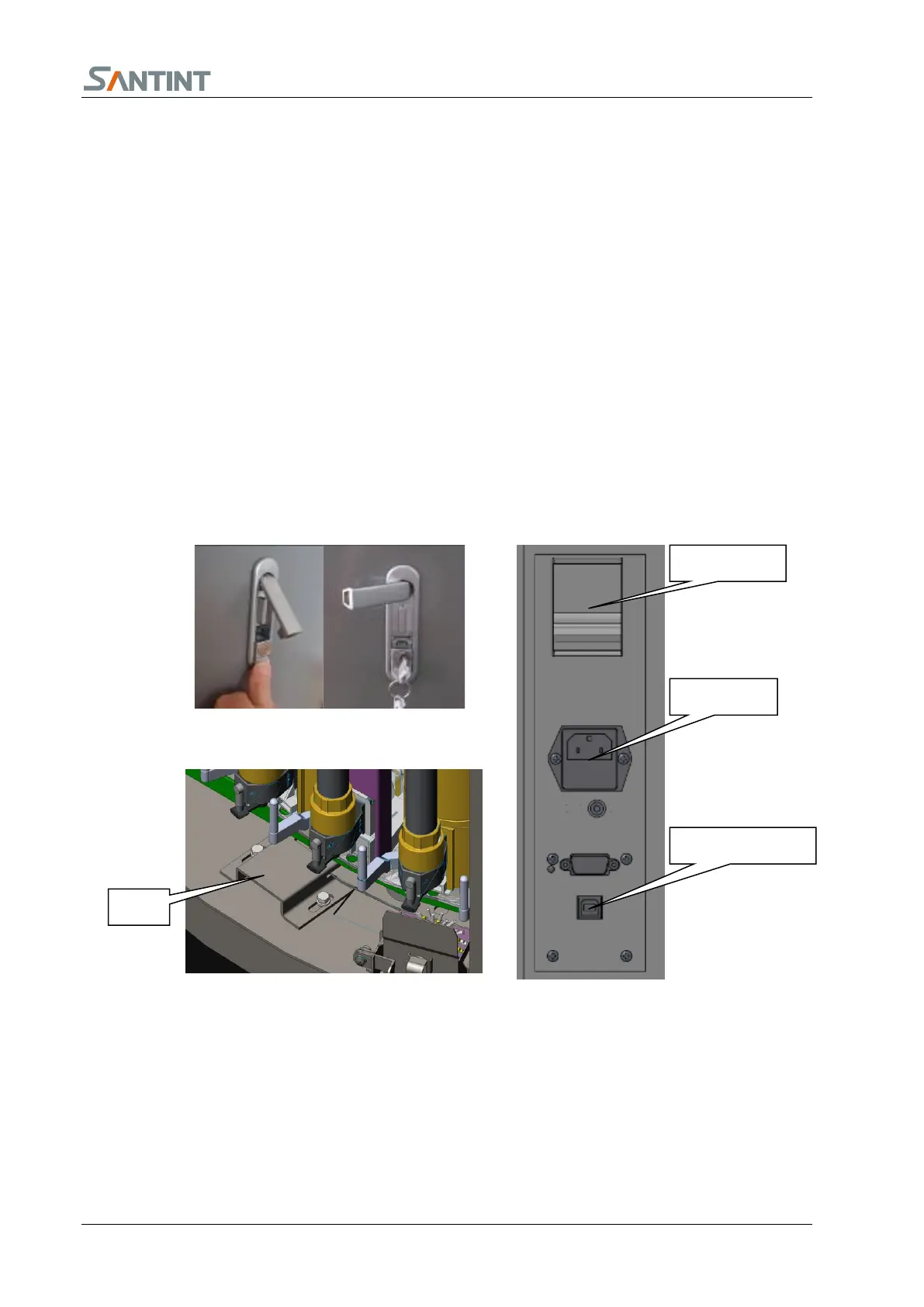
Find the two side door keys and open the door lock. Press the button to pop out the handle. Rotate
the handle to open the side door. See 5.1.1.
Use spanner 19 to remove the four bolts connecting the machine and the tray. Lift the machine to the
required site and level it.
Open the right/left side door and top door, remove the two fixing seats of the turntable. See 5.1.2.
Connect the machine with power supply.
Insert the nine-pin serial port line or the USB wire into the corresponding socket which is under the
change-over switch and fix it well. See 5.1.3.
The machine is installed now.
5.2 Computer
Install the mainframe, monitor, key board and mouse:Put the mainframe in the cavity at bottom of
the machine, or put mainframe on the top cover of the machine, then put the key board and the
mouse on the top cover of the machine.
Connect the power supply wire, data wire with the monitor, and connect the monitor with the


 To Next Page