13
43
*
15
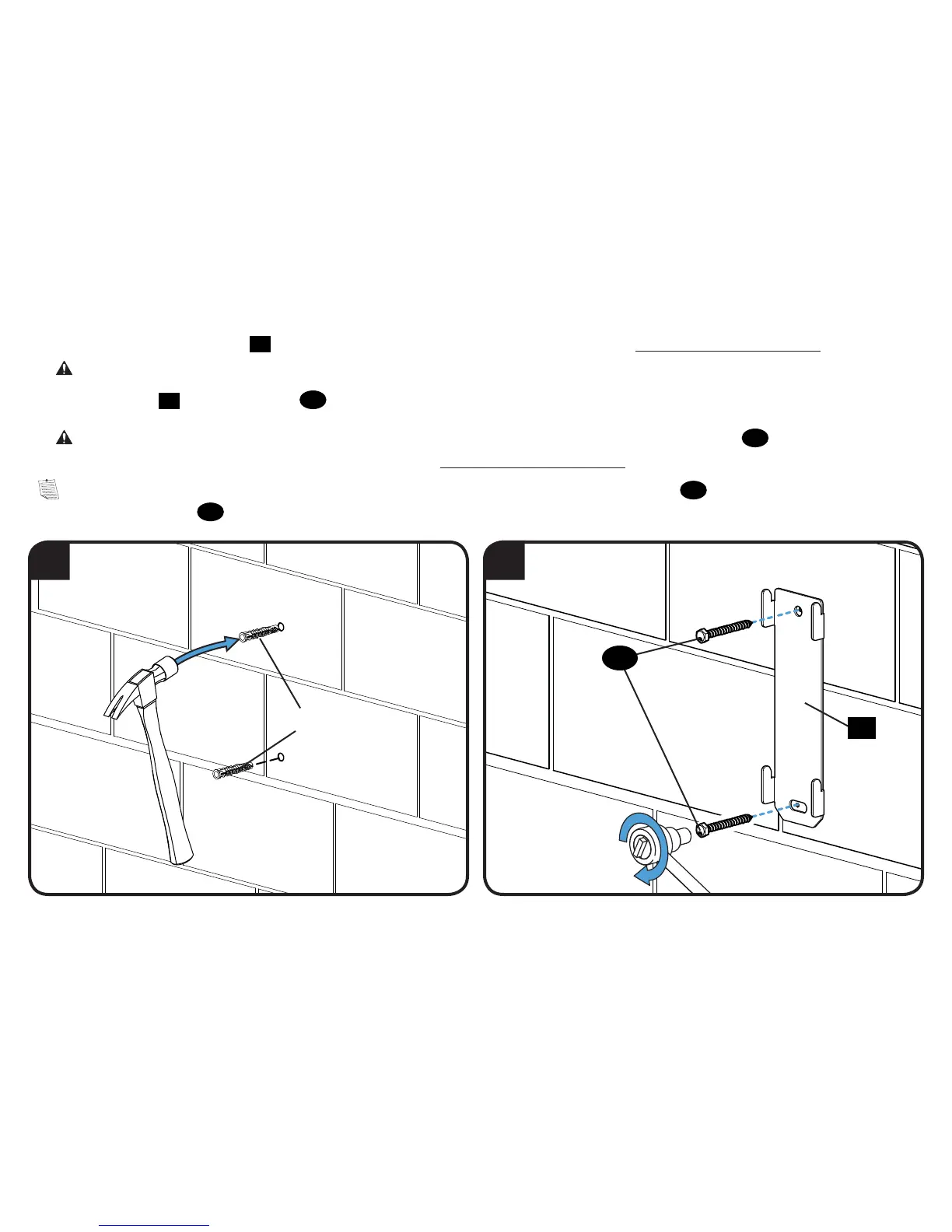
3. Remove the wall plate template
14
and insert two anchors (Fischer UX 10 x 60 - included in the Concrete Installation Kit CMK2*).
CAUTION: Be sure the anchors are seated flush with the concrete surface.
4. Install wall plate
15
using two lag bolts
16
. Tighten the lag bolts only until they are pulled firmly against the wall plate.
CAUTION: Improper use could reduce the holding power of the lag bolt. DO NOT over-tighten the lag bolts
16
.
*
Contact Customer Service at 1-888-333-9952 to have the Concrete Installation Kit CMK2 shipped directly to you.
NOTE: If needed, you can make small level adjustments to the wall plate by loosening the bottom lag bolt
16
and shifting the wall plate until level.
Tighten the bottom lag bolt
16
when adjustments are complete (see page 11).
16



 To Next Page