16
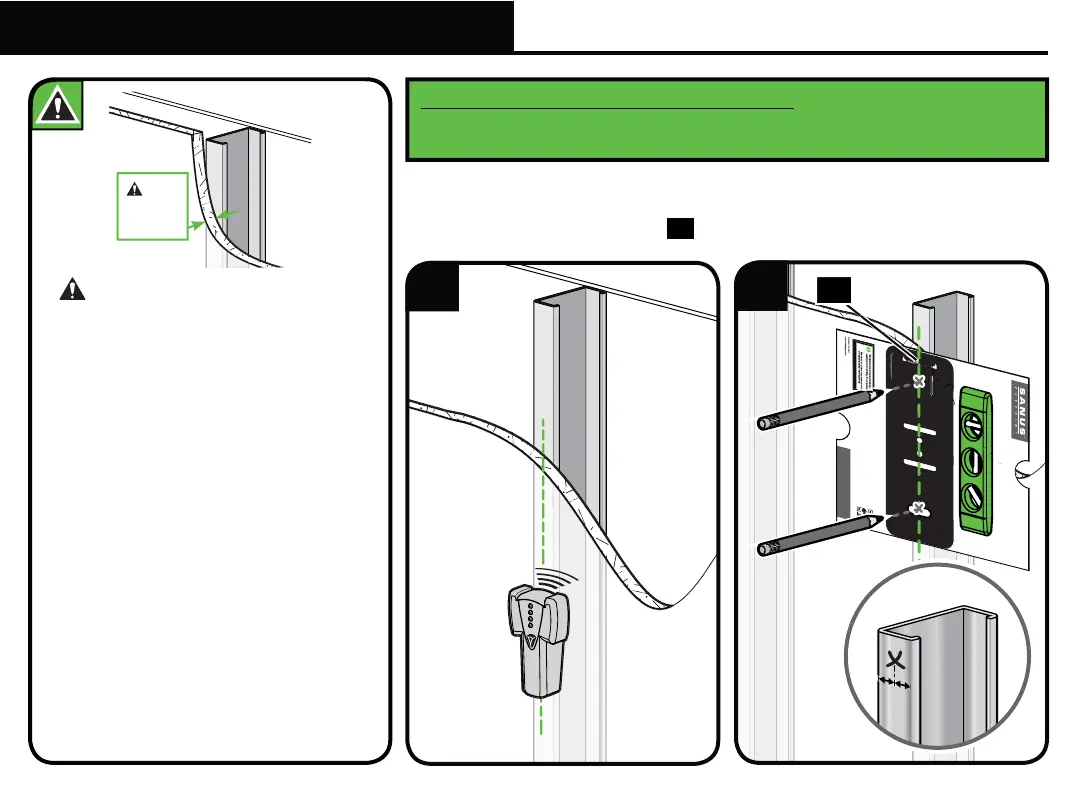
CAUTION: Avoid potential personal
injuries and property damage!
● Studs must be at least 2x 4 in. / 25 ga.
● Stud type and structural strength must
conform to the North American Specification
for the Design of Cold-Formed Steel
Structural Members
[362 S 125 18, C-Shape, S - Stud Section].
● If back side of wall is unfinished, drywall must be
installed to a minimum of one stud left and right
of the stud(s) being used to install the mount.
● Drywall must be a minimum of 1/2 in. (13 mm)
thick on each side of the studs, and a minimum
clearance of 1⅞ in. (48 mm)
behind the wall is required.
● Drywall must be secured to studs with
screws 12 in. (304.8 mm) on center.
● This product must be centered on the studs.
HERE WE GO!
Scan here to view
your install video.
san.us/1125
We're here to help! If you have questions at any point,
contact customer service at 1-888-333-9952.
THIS IS YOUR DRILLING
TEMPLATE FOR STEP 2
YOU’RE REALLY GOING
TO ENJOY STEP 3
GET STARTED
WITH STEP 1
Grab the TV bracket and line
it up with the holes on the
back of your TV.
Attach using the bolts that fit.
Locate your stud and choose a
height for your TV. Then
simply tape this template to
the wall and drill right through.
Once the wall plate is secured,
simply hang TV on arm and secure
into place with safety screw.
Congratulations! You’re done.
WELCOME AND THANKS FOR CHOOSING SANUS VUEPOINT
.
.
A
Y UP
Min.
1/2 in.
(13 mm)
1
2
1. Locate stud.
2. Level the wall plate template
14
and mark the hole locations.
Steel Stud Anchor Kit SSMK1 is not included
(see page 6) Contact
Customer Service at 1-888-333-9952 to have the additional hardware
shipped directly to you.
14
STEP 2C
Attach Wall Plate to Wall
Steel Stud Installation



 To Next Page